

Support our independent tech coverage. Chrome Unboxed is written by real people, for real people—not search algorithms. Join Chrome Unboxed Plus for just $2 a month to get an ad-free experience, access to our private Discord, and more. Learn more about membership here.
START FREE TRIAL (MONTHLY)START FREE TRIAL (ANNUAL)
Just over a week ago when the Googlebook platform launched, a massive chunk of the Android user base was left waiting on the sidelines. While Pixel owners immediately enjoyed the seamless “Better Together” integration that makes this new OS so special, Samsung Galaxy users were left waiting for a promised update to unlock the same cross-device magic.
To fully test what Googlebook OS was capable of during our initial review period, I actually shelved my Samsung Galaxy Z Fold 8 and switched my eSIM over to a Pixel 11 Pro XL. It was a necessary pivot to experience features like app streaming and notification sync.
Thankfully, I am thrilled to say the wait is over. Google has officially opened the gates for Samsung hardware, and after testing the new integration extensively, my Z Fold 8 is officially going back in my pocket as my daily driver.
A massive feature addition for the Galaxy ecosystem
This rollout isn’t just a simple update; it is the official arrival of Googlebook’s flagship ecosystem features for the most popular Android devices on the market. With Samsung still representing a massive majority of the Android user base, this is no small change, and it honestly should have been here on day one.
If you are running a modern Samsung phone on Android 17 (One UI 9.0), your device can now communicate with a Googlebook just as seamlessly as a Pixel does. Google is currently rolling out the necessary background updates – specifically to Google Play services (v26.37+) and the Cross-device services app (v1.0.1346+) – to make the handshake happen automatically and more seamlessly than before.
Hands-on: flawless integration with the Z Fold 8
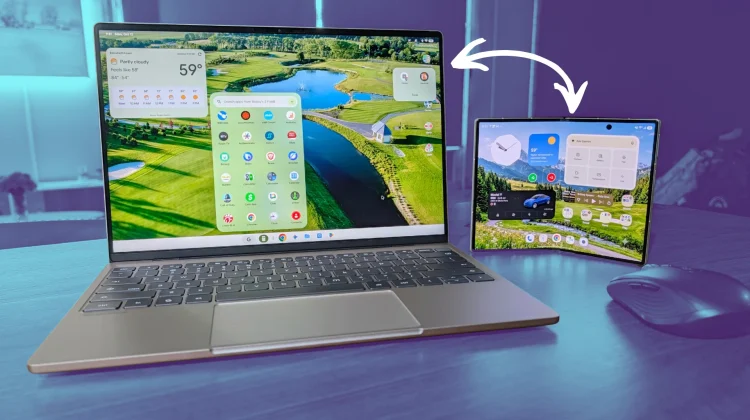
As soon as the news broke, I grabbed my Galaxy Z Fold 8, updated the necessary framework apps, and paired it with the Dell XPS Googlebook.
The experience is exactly what I’ve been waiting for. The initial setup process was buttery smooth, bypassing the QR code hiccups we saw on day one. But more importantly, the core functionality is fully intact and operating flawlessly.
Cast My Apps is cleanly streaming my Samsung apps directly into a window on the Googlebook desktop without skipping a beat. Notification Sync is now keeping working to keep my notifications between Googlebook OS and my phone on the same page, File Access is allowing me to pull files directly from my phone right in the Googlebook Files app, and Continue On is now appearing immediately when there’s a task I can hand off from my phone to the Googlebook.
Seeing this level of synergy between a Googlebook and a my phone makes the new OS feel far more complete as a Galaxy phone user. The platform was built on the promise of deep, native Android integration (not just Pixel integration), and having Samsung fully on board delivers on that promise in a big way for a wide swath of users. I’m very glad to see this feature addition happening sooner rather than later.
SUBSCRIBE TO UPSTREAM
Get Chrome Unboxed delivered straight to your inbox
Upstream is our flagship, curated newsletter with the top stories, most click-worthy deals, giveaways, and trending articles from Chrome Unboxed sent directly to your inbox a few times a week. Join 31,000+ subscribers.

