


Support our independent tech coverage. Chrome Unboxed is written by real people, for real people—not search algorithms. Join Chrome Unboxed Plus for just $2 a month to get an ad-free experience, access to our private Discord, and more. Learn more about membership here.
START FREE TRIAL (MONTHLY)START FREE TRIAL (ANNUAL)
Google is rolling out an update that could transform how you present in Google Meet. As noted by Android Central, live annotations are here for select Workspace users, and they’re bringing a whole new level of interactivity and collaboration to your virtual meetings.
Imagine circling key points on a slide, scribbling notes in the margins, or adding text boxes to highlight takeaways, all while you’re presenting. That’s the power of annotations. It’s like having a digital whiteboard overlaid onto your presentation. You can even invite co-annotators, opening the floor for real-time collaboration right within your presentation.
Annotation tools in Google Meet
The new annotation menu is packed with goodies to help you emphasize and collaborate. You’ll find a pen and highlighter for drawing freehand or emphasizing text, disappearing ink for temporary notes, text boxes and sticky notes for longer comments, stickers, and even lines and shapes to guide viewers’ eyes. Need to make changes? The trusty eraser and “clear all” option will save the day.
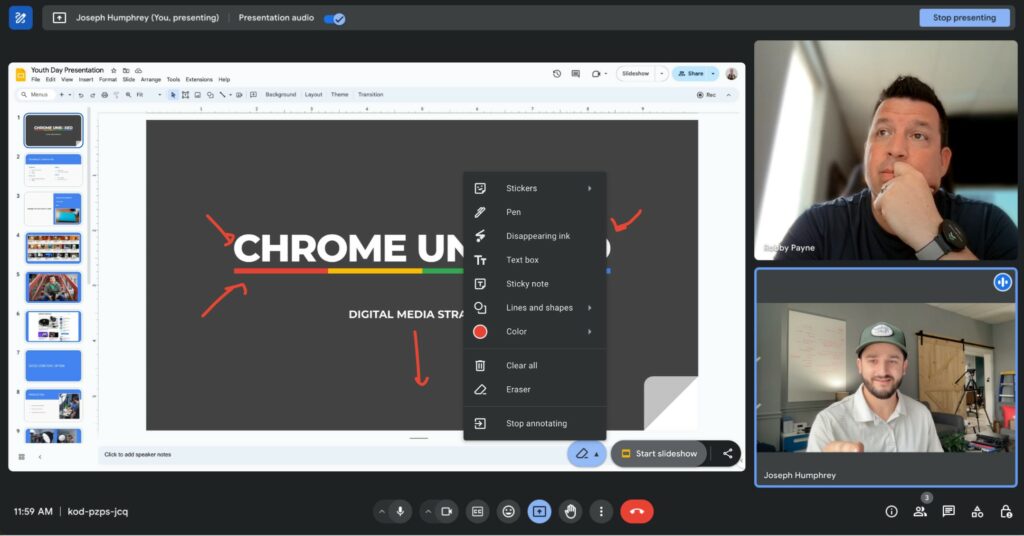
Sadly, this isn’t a free-for-all feature, although Google has made it available to most Workspace plans. You’ll need one of the following subscriptions to get annotations in Meet presentations:
- Business (Starter, Standard, Plus)
- Enterprise (Starter, Standard, Plus)
- Frontline (Starter, Standard)
- Essentials, Enterprise Essentials, Enterprise Essentials Plus
- Education (Standard, Plus, Teaching & Learning Upgrade)
- Workspace Individual
As for mobile users, Google says that at the time of launch, those on iOS (even on supported Workspace plans) currently can’t present with annotations. You can, however, join in as a co-annotator and make annotations that way. Android users get a slight edge and can make annotations currently, but the ability to add co-annotators is still coming in a future update. Google says they will provide more information on the Workspace Updates blog as mobile device functionally expands.
If you’re on the eligible Workspace plans, keep your eyes peeled for this awesome new feature that started rolling out back on April 18th. I’m personally very excited to use this feature more and think annotations in Google Meet are a game-changer for making presentations more engaging. I’d imagine this will be particularly useful for anyone presenting collaborative brainstorming sessions or hosting a training scenarios where real-time visual feedback is key.
SUBSCRIBE TO UPSTREAM
Get Chrome Unboxed delivered straight to your inbox
Upstream is our flagship, curated newsletter with the top stories, most click-worthy deals, giveaways, and trending articles from Chrome Unboxed sent directly to your inbox a few times a week. Join 31,000+ subscribers.

