
• Skip to main content
  • Skip to primary sidebar
  • Deals
  • Features
  • Guides
  • Chromebooks
  • Videos
  • Podcast
  • More +
    • Reviews
    • Unboxing
    • Upcoming Devices
    • Chromebook Plus
    • Chrome
    • ChromeOS
    • Chrome OS Flex
  • Search
  • Sign Up
  • Log In
Chrome Unboxed – The Latest Chrome OS News

Chrome Unboxed - The Latest Chrome OS News

A Space for All Things Chrome, Google, and More!

  • Deals
  • Features
  • Guides
  • Chromebooks
  • Videos
  • Podcast
  • More +
    • Reviews
    • Unboxing
    • Upcoming Devices
    • Chromebook Plus
    • Chrome
    • ChromeOS
    • Chrome OS Flex
  • Search
  • Sign Up
  • Log In

Stadia’s touch controls may soon feature game-specific iconography for each action

May 4, 2022 By Michael Perrigo View Comments

Support our independent tech coverage. Chrome Unboxed is written by real people, for real people—not search algorithms. Join Chrome Unboxed Plus for just $2 a month to get an ad-free experience, access to our private Discord, and more. Learn more about membership here.
START FREE TRIAL (MONTHLY)START FREE TRIAL (ANNUAL)

Google’s cloud gaming platform has, in my opinion, the best touch controls I’ve ever seen. Upon their release, I was immediately taken aback by how intuitive they were compared to what was on the market, and I believed that they would go on to revolutionalize the mobile gaming experience for cloud games.

For example, instead of being stuck targeting the virtual joysticks specifically to move your character or turn your camera, Google innovated and included a backup method of swiping the screen behind the joysticks to perform these actions. It may seem like a small thing, but in a world of Android games that have done things the old way for decades now, it was refreshing to see Google think outside of the box as they’re so good at doing.

Xremove ads

Continuing to lead the way in change, Stadia’s touch controls may soon swap out the generic button shapes and icons with game-specific iconography to better explain what each will do within the context of the title you’re playing. Check out this image below that was originally created by 9to5Google and later edited by Android Police to show the upcoming changes.
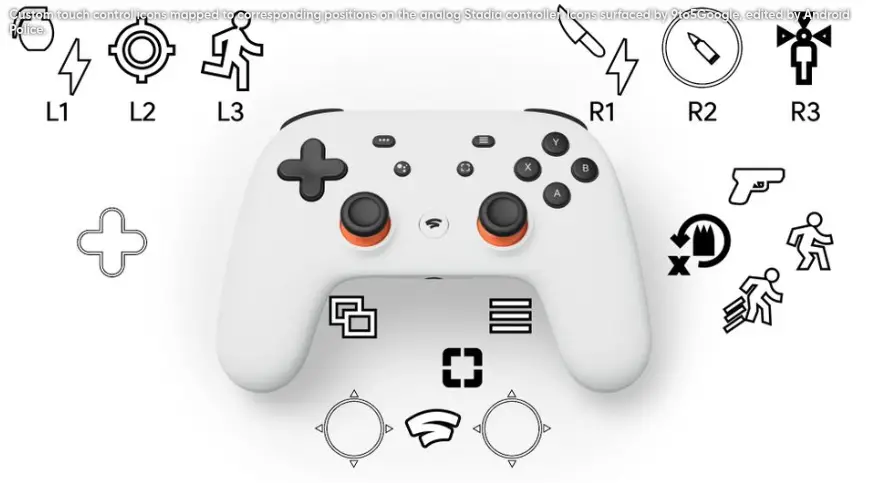
Source: Android Police edit of 9to5Google’s image

During its latest APK teardown of the Stadia Android app (version 4.13), 9to5Google discovered that the above imagery was buried deep in the code. Android Police simply took those images provided (which seem to be for a third-person shooter game) and overlayed them on top of an existing control map to demonstrate how this may end up looking in a game.

Featured Videos

Xremove ads

It’s important to note that these icons will change for other games, as mentioned. For example, if you have a roleplaying game on Stadia like Dragon Quest, the attack button will most certainly show a sword instead of a gun – you get the picture. Anyway, the icons discovered are likely meant to be demonstrative in nature, and each developer may need to provide their own once this rolls out officially.

In addition to this interesting UI update, 1440p streaming may be coming to Android. Right now, gamers are capped at 1080p, and the higher resolution is reserved for televisions and other devices. My guess is that my phone – the Google Pixel 6 Pro will be one of the target devices Stadia is hoping to provide this new streaming option on since it supports it.

Do you think that game-specific imagery on your touch controls would be too distracting, or more useful than generic buttons? I’d be interested in discussing this in the comments, so let me know! Oh, and if you’re hoping to use 1440p streaming on your Pixel 6 Pro or other compatible phones, drop your thoughts below.

Xremove ads

SUBSCRIBE TO UPSTREAM

Get Chrome Unboxed delivered straight to your inbox

Upstream is our flagship, curated newsletter with the top stories, most click-worthy deals, giveaways, and trending articles from Chrome Unboxed sent directly to your inbox a few times a week. Join 31,000+ subscribers.

SUBSCRIBE HERE!

Filed Under: Gaming, New & Upcoming Features, News, Stadia, Updates

About Michael Perrigo

Known as "Google Mike" to his customers, Michael worked at Best Buy as a Chromebook Expert who dedicated his time to understanding the user experience from a regular Chromebook owner's perspective. Having spent nearly 20 years meeting you face-to-face, he strives to help you understand your technology through carefully crafted guides and coverage, relentlessly seeking out the spark in what's new and exciting about ChromeOS.

Primary Sidebar

Xremove ads

Deals

Save $40 on the Google Pixel Watch 4 before the Spring Sale ends

By Joseph Humphrey
April 24, 2026

The best Chromebook deals today

By Robby Payne
April 20, 2026

Deal Alert: the excellent Lenovo Chromebook Plus 2-in-1 returns to $429

By Robby Payne
April 20, 2026

Lenovo Legion Tab Gen 3 drops to $399, ahead of the much pricier Gen 5 release

By Joseph Humphrey
April 18, 2026

How to get 50% off YouTube Premium for a full year with Google One

By Robby Payne
April 16, 2026

More Deals

Xremove ads

Reviews

Lenovo Chromebook Plus 2-in-1 Review: pretty great in a vacuum

By Robby Payne
April 23, 2026

Acer Chromebook Plus Spin 514 Review: Kompanio Ultra power in a convertible

By Robby Payne
December 24, 2025

My review after 6 weeks with the Lenovo Chromebook Plus 14 [VIDEO]

By Robby Payne
August 11, 2025

One week with the best small Android tablet you can buy, and I’m sold

By Robby Payne
May 9, 2025

Best Chromebooks of 2024 [VIDEO]

By Robby Payne
November 28, 2024

More Reviews

Xremove ads

Guides

This Chromebook trackpad shortcut is definitely not new, but is blowing my mind

By Robby Payne
March 11, 2024

How to reduce broadcast delay on YouTube TV to stop live spoilers

By Robby Payne
December 8, 2023

Windows PC keyboard and Chromebook

How to use a Windows keyboard with a Chromebook

By Joseph Humphrey
December 8, 2023

How reset and revert your Chromebook to the previous version of Chrome OS

By Robby Payne
November 29, 2023

My Chromebook Plus features disappeared: here’s how I fixed it

By Robby Payne
November 24, 2023

More Guides

TWITTER · FACEBOOK · INSTAGRAM · YOUTUBE · EMAIL · ABOUT

Copyright © 2026 · Chrome Unboxed · Chrome is a registered trademark of Google Inc.
We are participants in various affiliate advertising programs designed to provide a means for us to earn fees by linking to affiliated sites.

PRIVACY POLICY