
• Skip to main content
  • Skip to primary sidebar
  • Deals
  • Features
  • Guides
  • Chromebooks
  • Videos
  • Podcast
  • More +
    • Reviews
    • Unboxing
    • Upcoming Devices
    • Chromebook Plus
    • Chrome
    • ChromeOS
    • Chrome OS Flex
  • Search
  • Sign Up
  • Log In
Chrome Unboxed – The Latest Chrome OS News

Chrome Unboxed - The Latest Chrome OS News

A Space for All Things Chrome, Google, and More!

  • Deals
  • Features
  • Guides
  • Chromebooks
  • Videos
  • Podcast
  • More +
    • Reviews
    • Unboxing
    • Upcoming Devices
    • Chromebook Plus
    • Chrome
    • ChromeOS
    • Chrome OS Flex
  • Search
  • Sign Up
  • Log In

Six more Chromebook apps to receive refreshed iconography

March 8, 2021 By Michael Perrigo View Comments

Support our independent tech coverage. Chrome Unboxed is written by real people, for real people—not search algorithms. Join Chrome Unboxed Plus for just $2 a month to get an ad-free experience, access to our private Discord, and more. Learn more about membership here.
START FREE TRIAL (MONTHLY)START FREE TRIAL (ANNUAL)

We reported in September on a slew of new icon designs coming to Chromebooks in the wake of a system-wide light and dark themes. The device Files app along with Settings, Keyboard Shortcuts, and the Wallpaper picker all received stylish, new graphics with subtle, muted colors. I personally think that they look pretty incredible and show that the operating system is ‘growing up’, so to speak, but I understand that not everyone is a fan of them.

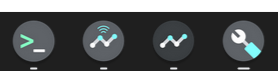
While browsing my Pixelbook Go a few days ago, I realized that in Canary Mode, several new icons had received redesigns and had joined those aforementioned with the new, suit and tie look. The Terminal app, the Chromebook Recovery Utility, Diagnostics tool, and the Connectivity Diagnostics app are all officially rocking a dark grey icon background with blue and teal pastel accents. You can see below that they all look very nice, and it’s a welcome change to the very early 2000’s design that they previously utilized.
Xremove ads

Additionally, while using my Lenovo Chromebook Duet this morning – this device is in Beta, mind you – a few more icons stuck out to me. The calculator and Text app icons had been updated with the same coloring scheme. What’s interesting though, is that the calculator has taken on a very, very teal coloring. Why is this though? Well, if you open the app itself, you’ll notice that the icon now accurately reflects much of the UI therein – again, lots and lots of green.
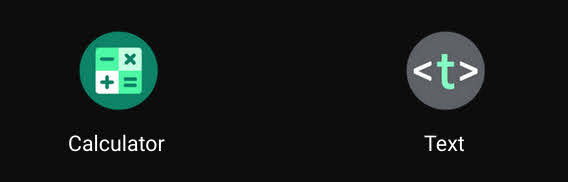
These two icons are likely to come to the masses in their new form before the Canary channel icons I mentioned before. The Beta channel lives right next door to the Stable channel which all devices utilize out of the box. I’m confident that the four Canary icons above won’t be far behind though.

Featured Videos

Xremove ads

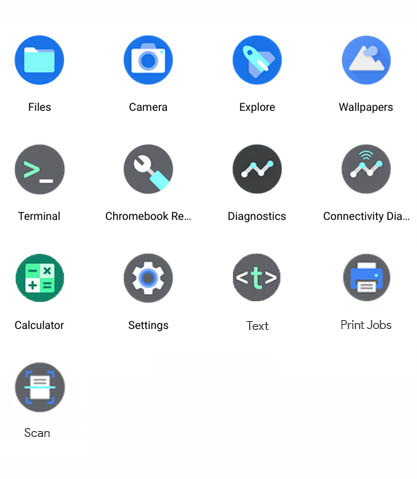
While writing this, I noticed that the Calculator and Text app icons on my Pixelbook Go had not yet updated, and while staring at them in my launcher, they blipped into the new designs right before my very eyes – almost as though system apps receive pushed updates predictively. Here’s a look at all thirteen of the updated icons aside from Borealis and Parallels.
Updated Icons

What do you think about this new direction Google is taking Chrome OS? We seem to be entering a new era of maturity. No longer is it solely about adding core functionality to these devices – though we’re still receiving essentials like Print Jobs, and the Scanning app, but instead, the company seems to be more focused on polishing the user experience, and that gets me pretty excited.

SUBSCRIBE TO UPSTREAM

Get Chrome Unboxed delivered straight to your inbox

Upstream is our flagship, curated newsletter with the top stories, most click-worthy deals, giveaways, and trending articles from Chrome Unboxed sent directly to your inbox a few times a week. Join 31,000+ subscribers.

Xremove ads
SUBSCRIBE HERE!

Filed Under: Apps, ChromeOS, New & Upcoming Features, News

About Michael Perrigo

Known as "Google Mike" to his customers, Michael worked at Best Buy as a Chromebook Expert who dedicated his time to understanding the user experience from a regular Chromebook owner's perspective. Having spent nearly 20 years meeting you face-to-face, he strives to help you understand your technology through carefully crafted guides and coverage, relentlessly seeking out the spark in what's new and exciting about ChromeOS.

Primary Sidebar

Xremove ads

Deals

The Google TV Streamer hits $80 again, bringing Gemini and smart home control to your living room

By Joseph Humphrey
June 5, 2026

The best Chromebook deals today

By Robby Payne
May 25, 2026

Save $300 as Acer’s Chromebook Plus Spin 714 returns to its all-time low price

By Robby Payne
May 21, 2026

Save $40 on the Google Pixel Watch 4 before the Spring Sale ends

By Joseph Humphrey
April 24, 2026

Deal Alert: the excellent Lenovo Chromebook Plus 2-in-1 returns to $429

By Robby Payne
April 20, 2026

More Deals

Xremove ads

Reviews

Lenovo Chromebook Plus 2-in-1 Review: pretty great in a vacuum

By Robby Payne
April 23, 2026

Acer Chromebook Plus Spin 514 Review: Kompanio Ultra power in a convertible

By Robby Payne
December 24, 2025

My review after 6 weeks with the Lenovo Chromebook Plus 14 [VIDEO]

By Robby Payne
August 11, 2025

One week with the best small Android tablet you can buy, and I’m sold

By Robby Payne
May 9, 2025

Best Chromebooks of 2024 [VIDEO]

By Robby Payne
November 28, 2024

More Reviews

Xremove ads

Guides

This Chromebook trackpad shortcut is definitely not new, but is blowing my mind

By Robby Payne
March 11, 2024

How to reduce broadcast delay on YouTube TV to stop live spoilers

By Robby Payne
December 8, 2023

Windows PC keyboard and Chromebook

How to use a Windows keyboard with a Chromebook

By Joseph Humphrey
December 8, 2023

How reset and revert your Chromebook to the previous version of Chrome OS

By Robby Payne
November 29, 2023

My Chromebook Plus features disappeared: here’s how I fixed it

By Robby Payne
November 24, 2023

More Guides

TWITTER · FACEBOOK · INSTAGRAM · YOUTUBE · EMAIL · ABOUT

Copyright © 2026 · Chrome Unboxed · Chrome is a registered trademark of Google Inc.
We are participants in various affiliate advertising programs designed to provide a means for us to earn fees by linking to affiliated sites.

PRIVACY POLICY