


Support our independent tech coverage. Chrome Unboxed is written by real people, for real people—not search algorithms. Join Chrome Unboxed Plus for just $2 a month to get an ad-free experience, access to our private Discord, and more. Learn more about membership here.
START FREE TRIAL (MONTHLY)START FREE TRIAL (ANNUAL)
Over the years, I’ve attempted several means of managing my work-life balance, creative personas, and even collaborative family efforts. Ultimately, Google Calendar has proven to be the best way to do so, but even it has flaws. For example, the only way to view all of my Calendars in one place on my Android phone with separate user profiles is to share them with one another or to log into all of my accounts on one profile.
Either way you slice it, there are drawbacks. If I log into my work accounts, my personal account, and my creative account on one profile, I don’t have data separation across all of Google’s other apps and services like I do if I were to separate them into separate phone logins. You could argue that I could simply turn off Sync for the other Google Accounts with the exception of Google Calendar, but even with sync turned off, you can still swap between those accounts in each app, see and manage data, even though it’s not saved.
The alternative is to share each Calendar with each of my other Google Accounts, but therein lies the topic of today’s discussion – duplicate events. That’s right, going this route causes your Google Calendar to display each and every event that’s shared between to display several times. Believe it or not, the company has still not found a way to mitigate this, and others aside from myself have taken issue with it for over a decade now.
See, for example, on Stack Exchange alone, there are closed threads requesting this feature as far back as 2009, 2010, 2013, 2013 again, and even 2014. There’s even an active thread going right now on Google Support that was started in 2014 that renews their cries for this. That’s not to mention all of the other places across the web that are complaining.
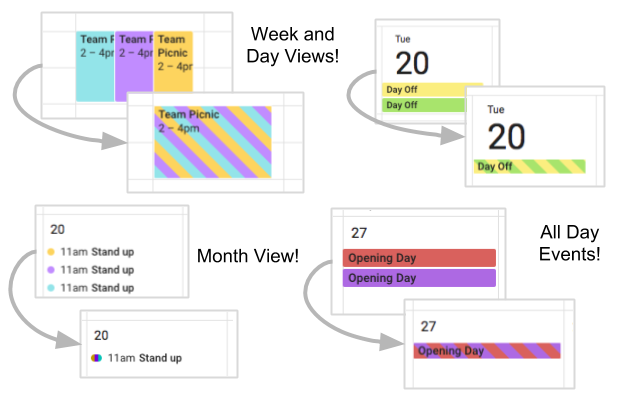
I imagine it’s a difficult problem to solve, but with all of its artificial intelligence and machine learning, you’d think that Google could find a way to detect and hide or remove duplicates with an algorithm. Does that seem too difficult? I mean, it’s a multi-billion dollar company that prides itself on being an innovative think tank that seeks to solve the world’s most impossible problems.
Maybe I’m being irrational and I’m sure there are several more technical aspects to this that I haven’t thought through yet, but here’s why I take issue with it. I say this more times than I can count, but Google still has no effective way of managing an individual’s separate personas in conjunction with one another. All of its services are predicated on the notion that individuals who are two-dimensional will be managing data using them.
The company seems to expect me and other business owners and creatives to spin up additional two-dimensional Google Accounts to manage data for said endeavors, and to share information between the two personas with the same privacy and data boundaries as two completely separate individual strangers.
However, Michael the individual, Michael the writer for Chrome Unboxed, Michael the game developer, and Michael the freelancer are not strangers. Yes, they are all truly individual in their needs and means of managing data, and have their own data sets and identities even, but compared to strangers, the different aspects of my life are not truly separate individuals.
This is what I mean when I refer to “personas” – separate aspects of the same person’s life. There’s truly just so much cross-pollination, and Google’s current means of data separation has sadly not been created for these use cases. In the case of Calendars, being one person with multiple account personas, I don’t need to see three event blocks for the same event. Hopefully that all makes more sense now.
I honestly think that despite it seeming like a less common need, and thus, many will say I shouldn’t be complaining about it, it is truly something most people struggle with but accept as is instead of advocating for. Part of this could be that most people I know at least are less tech-savvy and use the tools as they are instead of fine-tuning their approach to them to get the most out of them. It could also be that I’m an organization freak. I don’t have diagnosed OCD, but I like having a place for everything and everything in its place…once – not three times each.
I’m interested to see if this bothers anyone else, and by extension, how you all use Calendar across your work and home life. Drop a comment below to let me know your process and if you’ve encountered any issues like this with Calendar or Google’s other services. I’m hoping that by expressing my frustrations, Google will see this as a more important issue and stop sitting it on the backburner for 12 years. If we’re honest though, it’s probably something they don’t see a need to fix or won’t and haven’t prioritized.
SUBSCRIBE TO UPSTREAM
Get Chrome Unboxed delivered straight to your inbox
Upstream is our flagship, curated newsletter with the top stories, most click-worthy deals, giveaways, and trending articles from Chrome Unboxed sent directly to your inbox a few times a week. Join 31,000+ subscribers.

