
• Skip to main content
  • Skip to primary sidebar
  • Deals
  • Features
  • Guides
  • Chromebooks
  • Videos
  • Podcast
  • More +
    • Reviews
    • Unboxing
    • Upcoming Devices
    • Chromebook Plus
    • Chrome
    • ChromeOS
    • Chrome OS Flex
  • Search
  • Sign Up
  • Log In
Chrome Unboxed – The Latest Chrome OS News

Chrome Unboxed - The Latest Chrome OS News

A Space for All Things Chrome, Google, and More!

  • Deals
  • Features
  • Guides
  • Chromebooks
  • Videos
  • Podcast
  • More +
    • Reviews
    • Unboxing
    • Upcoming Devices
    • Chromebook Plus
    • Chrome
    • ChromeOS
    • Chrome OS Flex
  • Search
  • Sign Up
  • Log In

Google Collections gets some unsuspected love with the release of Google’s AI Search integration

May 26, 2023 By Michael Perrigo View Comments

Support our independent tech coverage. Chrome Unboxed is written by real people, for real people—not search algorithms. Join Chrome Unboxed Plus for just $2 a month to get an ad-free experience, access to our private Discord, and more. Learn more about membership here.
START FREE TRIAL (MONTHLY)START FREE TRIAL (ANNUAL)

Love it or hate it, Google Collections, Google’s content curation tool that’s kind of but sort of not meant to replace bookmarks is still alive and kicking. As I’ve covered a bunch in the past, Collections lets you save recipes, Maps locations, Travel trips, images, shopping products and pretty much anything else across the company’s information ecosystem with one click for recall at a later date.

While we all initially thought it would die off faster than the previous efforts to upend classic bookmarking systems, they’ve stuck around, and have instead become a layer over top of the traditional, helping users better organize their data, and placing it where it’s most useful instead of in a great bit pool where it’s rarely ever referenced again.

Xremove ads

Anyway, now that anyone with a 2TB+ Google One subscription who is also signed up for the Search Generative Experience (SGE) Labs preview can now toggle and use the tech giant’s Bing AI-style chat bot right inside of Google Search, something interesting and unexpected popped up.
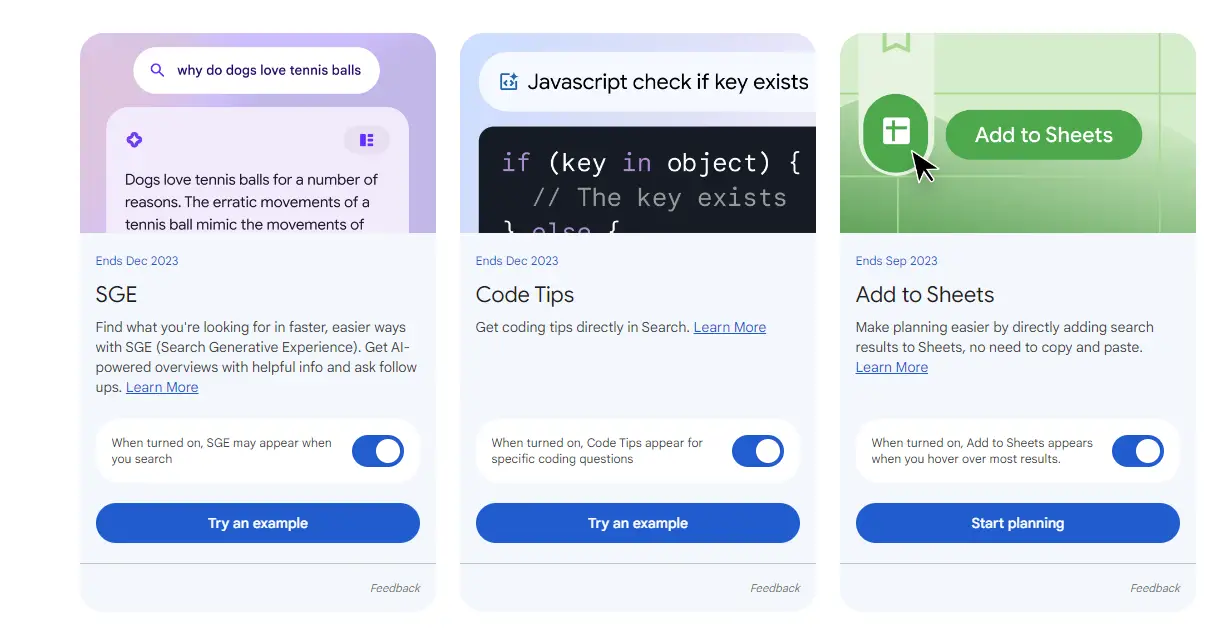
Toggle ‘Add to Sheets’ to get a Google Collections bookmark for web results!

If you visit the Labs icon at the top right of Search and select the extra options, namely the “Add to Sheets” toggle and return to your web query, you’ll notice while hovering over a result with your mouse, there is a new left-aligned floating smart chip.

Featured Videos

Xremove ads

In this, there’s an ‘Add to Google Sheets’ icon, of course, but also a direct ‘Share’ button. However, that’s not the most exciting thing in my opinion. Google is also testing out an add to Google Collections bookmark icon as the first icon in the row of three, letting you quickly save things for later!
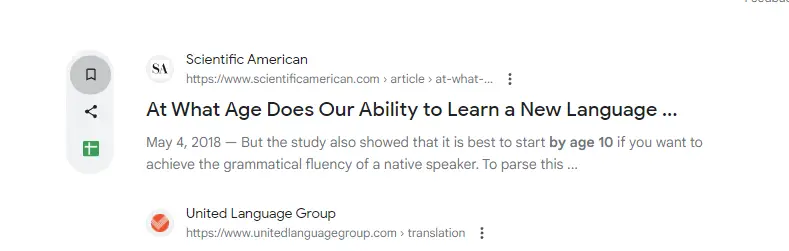
Why is this significant, you ask? Because up until now, you’d have to be on, well, any other Google Search result type other than ‘Web’ in order to bookmark things to Collections. For some reason or another, you were never able to easily add web links to a Collection for later use without clicking the three dots ‘more’ options menu to the right of that result to call up the ‘About this result’ overlay.

While not a huge feature or focus for SGE, having this available one click away instead of two or three is nice for Collections users like me. Before Reading List came to the Chrome Side Panel, I often added websites to a Collection called ‘Read later’ (though I wish we had a list view instead of thumbnails!).

Xremove ads

I may be one of the only ones to care, but I certainly hope Collections continue to get more integration and that others begin to use it to curate their data. This tool can help you bookmark less into your endless jumble of links and start to ‘save‘ things where they will be most useful and actionable!

SUBSCRIBE TO UPSTREAM

Get Chrome Unboxed delivered straight to your inbox

Upstream is our flagship, curated newsletter with the top stories, most click-worthy deals, giveaways, and trending articles from Chrome Unboxed sent directly to your inbox a few times a week. Join 31,000+ subscribers.

SUBSCRIBE HERE!

Filed Under: AI, Google Search

About Michael Perrigo

Known as "Google Mike" to his customers, Michael worked at Best Buy as a Chromebook Expert who dedicated his time to understanding the user experience from a regular Chromebook owner's perspective. Having spent nearly 20 years meeting you face-to-face, he strives to help you understand your technology through carefully crafted guides and coverage, relentlessly seeking out the spark in what's new and exciting about ChromeOS.

Primary Sidebar

Xremove ads

Deals

The Acer Chromebook Plus Spin 714 hits a new all-time low at $270 off

By Robby Payne
March 25, 2026

The best Chromebook deals today

By Robby Payne
March 24, 2026

You can score $40 off Google’s battery-powered Nest Doorbell right now

By Joseph Humphrey
March 20, 2026

The touchscreen Lenovo Chromebook Slim 3 is a steal at under $200

By Robby Payne
March 16, 2026

Google TV Streamer and Remote held in front of a wall-mounted TV

The premium Google TV Streamer 4K is back down to $80

By Joseph Humphrey
March 16, 2026

More Deals

Xremove ads

Reviews

Acer Chromebook Plus Spin 514 Review: Kompanio Ultra power in a convertible

By Robby Payne
December 24, 2025

My review after 6 weeks with the Lenovo Chromebook Plus 14 [VIDEO]

By Robby Payne
August 11, 2025

One week with the best small Android tablet you can buy, and I’m sold

By Robby Payne
May 9, 2025

Best Chromebooks of 2024 [VIDEO]

By Robby Payne
November 28, 2024

Samsung Galaxy Chromebook Plus Review: Samsung is back! [VIDEO]

By Robby Payne
October 28, 2024

More Reviews

Xremove ads

Guides

This Chromebook trackpad shortcut is definitely not new, but is blowing my mind

By Robby Payne
March 11, 2024

How to reduce broadcast delay on YouTube TV to stop live spoilers

By Robby Payne
December 8, 2023

Windows PC keyboard and Chromebook

How to use a Windows keyboard with a Chromebook

By Joseph Humphrey
December 8, 2023

How reset and revert your Chromebook to the previous version of Chrome OS

By Robby Payne
November 29, 2023

My Chromebook Plus features disappeared: here’s how I fixed it

By Robby Payne
November 24, 2023

More Guides

TWITTER · FACEBOOK · INSTAGRAM · YOUTUBE · EMAIL · ABOUT

Copyright © 2026 · Chrome Unboxed · Chrome is a registered trademark of Google Inc.
We are participants in various affiliate advertising programs designed to provide a means for us to earn fees by linking to affiliated sites.

PRIVACY POLICY