


Support our independent tech coverage. Chrome Unboxed is written by real people, for real people—not search algorithms. Join Chrome Unboxed Plus for just $2 a month to get an ad-free experience, access to our private Discord, and more. Learn more about membership here.
START FREE TRIAL (MONTHLY)START FREE TRIAL (ANNUAL)
Today was a sad day for Google gamers but I promise you, it’s not the end of the world. As a matter of fact, I’m here to share some very exciting news I discovered while on my way into the office this morning.
It’s no secret that Google has long been working on bringing more ways to game on ChromeOS. What started with Android apps then expanded to Stadia which opened the door to other streaming games services such as GeForce Now and Amazon Luna. Then, much to everyone’s surprise, Google announced that it had been working with Valve to bring native Steam gaming to ChromeOS using the same container technology responsible for Linux on Chromebooks. Exciting stuff.
Over the past year or so, we have been tracking more and more evidence that “gaming” Chromebooks were on the horizon. It began with work being done to bring RGB keyboards to Chromebooks and more recently, we’ve seen the addition of 120Hz displays and variable refresh rates to the Chromium repository. The 120Hz display was made official earlier this month when Lenovo announced its upcoming IdeaPad 5i Chromebook. While exciting, this Chromebook offered little in the way of game innovation outside of the display. It has low-end 12th Gen Intel CPUs and solid specs but it definitely wasn’t aimed at gamers.
Today, Lenovo let a new Chromebook quietly slip out on the company’s product specification reference website and this one is most definitely geared specifically towards ChromeOS gamers. So much so that “gaming” is actually in the product name. Yup, here we have the Lenovo IdeaPad Gaming Chromebook. Take a look at this little demo video that I unearthed.
Lenovo IdeaPad Gaming Chromebook
Okay. Before we get into the details of this new, extremely unique Chromebook, I do have to qualify my title. I put “gaming” in parenthesis because there isn’t much about this device’s internals that really sets it apart from any of the other 12th Gen Intel Chromebooks that are headed to market. Still, this premium laptop does have some features that should certainly appeal to the game-centric user.
So, the unreleased and unannounced Lenovo IdeaPad Gaming Chromebook is practically identical to the Lenovo IdeaPad 5i Chromebook Key that was announced at the beginning of this month. You’re getting a 16″ QHD display with a 120Hz refresh rate in a clamshell chassis with two USB-C ports, two USB-A ports, and a MicroSD card slot. Where the two devices differ is what makes the new IdeaPad much more desirable to someone that’s into gaming.
For starters, the Lenovo Gaming Chromebook is equipped with 4 speakers instead of two which should make for a more immersive audio experience. Then, you have a full-sized RGB keyboard with an integrated numeric keypad. This style of keyboard is very popular among gamers and Google is working on giving users control over supported RGB keyboards directly from the ChromeOS settings menu. Then there’s the outside of the device. The top is aluminum and the bottom is plastic which is standard fare for a lot of Lenovo’s Chromebooks but the lid has a unique design that definitely sets it apart from your standard ChromeOS laptop.
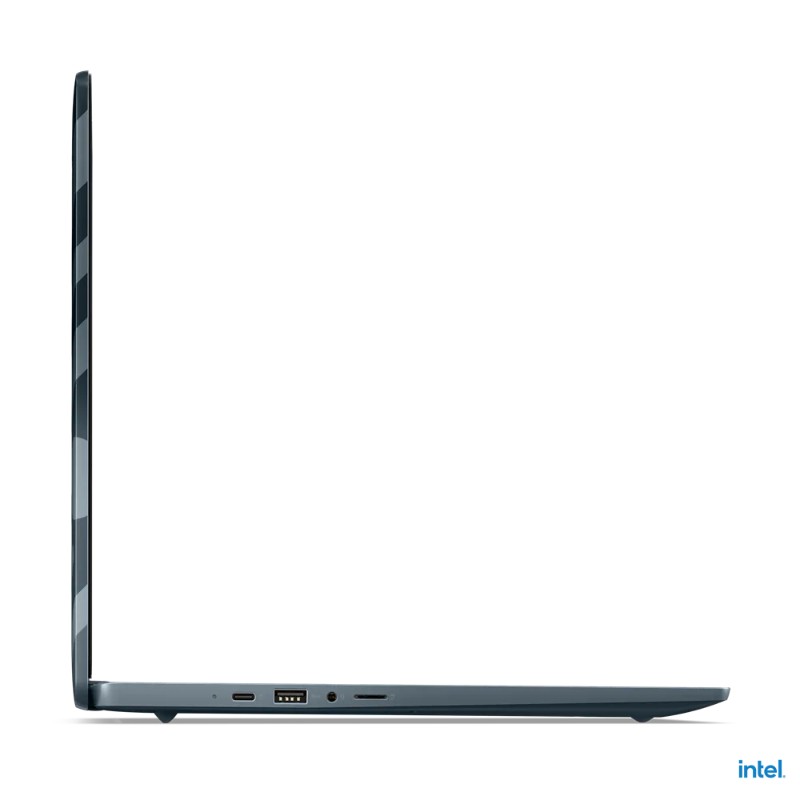

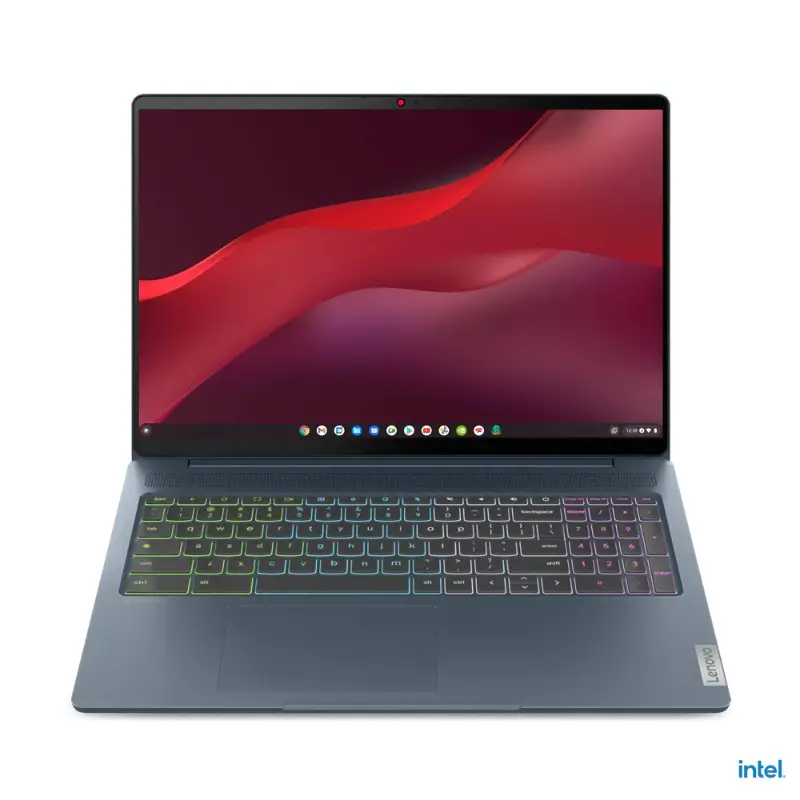
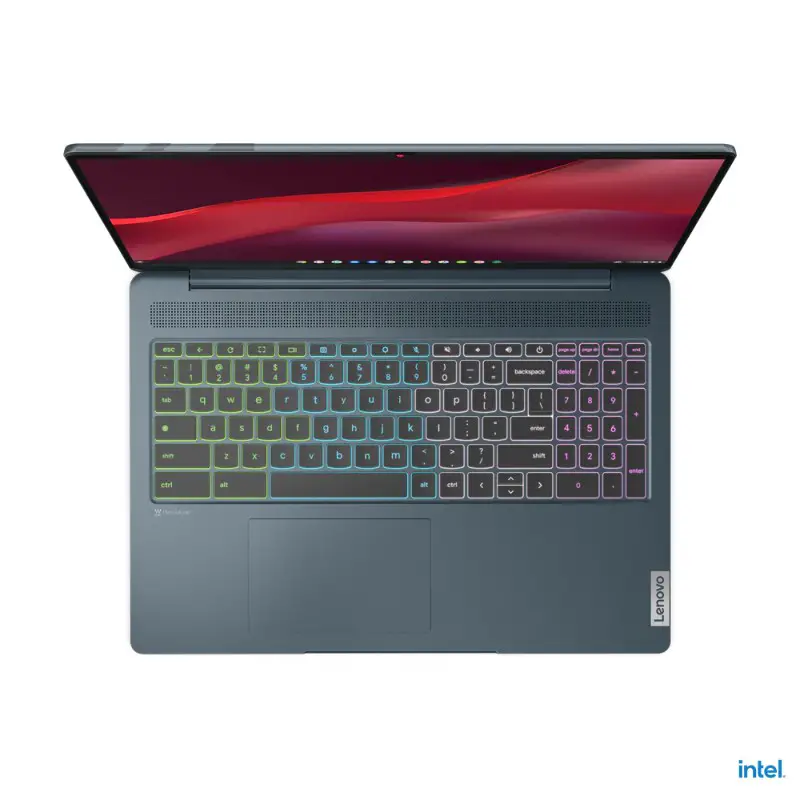

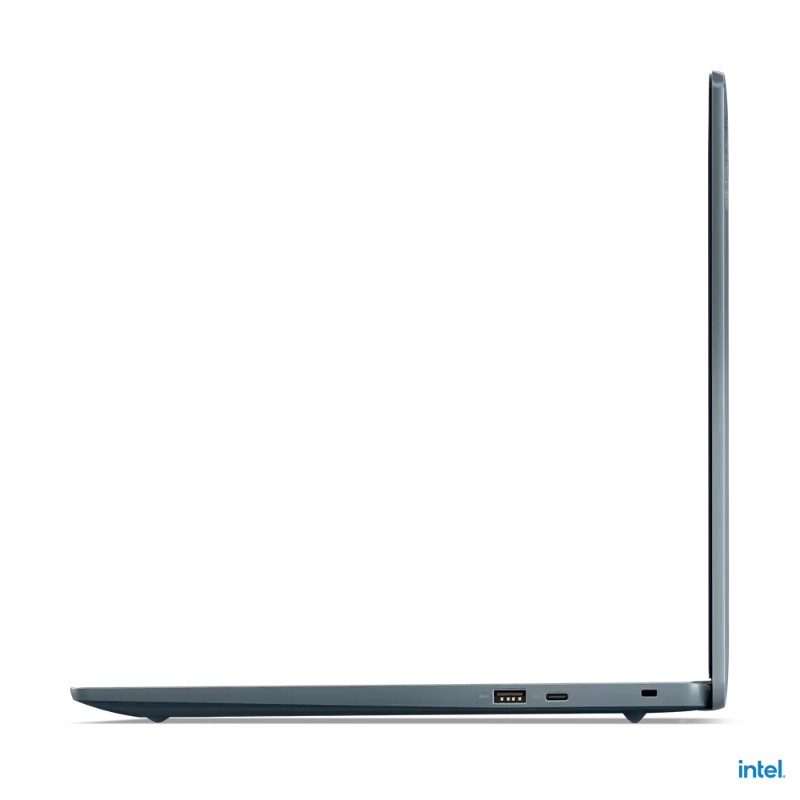

I’m sure that we’ll get more details on the design and styling of this new Chromebook when Lenovo makes it official. In the meantime, I’m content just enjoying the look of this thing. Will it be the most powerful Chromebook on the market? Nope. As a matter of fact, Framework’s recently announced modular Chromebook will likely top that list for the time being since it’s powered by a P-series 16-thread Intel CPU. That said, the Lenovo Gaming Chromebook features 12th Gen Intel Core i3 and Core i5 CPUs. The latter of which is equipped with Iris Xe graphics. As we’ve learned, this chip is more than powerful enough to handle Steam games. When Google brings Steam to the Core i3, I have no doubt that it will handle most games quite well, too.
It is plausible that Lenovo could market the Core i3 model as the “cloud gaming” device and the Core i5 as the laptop for those wanting to play Steam games. Again, we’ll have to wait for an announcement of those details. Until then, here’s a look at the specs for what could be the world’s first-ever Chromebook designed for gamers.
Lenovo IdeaPad 5 Gaming Chromebook Specs
- ChromeOS
- Intel Core i3-1215U or Intel Core i5-1235U
- 8GB RAM
- Up to 512GB NVMe storage
- 16″ 2.5K (2560×1600) IPS 350nits Anti-glare, 120Hz, 100% sRGB, TÜV Low Blue Light
- 4-Zone RGB Backlit keyboard
- Aluminum top
- FHD webcam with privacy shutter
- 2 x USB-C
- 2 x USB-A
- MicroSD
- Audio jack
- Stereo speakers, 2W x4, optimized with Waves MaxxAudio
- Wi-Fi 6/Bluetooth 5.1
Hopefully, we won’t have to wait too long to hear more about this exciting new Chromebook. We’ll most definitely be reaching out to Lenovo to get our hands on one for review ASAP. Stay tuned for more.
SUBSCRIBE TO UPSTREAM
Get Chrome Unboxed delivered straight to your inbox
Upstream is our flagship, curated newsletter with the top stories, most click-worthy deals, giveaways, and trending articles from Chrome Unboxed sent directly to your inbox a few times a week. Join 31,000+ subscribers.

