

Support our independent tech coverage. Chrome Unboxed is written by real people, for real people—not search algorithms. Join Chrome Unboxed Plus for just $2 a month to get an ad-free experience, access to our private Discord, and more. Learn more about membership here.
START FREE TRIAL (MONTHLY)START FREE TRIAL (ANNUAL)
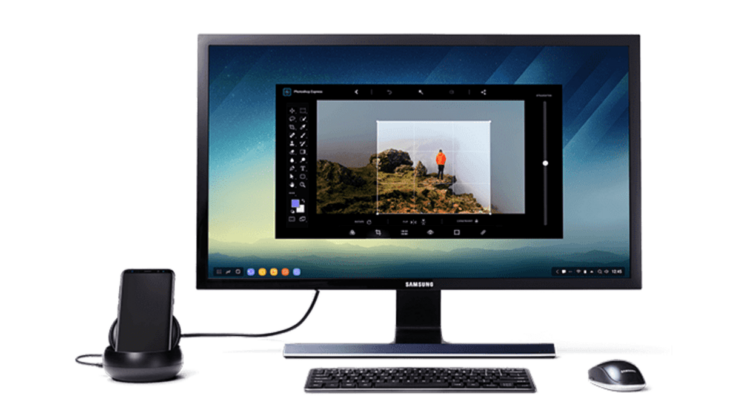
 If you’ve been online at all today, you’ve surely seen Samsung’s latest flagship phone, the Galaxy S8. It is beautiful and Samsung is doing a few interesting things with it, including a desktop dock called DeX.
While Samsung didn’t spend much time at all on this feature, the few things they mentioned were interesting for all of us in the Chrome OS world waiting on the full arrival of Android Apps on the Chrome OS desktop.
Sure, some will see this as some sort of competition to Chromebooks, but that simply isn’t the case. Android on a desktop has been done pretty well by RemixOS and some others, but what separates Chromebooks is Chrome OS, not Android apps on a desktop. We aren’t unpacking that whole argument here, but I don’t see Samsung’s desktop effort as any sort of competition to Chrome OS.
In fact, I see it as a substantial gain for Chromebooks and Android Apps running on them.
Let me explain.
Apps On A Desktop Are Apps on a Desktop
Here’s the thing, Android apps on any desktop environment, be it a large tablet, RemixOS desktop, a Chromebook, or this latest offering from Samsung, are simply Android apps on a bigger canvas.
More room to spread around the pixels and more screen real estate to utilize. With many phones pushing QHD screens these days, it is likely your phone uses more pixels than the display on your desk.
But screen real estate isn’t just about pixel counts. It is how you spread those pixels across a surface. A full-blown desktop on your QHD smartphone screen would be unusable and elements would be too small to ever really interact with.
Spread those same pixels onto a 25″ screen, though, and we have something we can work with.
What many Android apps don’t do well is take advantage of that real estate. I’ll give you a quick example.
Gmail understands that, when I’m on a larger physical screen, I want some additional UI elements. Maybe a few panels to help email flow would be nice. Here’s what it does on a tablet or Chromebook versus what I see on my Pixel XL:


If all Android apps did this, we’d already be in business. However, many do not. Apps like Twitter or Ebay simply expand the phone app and look awkward.
Instead of using the extra space to add more useful UI pieces, these apps simply stretch the exitsting UI elements with enormous white space between them. It isn’t attractive and is very odd to use on the larger screen.

What Samsung Could Change
We all know millions of Galaxy S8’s will sell over the next few months. Millions. Probably over 20 million.
And of those millions, a small percentage will buy and try the DeX Desktop setup. While it won’t be a huge portion of the user base, a small percent of 20 million could still be over a million. And who knows? Maybe more.
My point is, with all these users trying out Android apps on this desktop setup, they are bound to run into their fair share of non-desktop-optimized apps that are just odd to use in that setup.
Obviously, Samsung doesn’t want this. They are already working with developers like Microsoft to bring better, desktop versions of major apps to the DeX expereince.

And, as we said before, Android apps are Android apps. Regardless of the platform, if an Android app is tweaked to be better on the big screen, it will be better on ALL big screens: including Chromebooks.
With a manufacturer who has the clout that Samsung does, this is a very good thing for Chrome OS and Chromebooks running Android apps.
Adoption of Chromebooks over the course of the next year will happen one way or another: maybe slow, maybe faster than we expect. Either way, this new desktop focus by Samsung could give developers the push they need to begin work on desktop layouts sooner than they would have before with Chrome OS as the only larger-screen platform.
Allies After All
With all the talk of Andromeda and merged OS’s, it is easy to look at this move by Samsung and wonder if this is in competition with things like Chromeboxes.
I don’t see it that way at all. I think Samsung’s clout will only fuel the fire for more Android apps with proper desktop, big screen experiences.
And I think the benefactors will be anyone using Android apps on a bigger screen. Tablets, desktops, and Chromebooks could all be impacted by this if DeX takes off at all, and the impact can be nothing but positive.

