

Support our independent tech coverage. Chrome Unboxed is written by real people, for real people—not search algorithms. Join Chrome Unboxed Plus for just $2 a month to get an ad-free experience, access to our private Discord, and more. Learn more about membership here.
START FREE TRIAL (MONTHLY)START FREE TRIAL (ANNUAL)
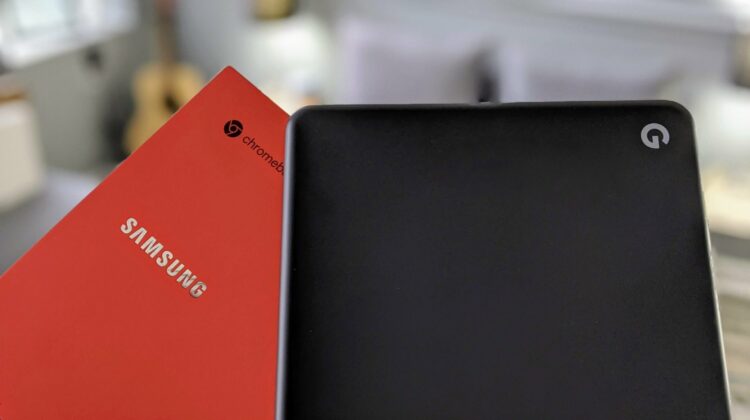
I’ve now been using the new Samsung Galaxy Chromebook as my primary device for a week at this point. Don’t worry, a full review is coming soon as my opinions are fully forming around this high-end Chromebook, but what I’m noticing in tangent to my thoughts congealing around the flat-out extravagance of the new Samsung Chromebook is a growing appreciation for what Google thoughtfully put together in the Pixelbook Go. While not the totally high-end Chromebook experience like the Pixelbook and Pixel Slate were, the Pixelbook Go was and still is a masterclass in restraint and proof that spec sheets are only part of the story.
I’ll kick this all off by saying that the spec sheet delivers a great experience on the Samsung Galaxy Chromebook. It’s easy to be enamored by it’s jaw-dropping display, impossible thinness, fiery red color, and crazy-fast performance. Those facts on the spec sheet deliver 100% and I’m not here to say the Samsung doesn’t provide a top-tier, high-end experience. It does, but it does so at a cost to not only your wallet, but to the battery inside it. While mitigation look to be on the way, it is unclear at this point whether or not they will really heal the wound or simply be a band-aid.
However, even if we took out the battery woes of the Galaxy Chromebook, there’s still something about using it that is making me fully appreciate the decisions Google made with the Pixelbook Go. With Samsung, it feels a bit like the kitchen sink approach where this Chromebook attempts to be the absolute best at everything. And though it is doing a great job at most of that, I’m left a bit speechless when trying to explain why most users should spend the extra cash to get it over the Pixelbook Go.
Chromebooks, by their nature, are practical machines. While I appreciate extras like super high-res displays, fingerprint scanners, and built-in pens, I’m realizing more than before that I don’t necessarily need those things. I’d always welcome them, but they aren’t deal breakers. In many ways, the Pixelbook Go is all about making the choice to leave out things that fall into that not-necessary category in order to deliver in the most solid way on the things that do matter. While it feels a bit Spartan, the Pixelbook Go is so great at nailing what counts that it makes it’s own simplicity almost into a feature of its own.
What the Pixelbook gets so right is its attention to details that aren’t so flashy. The screen is good, not great, but never feels like its in the way. It is bright enough for most environments, sharp enough that you don’t spot pixels at a normal operating distance and of a resolution and type that don’t decimate your battery. The build is understated but solid, giving the user confidence every time it is picked up. It just feels so firm, rigid, and well-built that I admire it constantly. The keyboard and trackpad are best-in class and clearly a spot where Google chose to spend some time and money. The same goes for the speakers, and I can’t tell you how much I miss them when using any other device. They are just spectacular.
Internally, the 8th-gen i3 and i5 are both great and the internal space is sufficient and fast enough. Does it match the speed of NVMe on the Samsung Galaxy Chromebook? No, but I honestly don’t notice in day-to-day use. So, again, while Google could have pushed for the better internal pieces with the Pixelbook Go, it chose not to in order to keep the price down and in this decision, I think they went the right way. For most users, pen support being jettisoned isn’t a huge deal, either, as stylus support is more of a niche than just about anything in the Chromebook world.
Finally, there’s the clamshell-only approach, which has bothered me almost never. Sure, I have to reach for another device to test out new tablet mode features in Chrome OS and I’d rather just check them out on the device I have, but this again is a decision made to serve the general users and not the niche of folks that actually need and use a convertible. Are you sensing a pattern, here? Google clearly did their research to decide what was necessary and what wasn’t in order to build a device that does only what is necessary and does all of it well.
I’ve never fully appreciated this fact as much as I do now that some of the next-gen Chromebooks are hitting the market. The Pixelbook Go is such a fantastic example of cutting the fat and focusing on what is important. It doesn’t mean I don’t like or appreciate the new, fancier stuff in the Galaxy Chromebook. Instead, I think many manufacturers of electronic devices could stand to learn a lot from what Google did with it. With a bit of research on usage, Google was clearly aware of the primary parts of the Chromebook experience and chose to stick to those core features, focus on them, and do them better than anyone else. And it worked. As a cohesive Chromebook experience, it is very hard to find fault in the Pixelbook Go.
There are going to be some of you out there that won’t be OK with the compromises Google made, and thankfully there are devices like the Samsung Galaxy Chromebook. If price isn’t as much of an issue and you want the fastest, brightest, thinnest, most beautiful Chromebook on the market, you have some options. And, as you’ll likely note in the review when it is completed, you have a fantastic, standout option in the Galaxy Chromebook. However, as I’ve been using that device, I’ll be the first to admit the understated brilliance of the Pixelbook Go has never shined so bright.
Shop Samsung Galaxy Chromebook at Chrome Shop
SUBSCRIBE TO UPSTREAM
Get Chrome Unboxed delivered straight to your inbox
Upstream is our flagship, curated newsletter with the top stories, most click-worthy deals, giveaways, and trending articles from Chrome Unboxed sent directly to your inbox a few times a week. Join 31,000+ subscribers.

