

Support our independent tech coverage. Chrome Unboxed is written by real people, for real people—not search algorithms. Join Chrome Unboxed Plus for just $2 a month to get an ad-free experience, access to our private Discord, and more. Learn more about membership here.
START FREE TRIAL (MONTHLY)START FREE TRIAL (ANNUAL)
The next generation of Chrome OS devices have started to hit the market and the new class of Tiger Lake Chromebooks will pave the way for the next evolution of our beloved operating system. Linux on Chrome OS will soon be out of Beta and the container tech that runs the Debian 10 framework will soon begin leveraging more of the CPU and GPU’s raw horsepower. That will be a much-needed boost when Google finally brings full support for Borealis, a.k.a. Steam on Chrome OS. While these new devices are exciting and it appears that they will be more budget-friendly, than previous flagship models, it also means significant discounts on highly-capable current generation hardware.
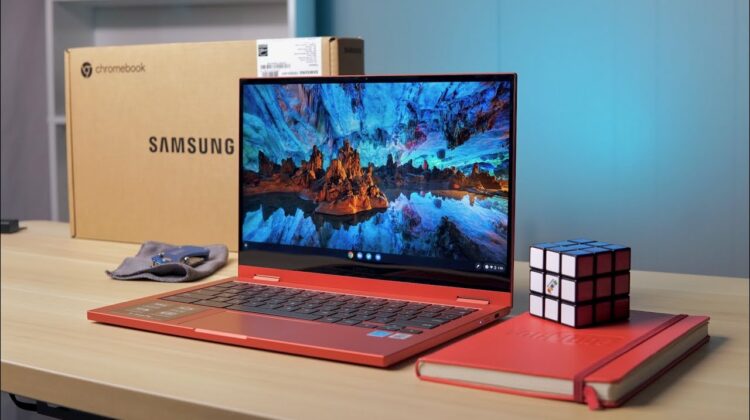
There are a lot of things to love about the current lineup of Comet Lake devices available to users. For starters, the 10th Gen Intel CPUs are more than powerful enough for heavyweight tasks such as running developer environments via Linux, playing games from the Play Store, and consuming high-quality media content from around the web. On top of that, devices like the Acer Chromebook Spin 713 and the Galaxy Chromebooks from Samsung look simply amazing. The best part? These premium devices are enjoying regular discounts a the moment and right now, eligible buys can score savings up to $500 on a Galaxy Chromebook.
If you are a Best Buy loyalist, both iterations are on offer and you can pick up one of the Galaxy Chromebooks for as little as $449 for the Celeron model. The Galaxy Chromebook 2 is a solid device but I would steer clear of the 4GB Celeron model simply because you’re still paying premium money for a Chromebook that could bog down under a heavier workload. The Core i3 version gets you 8GB of RAM and 128GB of storage while still saving you $100 and $599 is a decent price for this Chromebook. That said, the original Samsung Galaxy Chromebook, at its current sale price, is the better deal for your money.
If you grab the Core i5, 8GB/256GB Galaxy Chromebook with its 4K screen and stowable stylus and save $200. That’s a solid deal on a beautiful and powerful device whose only real shortcoming is poor battery life. If that discount isn’t enough to get you excited, you could save more if you head over to Samsung proper and get qualified for the company’s discount program. The Galaxy’s discount at Samsung.com is only $150 but eligible teachers, students, military, and others can get an additional price cut that will save you some serious cash. For example, my military discount takes the total price of the $999 Chromebook down to a cool $509.40 before tax. That’s just shy of 50% off which makes this a killer deal on a very nice Chromebook. Additionally, Rakuten is throwing in 6% cashback at Samsung right now which gets the total price well under the $500 mark.
The Core i3 Galaxy Chromebook 2 is also on sale at Samsung for $499 which is $100 less than Best Buy’s current deal. You don’t need to qualify for the discount program for this deal, either. If you are eligible for the extra savings, the Galaxy Chromebook 2 will only run you $399 and that’s a lot of Chromebook for very little money. You can find the Best Buy and Samsung listings at the links below. Don’t forget to sign up for a free Rakuten account and score an extra $30 when you make your first eligible purchase.

