

Support our independent tech coverage. Chrome Unboxed is written by real people, for real people—not search algorithms. Join Chrome Unboxed Plus for just $2 a month to get an ad-free experience, access to our private Discord, and more. Learn more about membership here.
START FREE TRIAL (MONTHLY)START FREE TRIAL (ANNUAL)
It’s been six months since Samsung unveiled the surprising update to the popular Chromebook Plus in what we now know as the Chromebook Plus V2. At first, it only shipped in a Celeron version, but it wasn’t long before a proper Core m3 version became available to truly give this successor a leg up on it’s earlier version.
With the Core m3 and an upgraded 64GB of storage, the Plus V2 became a decent consideration with it’s mostly-aluminum build, great screen, fantastic keyboard, and stowable stylus. As we’ve seen deals come and go on this version of the device, I’ve told quite a few people to go snag one when the price comes down between $450 and $500.
Just this week we saw what matches the deepest discount ever on the Samsung Chromebook Plus V2 from Amazon and shared that deal with all our readers immediately. So intrigued by the savings, I decided to snag one for myself as a possible go-to device for notes and writing on the go. What I received from Amazon was a bit surprising, though, and that’s what we’re here to discuss.
Not The Same Hardware
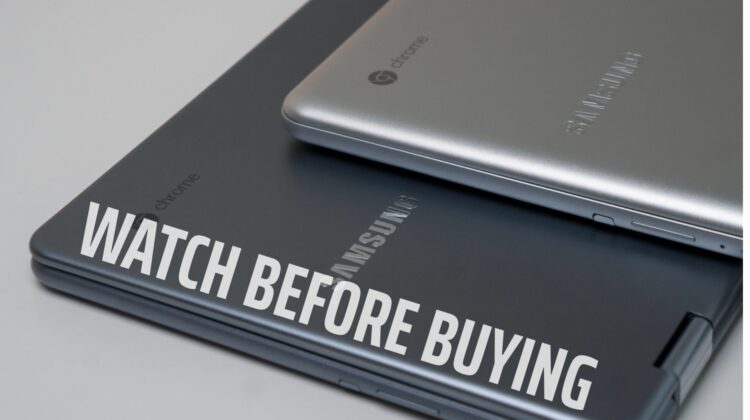
Upon cracking open the box and getting the Chromebook V2 out of the sleeve, I immediately noticed a difference. The listing showed what looked like a lighter shade of gray (Titan Silver is the how it is listed), but I thought maybe that was just bad lighting. It was not and this is indeed much lighter in color than the other two Plus V2’s we’ve reviewed (which are listed as Stealth Silver).
The differences don’t stop there. The entire outer build of the device is different, too, looking more pill-shaped than the original version. If you recall, the original V2 looked more like the first Pro and Plus from Samsung with rounded edges everywhere. This new version has sharper edges when open and makes a more cohesive outer shell when closed.
I actually like the look, but it is definitely different outer hardware. Because of this pill shape, when the device is actually opened up, the screen and keyboard deck have a sharp edge instead of the tapered, rounded edges of the Stealth Silver version. Not a deal breaker: just different.
If that was all that was different, I’d say this is just a strange move by Samsung and simply forget about it. There is one other very big difference here, however, and it is important. The entire bottom half of this laptop is now plastic. On the Stealth Silver version, only the bottom panel was plastic, leaving the screen portion and keyboard deck crafted from aluminum.
Thought the two don’t feel miles apart as far as sturdiness is concerned (both are a bit more flimsy than I’d like), the newer Titan Silver model from Amazon feels decidedly cheaper in use. There’s just no comparison between resting your palms on aluminum and resting them on plastic. Plastic will always feel cheaper.
Don’t get me wrong, I’m not saying any of this is a deal-breaker. I’m not even telling you not to buy it. We simply wanted to make sure potential buyers knew what they were actually buying as the Amazon listing doesn’t even come close to making these differences clear. If you walked into Best Buy and played with the Stealth Silver version and then ordered the Titan Silver from Amazon, it would definitely feel like a totally different device.
The internals, screen, keyboard, trackpad and pen are all the same on both devices, so they share most of their DNA in common. These changes to the Amazon version just feel odd and really make you wonder what exactly is going on. If Samsung made it clear that this was a different body, then none of these differences are an issue.
They don’t, however, and that is where there’s a problem. Imagine going to buy a Mac or Surface from Best Buy and realizing that, even though it looks just like all the other devices you’ve looked at, half of it is now made of plastic and no one told you otherwise. You’d be a bit ticked, right?
Well, that’s exactly what we want to save people from. Just know that if you choose to buy the cheaper model from Amazon, you are getting much more plastic in the device. That’s not saying it is bad; just saying it is different and you need to be aware. Just remember: Titan Silver is more plastic and Stealth Silver is more aluminum. Right now, Amazon and Best Buy are the two places to get this Chromebook, but that could change at any point. Pay attention to the color in the listing and you should at least know what to expect in the box.

