

Support our independent tech coverage. Chrome Unboxed is written by real people, for real people—not search algorithms. Join Chrome Unboxed Plus for just $2 a month to get an ad-free experience, access to our private Discord, and more. Learn more about membership here.
START FREE TRIAL (MONTHLY)START FREE TRIAL (ANNUAL)
Right off the bat, I want to make sure we’re all looking at the Poin2 Chromebook 14 through a very particular lense: the lense of price. You see, when a device drops down into this price range, it becomes quite a bit easier to forgive things that aren’t perfect, and that is exactly the case when we talk about the Poin2 Chromebook 14. Since you can find this Chromebook anywhere between $250-$300 brand new on Amazon on any given day, we have to allow that to inform the way we review this Chromebook.
Build
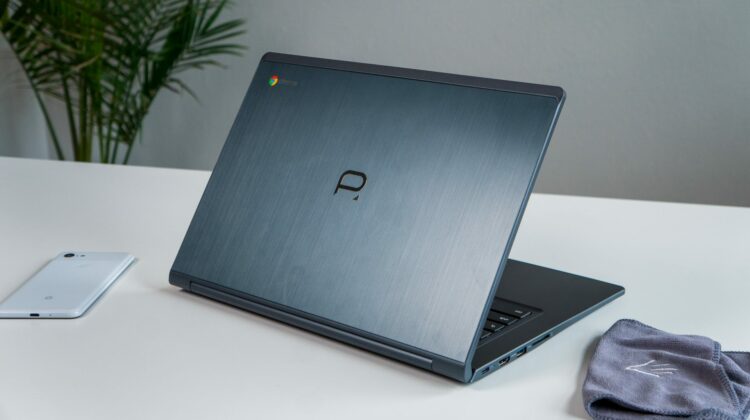
This is easily one of the high points for the Poin2 as the majority of the Chromebook is built with brushed, dark aluminum. Sure, brushed aluminum is a tad bit dated as far as looks go, but all that metal gives the entire Chromebook a sturdy, confident feel. There’s plastic around the edges and that subtly reminds you of the price, but I didn’t find the plastic parts to be in the way of what comes across as a sturdy, well-build machine.
This isn’t a convertible, but it will fold flat and the hinges feel solid and stable. Though a tad heavy at 3.5 pounds for a 14-inch Chromebook, if you are looking for something in this price range that doesn’t feel like flimsy plastic, this is the Chromebook for you.
Screen
The screen is, again, a spot where the Poin2 isn’t a standout, but a good performer nonetheless. Colors are decent, brightness is usable in indoor environments, and the 1080p resoution is the best compromise for a screen this size. No, 1080p isn’t as sharp as 4K or the 2400×1600 Pixelbook, but crammed into a 14-inch frame, this resolution does very well at looking great and not completely demolishing the processor.
What I’m expecting from a sub-$300 laptop is the TN panels we usually encounter with terrible viewing angles and incredibly washed-out colors, but that is not what you get here. Again, the price informs the experience, and when you see this display for such a small asking price, it becomes easy to feel impressed. Additionally, we see touchscreens usually added at higher price points as well, so it almost feels like the addition of a good touch experience is just icing on the cake.
Keyboard & Trackpad
The keyboard on the Poin2 is, not-surprisingly, pretty decent. I’ve used far worse in my time as a reviewer and that is saying something. We’ve already established a good build quality and decent screen, so I freely assumed the keyboard and trackpad would be a place where Poin2 cut some corners. As far as the keyboard goes, that doesn’t seem to be the case. Sure, it isn’t backlit, but it has decent travel and is fine for doing all sorts of work and I punched out quite a bit of content on it without getting frustrated with any part of the experience.
The trackpad, however, is the first place I can say this Chromebook feels decidedly budget. The surface is decent and oil-resistant, but the click mechanism is ultra-stiff and really felt like work to use. I was glad to see it isn’t floating and flopping around like other low-priced Chromebooks, but this one was equally frustrating to use. I actually turned on tap-to-click while using this one to avoid what felt like manual labor for my fingers when registering clicks on the trackpad.
Ports & Speakers
The lineup of ports is a bit of a grab bag. There’s only one of each, but we’re looking at:
- HDMI (full size)
- USB-C
- USB-A
- SD Card Slot (full size)
- Headphone/mic jack
- Kensington Lock
While this selection of ports feels a tad odd in this day and age, it was a nice change of pace from the dongle life I tend to live. Need an external monitor? Just plug in the HDMI cable. Need extended storage? Slide in an SD card without need of a micro-sized version. Have a keyboard/mouse dongle that needs USB-A? You have that port too. And since it charges via the single USB-C port, the charger you get in the box can charge your other stuff as well if you are on the go.
As far as speakers go, there’s little to say good or bad. These are as average as laptop speakers can get. Thin, tinny, and downward firing, they get the job done assuming the job is to help you hear some spoken audio for a YouTube video or something similar. As long as you don’t try to watch feature films on this thing without headphones, these speakers will do what you’d expect.
Internals
While I’d love to see an internal storage of at least 64GB, I can’t say I’m surprised to see only 32GB of onboard storage paired up with 4GB of RAM at this price point. Alongside the MediaTek MT8173, the overall experience is mediocre. You won’t be doing any hard core development or multitasking here, but if you keep your tasks and tabs under control, the Poin2 gets along just fine for daily use and general browsing.
Because the MediaTek chip inside, the performance with Android apps is much better than you’d expect given the middling Chrome OS performance. The reason there is simple: given the dominance of ARM chips in phones and tablets, developers clearly build their apps with ARM in mind first, so ARM chips are simply more efficient at running Android apps on Chromebooks.
Overall, when you take general use, Android performance, and strong battery life all together, this thing performs very well on many tasks for the general user. Just don’t go in expecting speed to blow you away and you’ll be very happy with the results.
Wrap Up
When we take all of this into consideration, it is hard to say there’s a better overall package under $300 brand new. When you consider the screen, build quality and port selection, you simply don’t see this sort of overall package on offer for this price outside of the Poin2 Chromebook 14.
Buy The Poin2 Chromebook 14 on Amazon
But, should you buy it? That question is even more difficult since this is actually an older Chromebook than it lets on. It was available for a little over a year before making it to Amazon here in the US, so it is already quite a ways into its EOL where it will stop getting updates. Google officially has this one slated for March 2022 as the date when it will likely stop recieving updates. While this isn’t written in stone (the date is simply when Google stops guaranteeing updates, not necessarily ceasing them), you can expect about 3 years of updates to your Poin2 Chromebook if you choose to get one as of the publishing of this review.
Overall I’d say if you find this device between $250-$300, it is a great purchase. If you see it dip even lower, then it becomes a no-brainer if you are in the market for a Chromebook that does a lot for less.

