
• Skip to main content
  • Skip to primary sidebar
  • Deals
  • Features
  • Guides
  • Chromebooks
  • Videos
  • Podcast
  • More +
    • Reviews
    • Unboxing
    • Upcoming Devices
    • Chromebook Plus
    • Chrome
    • ChromeOS
    • Chrome OS Flex
  • Search
  • Sign Up
  • Log In
Chrome Unboxed – The Latest Chrome OS News

Chrome Unboxed - The Latest Chrome OS News

A Space for All Things Chrome, Google, and More!

  • Deals
  • Features
  • Guides
  • Chromebooks
  • Videos
  • Podcast
  • More +
    • Reviews
    • Unboxing
    • Upcoming Devices
    • Chromebook Plus
    • Chrome
    • ChromeOS
    • Chrome OS Flex
  • Search
  • Sign Up
  • Log In

Play Store might be getting a new logo, Material You in tablets and Chromebooks

July 8, 2022 By Johanna Romero View Comments

A person holding a smartphone featuring the Google Play Store app

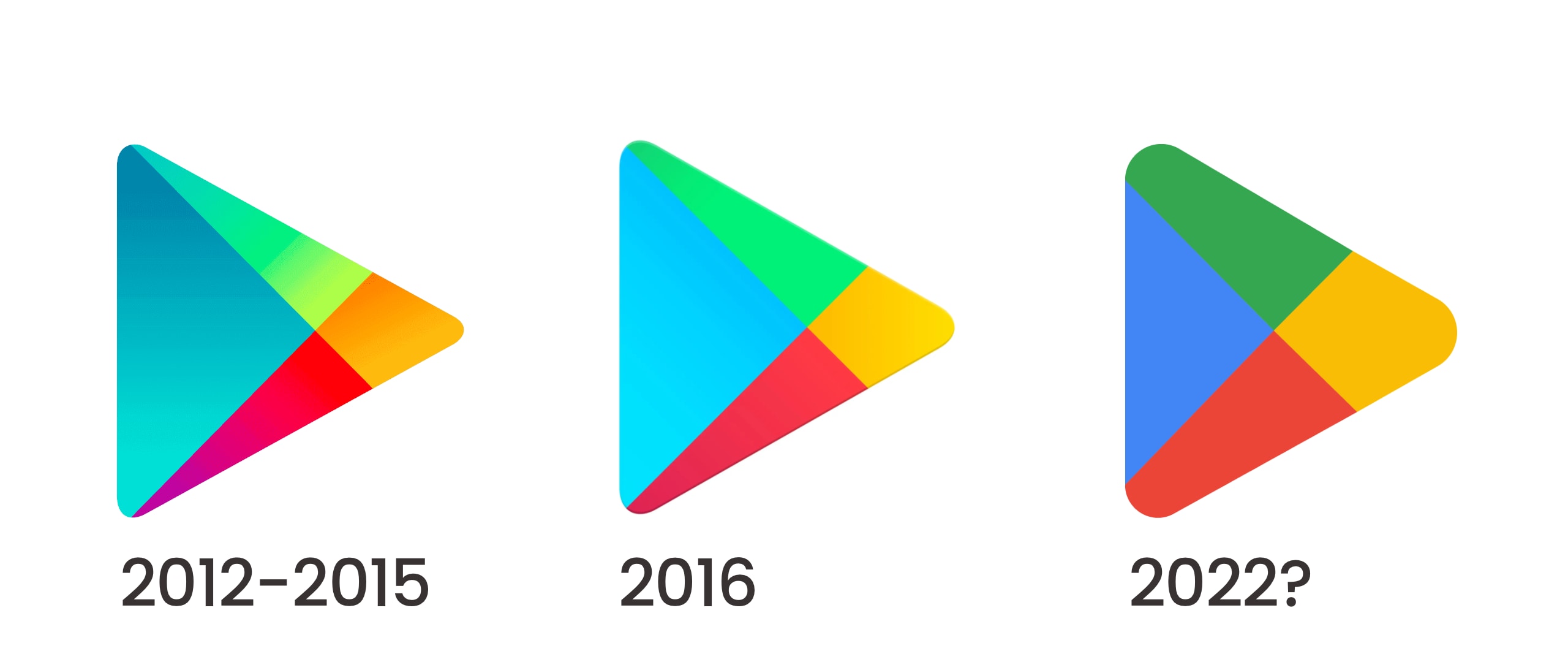
The last time Google changed its Play icon was back in 2016 when its signature interlocking triangles took on a new brighter look. However, six years later, The Google Play store and its icon remained largely untouched, donning its outdated UI and icon. At the same time, the rest of the apps in the Google ecosystem transitioned into what is now called Material You.

Things look to be changing now as it has been spotted that “Material You” touches are being added to the Play Store on Android tablets and Chromebooks, as well as the Play Store icon itself in some places. We knew of the proposed “Material You” redesign as it was unveiled by Google back in October for I/O 2022. However, we are just now seeing parts of the new promised look appear in bits and pieces. As spotted by 9to5Google, the Play Store icon is showing up in GPay and Google Pay with a more material-looking icon that flattens the colors and removes the shadows, resembling the current Google colors more accurately.
Xremove ads
Google Play icon changes throughout the years.
*Note: 2022 icon is a mockup of the lower resolution icon found and enlarged for clarity

Additionally, following the UI update on phones back in October, the Google Play Store on Android tablets and Chromebooks is picking up some “Material You” components. The changes include a navigation drawer, instead of a bottom bar, in landscape mode. Additionally, the shape of the search bar has changed from a rectangle with rounded corners to a pill-shaped field.

Play Store on Android Tablets and Chromebooks before and after the Material You update
Image Source: 9to5Google

Other subtle changes include how dynamic color and highlighting are applied to these fields and how the accent color changes from green to blue. However, that’s as much “Material You” you’ll get to see so far. Unfortunately, I could not see this change applied on my Lenovo Chromebook Duet 3, perhaps since it is still stuck on Android 9, unlike Chromebooks that are eligible for Android 11 using ARCVM.

Featured Videos

Xremove ads

As for the icon redesign, there is no clear indication if or when it will be made public since it only appears in a couple of odd places. My guess is that the icon will be unveiled once the tablet version is fully converted to the new Material You redesign. Even though this design is already present on phones, Google may be holding on to the announcement until the look of the app is more cohesive on all devices that support it, or perhaps, this is a treat that we will get once Android 13 comes out of Beta. We will have to wait and see what happens.

Featured Photo by Mika Baumeister on Unsplash

Filed Under: Android, Apps, Chrome OS Tablet, ChromeOS, New & Upcoming Features Tagged With: android, chromebook, chromeos, google play store, material you, play store

Primary Sidebar

Xremove ads

Deals

The best Chromebook deals today

By Robby Payne
December 29, 2025

The Acer Chromebook Plus Spin 514 hits an all-time low price of $499

By Robby Payne
December 23, 2025

Save $220 on the powerful, versatile Acer Chromebook Plus Spin 714

By Robby Payne
December 10, 2025

The Google Pixel 9a just hit its lowest price ever at $150 off

By Joseph Humphrey
December 8, 2025

At $349, this Lenovo Chromebook Plus is one of the best value laptops you can buy

By Joseph Humphrey
December 3, 2025

More Deals

Xremove ads

Reviews

Acer Chromebook Plus Spin 514 Review: Kompanio Ultra power in a convertible

By Robby Payne
December 24, 2025

My review after 6 weeks with the Lenovo Chromebook Plus 14 [VIDEO]

By Robby Payne
August 11, 2025

One week with the best small Android tablet you can buy, and I’m sold

By Robby Payne
May 9, 2025

Best Chromebooks of 2024 [VIDEO]

By Robby Payne
November 28, 2024

Samsung Galaxy Chromebook Plus Review: Samsung is back! [VIDEO]

By Robby Payne
October 28, 2024

More Reviews

Xremove ads

Guides

This Chromebook trackpad shortcut is definitely not new, but is blowing my mind

By Robby Payne
March 11, 2024

How to reduce broadcast delay on YouTube TV to stop live spoilers

By Robby Payne
December 8, 2023

Windows PC keyboard and Chromebook

How to use a Windows keyboard with a Chromebook

By Joseph Humphrey
December 8, 2023

How reset and revert your Chromebook to the previous version of Chrome OS

By Robby Payne
November 29, 2023

My Chromebook Plus features disappeared: here’s how I fixed it

By Robby Payne
November 24, 2023

More Guides

TWITTER · FACEBOOK · INSTAGRAM · YOUTUBE · EMAIL · ABOUT

Copyright © 2025 · Chrome Unboxed · Chrome is a registered trademark of Google Inc.
We are participants in various affiliate advertising programs designed to provide a means for us to earn fees by linking to affiliated sites.

PRIVACY POLICY