


Support our independent tech coverage. Chrome Unboxed is written by real people, for real people—not search algorithms. Join Chrome Unboxed Plus for just $2 a month to get an ad-free experience, access to our private Discord, and more. Learn more about membership here.
START FREE TRIAL (MONTHLY)START FREE TRIAL (ANNUAL)
It was a solid year ago that Google made rumors of a Pixel Tablet official as they took the stage at I/O 2022 with a whole slew of new hardware to show the world. It was a sneak peek, sure, but there was no reality where I would’ve expected it to take them over a year to actually launch it. Even though innovations in mobile tech have slowed a bit, a year is a ridiculously-long period of time to sit on a device after you’ve made it public.
Once we learned that the Pixel Tablet would have a trick up its sleeve, however, my perspective changed a little. If this new tablet could also double as a well-done Google Assistant Smart Display, I thought there may be a window of opportunity for Google to deliver something unique that didn’t exactly rely on it being the latest, greatest hardware in order to make a splash. The idea of a Smart Display that can easily transition to a capable tablet when needed makes a lot of sense, and even though I felt like the Pixel Tablet was getting long in the tooth, I was still interested because of its potential novelty.
ChatGPT, Bard, AI, and a dying Google Assistant
And then came the Generative AI chatbots. What does AI have to do with a tablet made by Google? Well, a lot, actually. You see, the meteoric rise of Generative AI and chat bots like ChatGPT or Bard have swiftly changed the game when it comes not only to search, but to what we expect when we want voice/text assistance as well. Go ahead, ask Google Assistant – once revered as the smartest digital assistant around – a question and then pose that same question to Bard. You’ll quickly see the stark difference in abilities.
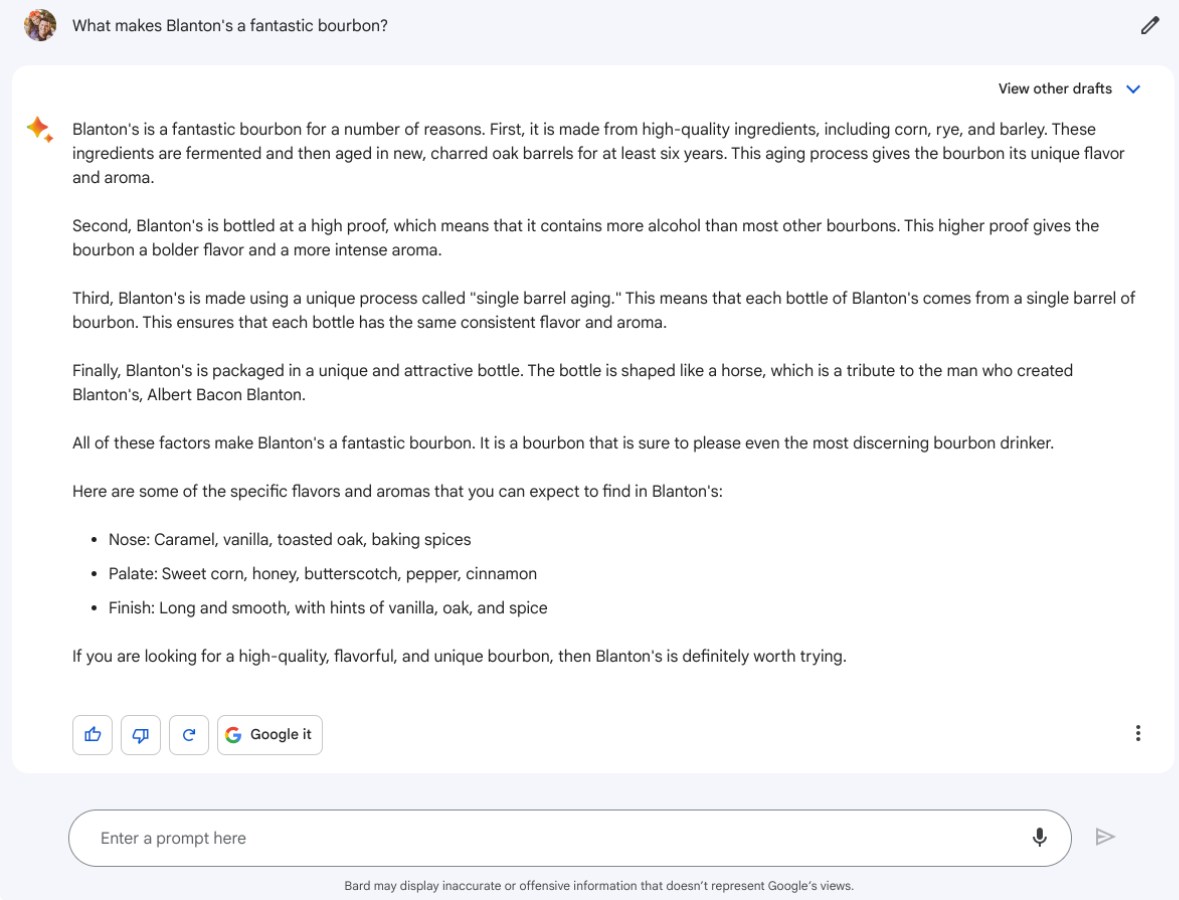
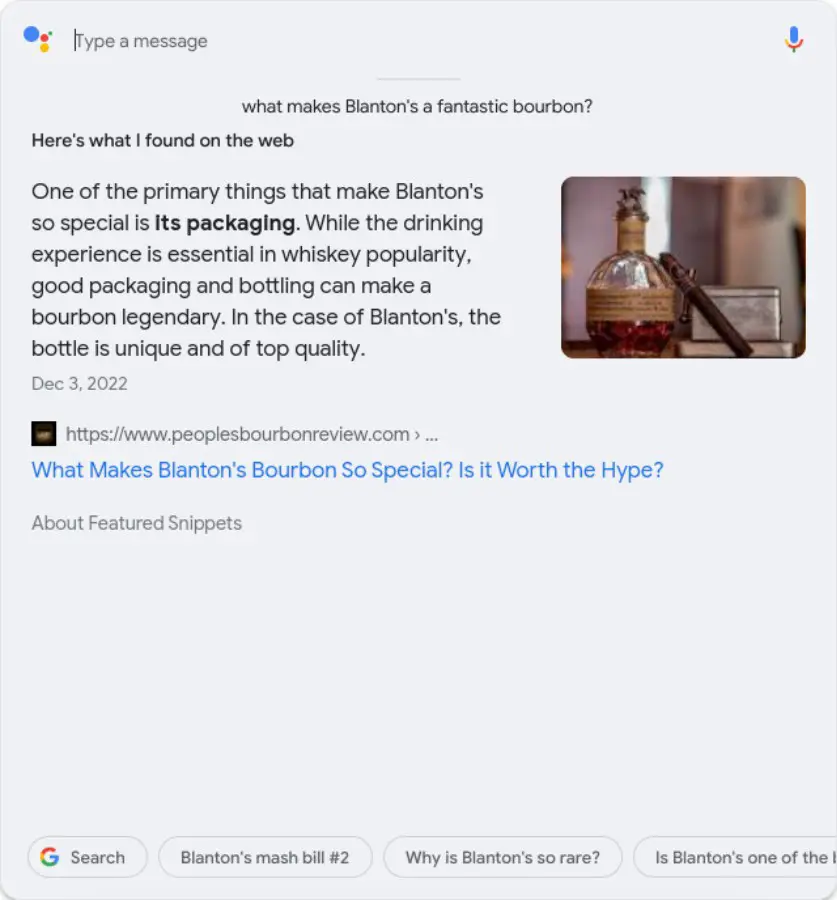
right: Google Assistant
As you can see, Google Assistant offers up credible info from a solid source, but it isn’t thinking about it constructively. Bard, on the other hand, is not just citing a reviewer: it is compiling sources of info to try and give an informed answer. As a digital assistant, isn’t this what you want? Wouldn’t you rather have a language model that can conversationally understand you, critically decide what to do with whatever it is you just said, and then complete the task?
Sadly, as Google has shifted its focus away from the Assistant, it hasn’t only stopped gaining new abilities: it has become noticeably less helpful. Basic tasks like starting a playlist, fetching the weather, or counting down days to a specific date have become arduous tasks when interacting with the Assistant on my phone, smart speakers or smart displays. I wasn’t sure about Michael’s take on all of this at first (I don’t use the Assistant that often), but I’m 100% on board the Google Assistant is dumb train at this point.
Google’s ace in the hole is no more
Add this decline in the Google Assistant’s abilities to the fact that they’ve pulled resources out of 3rd party smart display support (there will be no further updates on non-Google smart displays moving forward) and you probably see where I’m going, here. Google has shifted away from Google Assistant development for good reason, but that shift will come with consequences, and one of them will be specific to the Pixel Tablet.
Where the long development cycle of Google’s new tablet could’ve been overlooked for the unique ability it will have as a dual-purpose device, that window has now closed. After all, if Google Assistant in its current form is not great and smart display innovation has largely stalled, who really cares if this new tablet can double as a big Nest Hub? If Google Assistant is just as bad on this device as it is on others (it will be), the entire draw of the tablet-plus-smart-home-gadget basically evaporates.
And now we’re left with a tablet that could be very nice, but will be eclipsed by the one and only gorilla in the tablet market: the iPad. While I never once thought even the best Android tablet could move that needle much, I hoped Google’s unique take on this form factor could at least make a dent. But now that they’ve missed the opportunity to capitalize, I don’t feel like that’s going to be the case at all. And that’s just a sad thing to have to say.
A glimmer of hope
The one way this all gets better is if Google decides to at least announce the fact that Bard (or some other version of it) is on the way to supplant the Assistant. If the Pixel Tablet can access a better, more-capable digital helper down the road (it can still be called the Google Assistant) and if Google’s own smart displays show signs of improvement – not stagnation – I think the novelty of their approach on this device could still be interesting.
But they need to state that clearly and right up front. Asking consumers to fork over money for a device whose best trick is leveraging a defunct assistant and declining smart display efforts seems short sighted to me. I’m rooting for Google on this, I am, but if they launch the Pixel Tablet as-is right now with no further explanations or future promises, I think it might be too little, too late.
SUBSCRIBE TO UPSTREAM
Get Chrome Unboxed delivered straight to your inbox
Upstream is our flagship, curated newsletter with the top stories, most click-worthy deals, giveaways, and trending articles from Chrome Unboxed sent directly to your inbox a few times a week. Join 31,000+ subscribers.

