Up next in 10

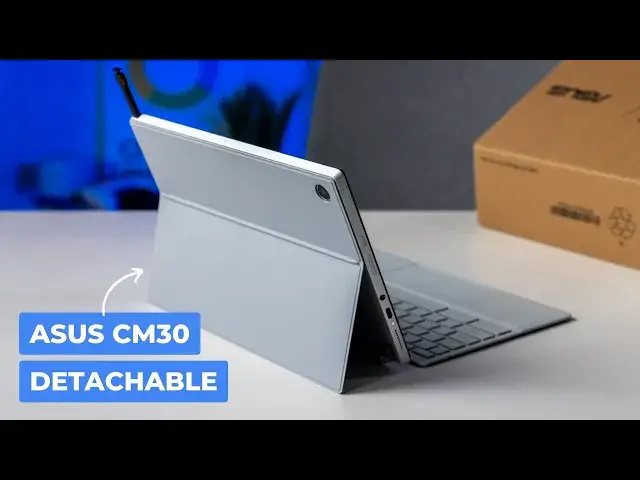
ASUS Chromebook CM30 Detachable: Unboxing & First Impressions
Jun 5, 2024


Join our community for access to our private Discord, an ad-free website experience, and more! Start your FREE TRIAL here ➡️ https://www.patreon.com/chromeunboxed
・・・・・・・
💲Shop Today's Best Chromebook Deals: https://chromeunboxed.com/the-best-chromebook-deals-today-updated/
CES 2024 is here in full force, but we're clearly not out in Vegas this year for the festivities. Thanks to Asus, however, we got our hands on their latest Chromebook tablet - the Chromebook CM30 Detachable - well before its official release. So, let's jump in the box and get into the good and the bad with the ASUS' latest stab at a detachable Chromebook.
📰 Read more: https://chromeunboxed.com/unboxing-the-new-asus-chromebook-cm30-detachable-tablet-video/
📧 Join our newsletter: http://bit.ly/2WjCDm7
・・・・・・・
☕ Fueled by Fresh Roasted Coffee! Buy the special edition Chrome Unboxed bag here: https://chromeunboxed.com/coffee
Subscribe to the channel: http://bit.ly/2xFuj6L
Follow us: https://www.instagram.com/chromeunboxed
Show More Show Less View Video Transcript
0:00
It is CES 2024 time and clearly we're not there this year
0:05
But ASUS was kind enough to send over one of their newer devices. The ASUS Chromebook detachable CM30
0:12
We're just going to call it the CM30 or the, I don't know, ASU's new Chromebook tablet because that's a whole lot of words to say
0:18
But we have it here in the office. I've got it in the box and let's jump in here and take a look at it
0:27
So I'm going to be right up front with you guys. This is, what, the, carry the two, third time, third time that we have done this
0:36
Technical difficulties, some user error, if I'm being honest. But I'm not going to lie to you and tell you this is the first time I'm cracking this thing open
0:45
We've been in this box multiple times. Hopefully this one works out okay
0:50
But we do still want to show you the box. It's interesting how large the box is, to be quite frank, because that's really this and a charger is all it's in here
0:59
but I can't remember what the wattage was on this thing. Yeah, so a nice 45 watt charger, which is kind of cool
1:07
For a smaller device, that's a pretty hefty charger. But yeah, let's get in here to see what you guys came for
1:15
So this is it. And I'm going to talk through it like I haven't seen it before
1:19
because we did the first couple tries of this before the weekend
1:24
So it's been a couple days since I've seen it, at least. But you've got this nice gray
1:29
exterior they've done away with the faux cloth look from the CM3 this is the CM30 so this is the new one
1:36
it's got a Campano 520 inside from MediaTech uh I want to say it's 8 gigs of ram
1:42
128 I think on the storage we'll check all that stuff once we get in here but um the feel of this
1:48
stuff is really nice it's like this soft I don't know almost like a velvety touch here I just I like the
1:54
color of it doesn't seem to collect fingerprints who knows over time this might
1:59
get a little oily. I'm not really sure because it does feel, I don't know, like a leatherish kind of
2:03
material, but I like the look of it from the sides and angles. It feels good in the hand. It's like
2:08
this isn't sliding around all over the place. So with certain tablets, I mean, it's got some movement
2:13
there, but there's a slight magnet kind of holding that in place. Oh, I forgot this was in here too
2:18
So that comes closed nicely with a magnet. So when you're carrying it, it just doesn't feel
2:24
poorly executed there. Before we get into the tablet, though, let's pop this
2:29
up yeah that's nice and firm and you can see it's nice and thin so it looks like
2:34
Asus has learned a little bit from Lenovo success in this portion of the
2:39
tablet-making business this feels very similar to what you get on a duet and that's a
2:44
good thing so it's nice firm hinge but it also comes off one of the other big
2:48
complaints I had with the CM3 was that you'd go to put this piece on and it
2:52
would never align and it just kind of shifted all over that one drops right on
2:56
there really nice I mean you can hear that thing just Slap, that wasn't as good of a slap, but it aligned itself perfectly
3:02
Do it one more time. Oh, you can't miss that bad or that bad
3:07
There we go. So, I do like that, and it's nice and thin
3:10
That's the biggest thing. It doesn't add a bunch of bulk to the back. And, again, before we talk more about the Chromebook itself, let's look at this keyboard
3:21
Kind of a nice soft-touch plastic there. This part looks very similar to other Chromebook tablets we had in the past It not going to be one of those like the H where the keyboard kind of attaches to the screen It just going to lay open like the Duet or other devices you seen
3:34
Man, that 1.5 millimeter travel, I think, is what the travel is on this
3:41
Man, you can feel that. That feels fantastic. I mean, for a keyboard, that's part of the case
3:46
That feels really good. Trackpad feels great, too. And, you know, there's a little movement to it
3:54
it. That's just the way it is. It's going to be flimsy. It's a folio cover. So we're not looking
3:58
for ultimate rigidity here. We just want a good keyboard, good track pad when it's on a desk and that
4:04
seems to be the case. Let's see how the magnets work. Oh yeah. Good magnets there too. So that and that's
4:10
one of the things here. Like if you have this thing taken apart, say, and you're sitting, I don't
4:14
know, on a couch or something, you're doing some tablet type stuff. When you're ready to put it back
4:18
together, you don't really want to fumble through this whole thing. You just want to snap everything back
4:22
together and go and this is accomplishing that very well so that's very good so for the outer portions
4:27
i think we're in a good spot so let's actually pull all this stuff off here and look at the tablet
4:31
itself now so around back here sorry for the big sticker i think this is a demo model oh it's got
4:39
some stats on there though so i can go in and answer that again Campanio 520 8 gigs of ram 128
4:45
gigs of storage so starting off really nicely there we don't have pricing or availability info just
4:50
yet. And while we're talking specs, 5 megapixel camera on the back, 5 megapixel camera on the front as
4:57
well. But yeah, this has like some surface pro vibes to me. So it's kind of angled off exterior
5:06
Feels aluminum, which is nice. The whole thing just, it feels really, really well made and premium
5:12
which is kind of wild for these tablets. A lot of these Chromebook tablets come in at pretty
5:17
reasonable price ranges. And you get a lot of quality build. materials in them. I think just because with a tablet, it's meant to be handled a lot. And so I don't
5:26
think they want to put something out there that's kind of flimsy or could have a possibility of
5:30
hurting the screen if it's wrenched on too much. And so having that aluminum really solidifies
5:36
the whole thing. But it feels really great in the hand. It's very light. I would see my guess this is
5:43
probably just over a pound. Obviously for like a full review, we'll talk about all that kind of stuff
5:48
dual speakers down at the bottom on each side, a single USB type C port, and the headphone
5:55
jack is still there. So if you're using this, you want to plug in some headphones, that
5:59
will be a thing that you can do. Now let me get logged in here. Like I said, we've unboxed this
6:05
already. So I'm already logged in on this. I don't have to do any kind of setup or anything
6:09
like that. I think this one gets to 400 nets, if I'm correct, 350, 400 nets. You know, the colors
6:17
look good. Off angle viewing, like the stuff on it looks fine
6:22
I'm not losing any colors. There's no color shifting. And I don't know if you can tell this or not
6:27
but when I move off angle, you can see massive shifts in the brightness
6:33
I don't love that. With a device like the Duet 5 or the Duet 3
6:38
that's not really a problem. And I don't know enough about screens to know exactly what causes that
6:43
I know actually it exists in the Dragonfly Pro as well. Like you get this wildly bright image here and we turn it off
6:50
It's like all the light is just pointing in one direction instead of kind of opening
6:54
up in broader directions And I not sure what part of the display process impacts that But this one definitely when it down at this lower brightness for sure let me crank it up
7:04
I won't put this at the camera, but it's still there. It's less noticeable and the screen's a little bit brighter
7:10
But, you know, that's just part of it, realizing that this isn't going to be the best display you've ever seen
7:16
but there's a cool part about this. It is a 1080P plus display, so it's 1920 by 1,600, 16 by 10, 11 inches across this way
7:24
So similar to what we've seen in the Doet 3 and the CM3 that came before this one
7:29
So plenty of sharpness here and a nice amount of brightness as well to go along with that
7:33
And again, it's a 11-inch tablet. So if you have larger hands, at least this way, you can hold it in one hand this way if you wanted
7:41
And the bezels, even though they look a little big, the bezels are there so that, you know, your thumbs have a place to go
7:47
And so I don't 100% hate larger bezels on smaller tablets for this reason specifically
7:52
it's nice to be able to hold it this way and have my thumbs
7:56
They have a place to go without touching stuff on the screen constantly. My palm isn't rolled over on the screen
8:02
And it gives me an 11-inch screen with a little bit more real estate so they can stretch this keyboard out
8:07
Because obviously this keyboard is always going to be the width of the device, the physical device
8:12
So if they cut those bezels down, that means they've got to cut more off this keyboard. And I guess the argument could be, well, why not put a 12-inch screen with narrow bezels on there
8:20
You'd have me there. that would be a good thing to do, I suppose. But, you know, cost cutting obviously hopefully plays a part in a device like this
8:29
And part of that is to get the cost down, hopefully. If this thing shows up at $500, I guess I'll have to eat my words on that
8:36
I also want to point out at the top, this one comes with a stowed stylus
8:40
So right up there at the top, you just click, that thing pops out, and you pull your pen out
8:45
And it's kind of that carpenter style, so kind of a little bit flat. And nice to hold
8:50
and as I always say with these styluses and right now again this is a pre-production unit
8:56
it did this in one of our three other unboxings where the pen wasn't charging or
9:02
there it goes now it's alive yeah it's saying this has low battery
9:06
in the pen so sorry I didn't get that charged up but the pen works just fine it's USI
9:12
if you have another USI pin around you can obviously have that pen out and
9:16
use it but this one's always going to be here for you hopefully it's it can have a
9:20
production unit gets out, it's charged up and ready at all times when you want to take that thing
9:25
out and need a quick note or something like that, the pen is there for you
9:29
A couple of things we'll check real quick before we get out of here
9:33
Let's take a look at these cameras real quick. You know, it's still a Chromebook, so I'm not expecting too much
9:38
I'll see if I can get the guitar over there. That's pretty dark over there
9:43
Got that kind of sort of okay. And then we'll do a front facing
9:48
Okay, we're on there. I'm going to point it over here at Joe. And yeah, it's not doing too bad
9:57
Let's take a look at that photo I took, the dark photo. Oh, that is
10:01
That's real noisy. So, again, don't expect any low-light photo skills from your Chromebook
10:08
These things are meant to, especially the rear-facing lens, scan a document, something like that
10:13
Take a quick photo of something you need to show somebody. This is not going to be a replacement for your camera anytime soon
10:20
But you know the front facing 5 megapixel camera with some lights Let me let me here I get this here It should probably be the exact same sensor on both Let me see if I can get a little texture on here with some light Let be fair to this guy right Okay see that does pretty good
10:35
Let me zoom in there a little bit. That's quite a bit of texture there
10:40
Now granted, this is really good lighting, so it's not going to be that perfect all the time
10:45
But, you know, at least we're seeing some 5 megapixel looking photos here
10:50
That's not terrible. So if you needed to scan a document or get a picture of something as long as a light
10:54
lights okay. You're going to be able to pull that off with either of these five megapixel cameras
10:58
And finally, I want to see what these speakers sound like because, again, this is a small device
11:02
that optimally you're going to be holding and watching some videos on and that kind of stuff
11:07
So let me pull up one of our videos so we can kind of hear the opening track
11:11
And I can tell you from messing around with this tablet for a little bit, don't expect wild performance here
11:18
So what do I mean by that? This is the Campano 520. So it's the update to the Campanio 500 that was in there
11:24
original duet, not the duet three. The duet three has the Snapdragon 7C Gen 2 that we still say like
11:29
performance is okay on that. This one's going to be a step under that
11:33
It's just the way it is. The cores that are in this chip, this thing is meant for a budget device. And again, it's why
11:40
I really hope that they get the budget under control on this particular
11:44
Chromebook. Let's give us a listen though. Yeah, we got it. Ooh, real tinny
11:50
before we get into what this is. Yeah, no real base there
11:57
No real surprise on a tablet this small. I don't fully expect these kind of tiny speakers to really do a whole lot
12:05
Maybe you'll get some good stereo separation from the left and right
12:09
The only problem is with the position of these where I hold this tablet just naturally
12:13
Well, guess what? My palm completely covers that speaker grill. So, yeah, I don't know that that's going to be your best
12:20
bet. Luckily, there's that nice headphone jack there. So you can plug in a pair of pretty cheap
12:25
headphones and really amp up your audio experience there. But as I said, don't think that when
12:33
this device shows up that, you know, well, it's got 8 gigs of RAM and it's a new tablet. It won't be
12:38
the fastest tablet out there the day it launches. It's just not the market for this thing. So as long as
12:43
the price is in a good place, the fact that you get the keyboard, the kickstand, a pen, all that stuff
12:48
all in the box, that's a pretty compelling thing. One or two tasks at a time
12:54
That's kind of the idea here. What you want to be doing on a device like this
12:59
not something that you're going to take and plug into a monitor and have multiple desks open
13:03
and all kinds of applications open. That's just not where this thing is aimed. So if it comes in at a decent price
13:08
you get a tablet, all the accessories and stuff with it for, you know, I don't know, in that $300 range
13:14
I think it's going to be a pretty good device for ASUS. But, you know, we need to be a good device for ASUS. But we need to get the full device in and not a pre-production one in for full review and take some time with it, obviously, because 2024, hopefully we're hoping for some other pretty awesome tablets to show up as well
13:30
So this could be the start of tablets in 2024 that have Chrome OS on them
13:35
But that's it for this one, guys. If you like this video, give us a thumbs up
13:39
Head down there, hit that subscribe button. And be sure to click the notification icon as well if you'd like to be alerted when we make future videos just like this one
13:45
Until next time, we'll see you
#Computer Hardware
#Laptops & Notebooks
#Consumer Electronics
#Gadgets & Portable Electronics