Up next in 10



Join Chrome Unboxed Plus for access to our private Discord, an ad-free website experience, ad-free podcast, AMAs, exclusive giveaways, and more! Start your 7-day FREE TRIAL here: https://chromeunboxed.com/join/
👉 Shop the best Chromebook deals today: https://chromeunboxed.com/the-best-chromebook-deals-today-updated/
📧 Subscribe to our newsletter: https://bit.ly/4jVq0de
・・・・・・・
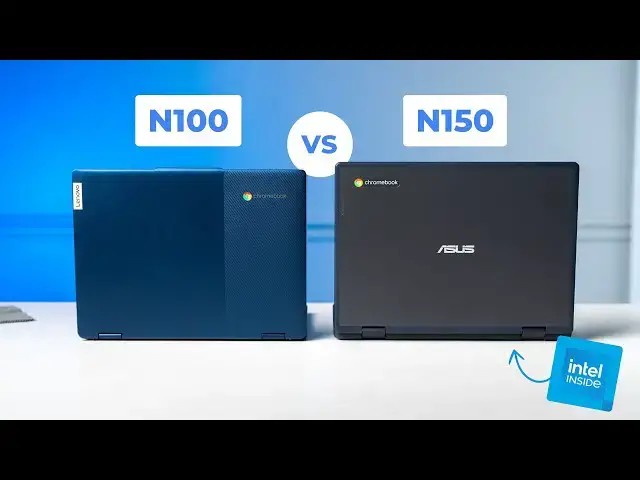
As we progress through 2025, a wave of new education-focused Chromebooks is emerging, powered by Intel's latest Twin Lake processors, the N150 and N250. These chips represent the successor to the now-familiar N100 and N200, which have become staples in devices like the Lenovo Chromebook Flex 3i. With the arrival of new devices featuring the N150, the question arises: does this generational update warrant an upgrade?
Read more: https://chromeunboxed.com/
☕ Fueled by Fresh Roasted Coffee! Buy the special edition Chrome Unboxed bag here: https://chromeunboxed.com/coffee
Subscribe to the channel: http://bit.ly/2xFuj6L
Follow us: https://x.com/chromeunboxed
https://www.instagram.com/chromeunboxed
https://www.threads.net/@chromeunboxed
Show More Show Less View Video Transcript
0:00
as we've moved through the beginning of
0:02
2025 we're starting to see more and more
0:04
manufacturers in their education
0:06
Chromebooks specifically start to deploy
0:09
these new Twin Lake Intel processors the
0:11
N150 and n250 and those numbers probably
0:14
sound familiar cuz for a couple years
0:16
now we've had the n100 and n200 and
0:19
these are the follow-up chips to that
0:21
original n100 that we find in devices
0:23
like this the Lenovo uh Chromebook Flex
0:26
3i and so we're finally getting our
0:29
hands on uh a couple devices thanks to
0:31
Asus uh with these new twinl processors
0:33
in it and so we thought it a good time
0:35
to put them side by side and see is it
0:38
worth the
0:42
upgrade all right so a quick word about
0:44
how we're going to get into this uh I'm
0:46
going to run just a few benchmarks side
0:48
by side and we'll see what the numbers
0:50
come out like I do want to say one
0:52
caveat the only device we've got with
0:54
the n100 in it in the office is the flex
0:57
3i and it's only got 4 gigs of RAM
1:00
whereas this uh new device from Asus I
1:02
think this is the cm12 uh their latest U
1:05
edu device actually has 8 gigs of ram in
1:07
it it doesn't usually make a huge
1:09
difference on benchmarks when it comes
1:11
to these types of benchmarks CU they're
1:13
really working on processor speed but I
1:14
did want to clarify that that is the
1:16
case um so we should see hopefully some
1:19
some pretty big differences in the
1:21
numbers between the two so the
1:22
benchmarks will run are uh the the new
1:25
version of octane the original's been
1:27
retired uh but it has been like
1:29
rejuvenated by the fan base uh we'll run
1:31
that uh we will run uh speedometer 2.0
1:35
and 3.0 I feel like 3.0 especially on
1:38
Lower speed devices I mean the scores
1:40
are just so low uh I don't know what the
1:43
difference is in the two benchmarks but
1:44
we'll run speedometer 2.0 as well it
1:46
doesn't take but another extra minute or
1:48
two and then uh browser bench's other
1:51
big Benchmark that I like using is uh
1:53
jet jet stream I think is what it's
1:55
called um and so we'll we'll run that as
1:57
well it it takes into account a little
1:59
bit more of the graphic ability of these
2:00
things and so we'll just see side by
2:02
side which one wins all right so as
2:05
promised we're going to start up with
2:06
octane 2.0 plus we'll begin it on both
2:10
of these here and this one runs pretty
2:13
quickly so we should see our results in
2:16
very little time okay all finished with
2:19
octane 2.0 and you can see the single
2:21
core standard octane score you're
2:24
getting a 10% bump over here but you're
2:27
getting a I don't know what what that be
2:29
about a 20 % no 25% bump actually a
2:32
little bit more than that my Math's bad
2:34
U so probably pushing almost a 30% bump
2:36
in multicore so we'll see how that plays
2:38
out across the rest of these benchmarks
2:40
but you know single core stuff is like
2:42
you know single task type type things so
2:45
you're not going to see a huge bump and
2:46
performance there but as you're
2:47
multitasking and that kind of stuff it
2:50
does look like the N150 is definitely
2:51
going to put it uh a little bit more
2:54
just brute force behind some of those
2:56
multitasking tasks now we are on to
2:59
speedometer 2.0 and you can see the
3:01
warning up here basically saying hey go
3:02
to 3.0 that supersedes this Benchmark I
3:05
still feel like 2.0 is a better
3:07
Benchmark for lower powered devices like
3:09
these so we're going to do that first
3:11
then we'll run 3.0 and as I begin this I
3:14
do want to point out the fact that um we
3:16
are running these in guest mode so
3:18
there's no extensions there's nothing to
3:19
do with my personal uh Google account or
3:22
anything like that going on here so
3:23
these are uh basically completely power
3:26
washed right out of the box in guest
3:27
mode so that hopefully we're comparing
3:29
uh Apples to Apples here all right and
3:31
as you can see I mean this is not a big
3:33
bump um this almost feels like a
3:35
rounding error if we ran this multiple
3:37
times we might get a little bit lower
3:39
here a little bit higher there so I mean
3:41
we're talking single digit percentage
3:43
increases with spedometer 2.0 so let's
3:45
move on to speedometer 3.0 so as we get
3:48
this one started um I will point out the
3:50
fact that speedometer as a benchmark in
3:53
general is The Benchmark that Google
3:55
basically when they folded up Octane and
3:57
said hey we're not going to do this
3:58
anymore um it is The Benchmark that they
4:01
said hey this is this is kind of the
4:02
standard Benchmark for Chromebooks
4:04
moving forward so um I would say of all
4:07
of the benchmarks we're going to run
4:08
here today this is the one I would take
4:10
most seriously when it comes to actual
4:11
performance with web-based tasks I mean
4:13
you see it doing all sorts of stuff in
4:15
the background so it's getting a good
4:16
idea of how fast these Chromebooks
4:18
actually are all right and a very
4:20
similar um situation here where we've
4:23
got 3 to 5% increase not even that much
4:27
here um and and I think you know that
4:30
makes a lot of sense I think with
4:31
speedometer 3.0 I'm sure they changed
4:33
quite a few things in this but
4:34
ultimately there were devices that were
4:36
just pegging this thing out so I mean we
4:37
were 180 190 on certain Chromebooks and
4:40
so I think they just kind of changed the
4:42
the overall spectrum of what they're
4:44
testing so obviously a low-end device
4:47
should be on the low end of the scale um
4:49
it's not like it's that different of a
4:51
benchmark I just think the the the
4:53
metrics are a little bit different but
4:54
you're seeing a very similar score here
4:56
as well uh on speedometer 3.0 so there
4:59
are some pretty good differences in
5:00
octane but there is not much difference
5:02
uh when it comes to speedometer finally
5:05
we are going to test on jet stream 2
5:07
which is another browser bench uh
5:09
Benchmark this one is definitely um
5:12
aimed more at handling like more complex
5:14
tasks stuff like pwas would do so I
5:17
always think it's a good one to run
5:19
alongside speedometer cuz speedometer is
5:21
more of just a Brute Force here's how
5:23
fast this thing is so let's get this one
5:25
running and see what we get all right so
5:27
as jet stream 2 wraps up we've got uh
5:30
188
5:31
985 on the 150 and
5:34
15815 on the n100 and I feel like what
5:38
we're seeing here is more complex tasks
5:41
so things that maybe take a little bit
5:42
more graphic rendering things that take
5:44
a little bit more in terms of doing
5:46
multiple things at once you're going to
5:48
see a little bit of a bump so you're
5:49
getting a 10 12% bump over here um and
5:53
then we were seeing you know more than
5:54
that with octane but you know ultimately
5:56
when it comes down to it um I just don't
5:59
know that I could say if a school was
6:00
looking uh that didn't need to go buy
6:02
new Chromebook say you already have
6:04
devices that have the n100 and n200 in
6:07
your uh in your classrooms there's no
6:10
way I would say yeah dump those and go
6:12
get this it's not that big of a
6:14
generational leap in performance uh but
6:16
what I will say is if you're a school
6:18
that's ready to you know overhaul your
6:20
Fleet of Chromebooks and you have the
6:22
option between an n100 and an
6:24
N150 and it's not that different in
6:27
price for sure go with the N150 that
6:29
obviously the updates are going to last
6:30
a little bit longer than with the n100
6:33
and it definitely is a bit of a
6:34
performance jump it's just not a
6:37
generational leap in performance and I
6:39
wasn't expecting it to be um ultimately
6:41
I I don't know that intel was uh ever
6:44
going to position these chips in such a
6:46
way but ultimately um again if you're
6:49
looking at the difference in these two
6:51
and the price is the same yeah go for
6:52
the 150 but I wouldn't stress out too
6:54
much uh about uh keeping the n100 around
6:58
for a little while if if you've got a
7:00
fleet of these Chromebooks it's been a
7:01
great processor and it's going to
7:02
continue to be a great processor um for
7:05
the foreseeable future but guys that's
7:07
it for this one if you enjoyed this
7:08
video give us a thumbs up head down
7:10
there hit that subscribe button and ring
7:12
the notification icon as well if you'd
7:13
like to be alerted when we make future
7:15
videos just like this one till next time
7:17
we'll see you
7:21
[Music]
#Computers & Electronics
#Laptops & Notebooks