Up next in 10

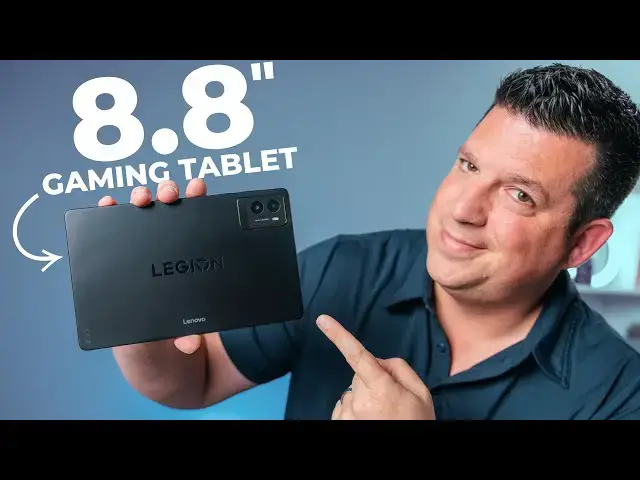
Lenovo Legion Tab Gen 3 Unboxing and First Impressions
May 13, 2025


Join Chrome Unboxed Plus for access to our private Discord, an ad-free website experience, ad-free podcast, AMAs, exclusive giveaways, and more! Start your 7-day FREE TRIAL here: https://chromeunboxed.com/join/
👉 Buy the Lenovo Legion Tab Gen 3 from Lenovo: https://howl.link/zbnibt0wknsgn
👉 Shop the best Chromebook deals today: https://chromeunboxed.com/the-best-chromebook-deals-today-updated/
📧 Subscribe to our newsletter: https://bit.ly/4jVq0de
・・・・・・・
While our focus around here tends to gravitate towards Chromebooks, sometimes a piece of hardware arrives that demands attention regardless of the operating system. That's precisely the case with the Lenovo Legion Tab Gen 3, an Android tablet that recently landed in the office. Announced back at CES, this device piqued my interest for a few key reasons, primarily its blend of a compact form factor with seriously powerful internals – a combination that feels increasingly rare in today's market.
The Android tablet space has largely settled into two camps: large, productivity-focused screens or smaller, often budget-constrained devices. I really have missed the good old days when we had tablets like the Nexus 7 that were supremely portable, excellent for content consumption, yet didn't feel redundant next to increasingly large smartphones. The Legion Tab, with its 8.8-inch display, aims squarely at that neglected middle ground. It's large enough to offer a tangible upgrade over a phone screen for media and gaming, but compact enough to remain easily manageable.
What truly sets the Legion Tab apart, however, is Lenovo's refusal to compromise on specs despite the smaller size. This isn't just another budget media tablet; it's positioned as a portable gaming powerhouse. And so far, I'm buying the hype.
Read more: https://chromeunboxed.com/lenovo-legion-tab-gen-3-unboxing-and-initial-impressions-video/
☕ Fueled by Fresh Roasted Coffee! Buy the special edition Chrome Unboxed bag here: https://chromeunboxed.com/coffee
Show More Show Less View Video Transcript
0:00
so today in the office we have something
0:02
a little bit different This is not a
0:04
Chromebook In fact it's a tablet It is
0:05
the Lenovo Legion Tab 3 that was
0:08
announced back at CES And there's a few
0:11
reasons why I'm pretty excited to take
0:14
this tablet for a spin We don't do a lot
0:16
of stuff with Android tablets but the
0:18
size of this one and the specs involved
0:20
in it alongside the fact that I've been
0:23
driving the uh Pixel 9a which is a
0:26
smaller phone than I'm used to uh make
0:28
this a really good time to give this
0:30
tablet a test drive So let's uh let's
0:32
jump in the box and see what this
0:33
thing's about
0:38
But before we hop in the box a quick
0:40
invitation uh to you to come and join us
0:43
in our Chrome Unbox Plus community It's
0:46
a spot where lots of people who are
0:48
enthusiasts about Chrome OS and Google
0:50
things and stuff like tablets and gosh
0:52
all sorts of things get together and and
0:55
uh just have a great community
0:56
experience with one another Um you also
0:59
get ad free access to our website uh our
1:02
podcast feed um exclusive AMAs with the
1:06
Chrome OS team There's just all kinds of
1:08
really cool stuff that comes along with
1:09
it It's two bucks a month Um and it's
1:12
just a great deal on a great service
1:14
that hundreds and hundreds of people are
1:16
already enjoying and uh we think that
1:18
you might like it too So if you're
1:19
interested in that uh check us out over
1:21
at
1:23
chrounbox.com/join and you can learn
1:24
more and get started there today All
1:27
right So without further ado I'm I'm
1:29
really eager to get into this box Um I
1:31
said it in the intro but this is a
1:33
device that um I've been kind of excited
1:36
about since uh since it was announced It
1:39
was like this surprise device They've
1:41
had devices like these overseas Uh
1:43
Lenovo has for a little while Uh but we
1:46
don't normally get them here in the
1:47
States And and tablets in general have
1:49
just kind of grown to this big size I
1:50
mean you look at iPads now You got the
1:52
10 in is kind of like the small iPad if
1:54
you if you skip the the iPad mini and
1:57
then it just kind of goes up in size
1:58
from there And you know I'm all for a
2:01
productive tablet um that you can put a
2:04
a keyboard on and all that kind of stuff
2:06
but I do miss the days of you know like
2:08
the Nexus 7 and and stuff like that like
2:10
these smaller tablets that um are easily
2:14
portable um are great for content
2:16
consumption easy to have around the
2:19
house without feeling like you're
2:20
carrying a big screen around
2:22
But I've also said in the past that
2:23
smaller tablets are confusing to me
2:25
because if I have a huge smartphone and
2:27
then like a 8 in tablet it's like why am
2:30
I carrying both of these things around
2:32
so this thing's 8.8 in screen Um so it's
2:34
not it's not tiny Um but it's big enough
2:38
I feel like that it's um it's going to
2:41
enhance the uh content consumption that
2:44
you get into with it Making sure there's
2:46
nothing else in here Um it's it's it's
2:49
big enough to kind of enhance that
2:50
content consumption but also it's I mean
2:54
spec to the gills So usually smaller
2:56
tablets just don't get the highest end
2:58
processors They don't get great displays
3:00
and this thing has it all So I know for
3:03
sure Snapdragon um 8 Gen 3 Oh here we go
3:07
8 Gen 3 you've got whatever a dual super
3:11
linear speakers are I don't know what
3:13
that is Um but it's got a a quad HD
3:15
display on here So 16x10 8.8 in um big
3:20
huge battery um all that kind of stuff
3:23
Dual USBC port so you can actually plug
3:25
one in and bypass the battery so that
3:27
it's you're playing off of the you know
3:29
your your wall charger It's not going to
3:31
get hot Um so that you know you can um
3:34
you can keep gaming if you want to This
3:36
thing is obviously kind of aimed towards
3:38
gamers Um and that's another reason I'm
3:41
I'm just kind of excited about it you
3:42
know like I want a tablet I'm getting
3:44
older um seeing small things on a small
3:46
screen is getting tough And so playing
3:48
any kind of action game it's like when
3:50
the people are a little on the screen
3:51
it's kind of hard to see them And um so
3:54
having a little bit larger of a screen
3:55
is uh obviously something I'm I'm very
3:58
interested in And this thing is like
3:59
vacuum sealed Um
4:04
golly All right Lenovo Make the box a
4:07
little easier to get into You know Apple
4:10
debuted this um with one of the first
4:13
iPhones you know making the casing so
4:15
tight that you lift it and there's that
4:18
like suction Um they did that so it kind
4:21
of heighten the anticipation when you're
4:22
opening something This takes a little
4:24
bit too
4:25
far Oh come
4:28
on This isn't really making me work for
4:31
it I'm used to like Chromebook boxes Pop
4:33
it open everything just kind of comes
4:34
out Uh yeah it's considerable there
4:38
There's the tablet We'll get to that in
4:39
a second All right let's see what other
4:41
goodies we got in here Let's Let's start
4:43
with this guy first Um Oh that's right
4:46
This comes with a case Uh which is
4:48
really awesome It's like a little stand
4:50
case Um it comes with Was it two
4:53
cases holy cow Or is this one let's see
4:57
I'm not really sure Tell you man You
4:59
take me outside of like Chromebook and
5:02
I'm
5:02
just I'm amazed by all sorts of things
5:05
Let's see I'm not
5:09
I'm not completely sure what that is All
5:12
right let's
5:15
see
5:17
Oh that might be a glass screen
5:22
protector It's either glass Really thin
5:24
glass or plastic But yeah there's a
5:26
included screen protector I'm not going
5:28
to put that on on camera but I will
5:30
probably put it
5:31
[Music]
5:32
on Some instructions
5:39
[Music]
5:41
And oh this is like the sticky back part
5:43
of it Okay Yeah So this is just a screen
5:45
protector kit Little microfiber in there
5:47
some dust removers all that good stuff
5:50
Very nice packaging for a screen
5:52
protector Really cool that it's included
5:54
Um maybe this then is probably part of
5:58
that It's like a holder maybe for I
6:00
don't know I'll have to mess with that
6:02
later Here's the case I was wondering
6:04
And I was like man are they including
6:06
two cases in this thing that'd be
6:09
wild And yeah if you uh if you look at
6:12
this online on Lenovo site you see this
6:14
case in the prominently displayed in the
6:17
photos Um so yeah it's like old school
6:21
If you ever had an iPad um triple kind
6:25
of folio thing that you can roll into a
6:28
triangle and it gives
6:31
you it gives you a little stain case
6:33
like that Obviously works better when
6:35
there's a weighted uh tablet in there
6:38
with it Yeah a little gamery looking
6:41
kind of on the back but just really cool
6:43
to see them include it Um it actually
6:45
has a flap around the edge too So that's
6:46
kind of a nice nice extra touch Uh is
6:49
that Yeah So it's magnetic on both sides
6:51
actually So it looks like you can
6:52
completely pop this top cover off and
6:55
then just attach this So we'll do that
6:56
before we kind of wrap up here but I'm
6:58
going to set it aside for right now See
7:01
what else we got in the box here
7:05
Um USB
7:08
cable
7:11
paperwork and then it looks
7:15
like 68
7:18
uh watt charger So should charge it up
7:20
pretty well And looks like that is
7:25
it Feel like with boxes like these
7:27
there's stuff hiding everywhere Okay I
7:28
think I got everything out of here All
7:31
right Set that over
7:34
there Hopefully this thing's got enough
7:36
charge to turn
7:38
on We'll peel this
7:39
[Music]
7:41
off And here we are Oh that is very nice
7:46
You know Lenovo's made uh we've we've
7:48
had some hands-on with different tablets
7:50
uh over the years and obviously their
7:51
Chromebook tablets are always really
7:53
nice Uh but you get this really nice
7:55
just blacked out It's probably going to
7:57
be really hard to catch some of the
7:58
stuff on camera but I'll try to wiggle
8:00
it around enough so you can see it
8:02
Legion in there kind of just emboss
8:04
there Um your camera sensor up here Um I
8:09
think it's a 13 megapixel sensor I
8:11
believe And then you've got the speaker
8:13
grills Um again some of the stuff is
8:15
going to be hard to see cuz the all
8:17
black chassis here And then yeah you've
8:18
got your USBC port down here and then a
8:22
USBC port on the side So presumably if
8:24
you're holding it this way and you're
8:26
playing your game you could have that
8:27
USBC down here that would just direct
8:29
charge uh without heating everything up
8:32
But you know Lenovo touts the cooling
8:34
chamber in here Massive battery so uh
8:36
it's built to stay cool while you're
8:38
playing games Um um I'm blanking on the
8:41
refresh rate Let me check it real fast
8:44
Yeah it's uh 8.8 in um 2560 x600 16x10
8:48
quad HD basically 165 Hz refresh rate
8:52
which is awesome 98% of the DCIP3 color
8:56
gamut Uh 500 nits of brightness 900s of
8:59
peak brightness if you get you know
9:00
around the sun or anything like that
9:02
HDR10 all that good stuff Um love seeing
9:05
all those specs for a screen obviously
9:07
for a device that is uh built for gaming
9:10
So uh wellmade obviously just feels
9:13
incredibly solid Glass on the top Um
9:16
yeah so let's uh let me fire this thing
9:17
up I'm sure I'm going to have to go
9:18
through a couple settings real quick Uh
9:20
and then we'll get into at least
9:22
listening to the speakers Uh I'll give
9:24
you a quick reaction on how good the
9:26
screen looks Um and we'll slap this case
9:29
on here and kind of see what it looks
9:30
like All right so we are basically uh in
9:34
and set up Um there's a lot to discover
9:36
here So with a Chromebook you know
9:38
Chrome OS is Chrome OS across the board
9:41
It's really easy to go hey here are the
9:42
couple things to hit on Um but with
9:45
Android you know the the builds of the
9:46
OSS are very different So there's a lot
9:48
to for me to get into I've never really
9:50
dove deep with a a Lenovo Android tablet
9:53
so I've got a lot of settings to figure
9:54
out here So I just wanted to get in and
9:56
basically kind of see uh some of the uh
9:59
initial things And so for one uh the
10:01
screen looks incredible I I wasn't
10:04
really concerned that it was going to
10:06
look good Um but the colors are vibrant
10:08
viewing angles are great everything's
10:10
just super buttery smooth It's 165 Hz Um
10:14
I can't turn it up past like a third
10:16
brightness uh for the cameras It just it
10:19
looks fantastic Um and Android 14 which
10:23
is what this is running uh has really
10:25
good tablet support So they didn't mess
10:27
with too much here So like if I'm in um
10:30
say I'm in here I can I can bring up you
10:32
know my tray down here just like I could
10:34
on like a Pixel tablet Um but my Android
10:36
tablet um usage is very low So I'm I'm
10:42
interested to kind of get get in here
10:43
and mess around Um obviously ping some
10:45
stuff off Joe who's used uh the Pixel
10:47
tablet quite a bit and and just kind of
10:49
see how uh Lenovo's particular skin
10:52
performs One thing I'll tell you uh they
10:54
they mention in here um I want to get to
10:57
the haptics and see exactly what they
10:59
say So dual axis dual X-axis haptics uh
11:03
and stereo with uh super linear speakers
11:06
So that I I don't know if that means
11:07
it's got dual uh vibration motors or how
11:11
exactly that works but every place
11:13
there's a haptic response it is it's
11:15
pretty intense So I'm assuming any games
11:17
that were support kind of rumbling uh
11:19
it's going to be pretty wild But I mean
11:20
you really feel it in your hands no
11:22
matter what you do And then the speakers
11:25
I mean they obviously talk about how
11:26
good the speakers are on this thing Uh
11:28
just let me rewind this back to where I
11:30
was here get right before that music
11:33
roll because I want you to hear a little
11:34
bit of music a little bit of spoken
11:36
voice I'm gonna turn it down just a
11:37
little bit because I'm not gonna be able
11:39
to talk over it It's It's super loud but
11:41
also super full So check this out 16 as
11:44
good as these gaming edition versions
11:47
Let's jump in the box and find
11:51
out All right so let's take this guy at
11:54
full volume to the side for now Uh and
11:57
let me check on my SP Incredibly deep
12:00
bass coming from something this thin Um
12:03
I Chromebooks have a lot to learn in
12:05
that space I mean clearly uh with with
12:08
uh a tablet like this you can put in
12:09
speakers that can move a lot of air cuz
12:11
that sounds incredible And so now you
12:13
got great sound great haptics obviously
12:15
great performance This thing has 12 gigs
12:17
of RAM 256 gigs of UFS3 storage Um the
12:21
Snapdragon 8 Gen 3 Um so I mean there
12:24
it's going to have no problem running
12:25
any game that you want to run on it Um
12:28
I'm I'm just super impressed already And
12:30
again like I said the the whole point of
12:32
this was how can I take a a tablet and
12:36
find a a spot where it's kind of more
12:38
useful So from a reading perspective
12:41
from content consumption video watching
12:43
gameplay all that kind of stuff if I
12:46
pair that up with a cheap a cheaper
12:48
phone I want to call the the Pixel 9a
12:50
cheap but it's a cheaper phone It's
12:51
$4.99 and it'll go on sale and all that
12:53
kind of stuff You look at the screen
12:55
size differences here This makes more
12:57
sense I'm going to get a lot more here
12:59
in the tablet and it's a big upgrade
13:01
versus what I have in this phone Now
13:03
I've also been using my ZFold a little
13:05
bit and it has an 8 in uh tablet screen
13:08
but because it's kind of square it
13:10
doesn't kind of lay itself out like this
13:11
So for videos and stuff like that I'm
13:13
going to get much more use out of the
13:15
screen like this For a reader uh at
13:17
least you know my hands aren't massive
13:19
but I have decent sized hands like I'm
13:20
going to be able to lay in bed and read
13:22
my books and stuff with this with one
13:23
hand Like I said it just hearkens back
13:26
so much to the Nexus 7 days I loved
13:28
those tablets Um they weren't trying to
13:31
be super square or anything They were
13:32
okay with being a little bit more
13:33
portrait And so for reading and web
13:35
browsing this is great For videos and
13:37
gaming this is great And it's been so
13:40
long since we've had a tablet in this
13:42
form factor actually have like flagship
13:45
level specs And this thing's just got it
13:47
Um I'm I'm interested to see what the
13:49
camera looks like It's picking up
13:50
fingerprints I'll say I don't know if
13:52
you can see that or not for sure I just
13:54
figured brushed black uh exterior was
13:57
just going to do that And it does It
13:58
does pick up fingerprints But since I
14:01
included this handy dandy case let's
14:03
just see
14:05
Um let's see how it how it fits what it
14:09
feels
14:09
[Applause]
14:11
like Yeah not bad So there's not a lot
14:13
of overlap uh here on the edges which is
14:16
nice I figured it was going to kind of
14:17
overlap the edges So where you grab it
14:19
it just kind of comes up around on the
14:20
corners Um it gives me like PC vibes you
14:24
know like vents and that kind of stuff
14:25
but it's not adding a ton of bulk to it
14:27
It's still nice and thin in this case Um
14:30
makes it pretty grippy And let's see So
14:34
yeah that side goes there Slap this
14:38
on And then should be able
14:45
to All right Yeah there we go Now you've
14:48
got a stand case And I'm
14:51
wondering if I go the other way with it
14:54
Could I do that yeah that's going to be
14:57
Yeah that won't work Um so yeah you can
15:00
use it with this thing on there flip
15:01
that around for a stand case and keep
15:03
your screen protected which I think is a
15:04
really good idea for something like this
15:06
Uh but then if you don't want it at all
15:08
just you can pop that part off uh while
15:10
you're not using it which is uh kind of
15:11
helpful Um but yeah overall super
15:14
excited to start using this thing and
15:16
actually trying it out Um again
15:18
alongside the Pixel 9a I think this is
15:21
going to make a great pair that you know
15:23
for instance when I go home at night you
15:25
know I'll probably put this on my
15:26
nightstand or you know whatever It's
15:28
connected to my watch So in my house I'm
15:30
I'm going to get my notifications but
15:31
I'll also get most of my notifications
15:33
on my tablet And this is a much better
15:35
content consumption device around the
15:37
house um on car trips whatever like I I
15:40
just see this being a really great
15:42
companion So super excited to give this
15:44
thing a try Uh hope you guys enjoyed
15:46
this video But that's it for this one Uh
15:48
if you did like it give us a thumbs up
15:49
Head down there hit that subscribe
15:50
button and be sure to ring the
15:52
notification icon as well if you'd like
15:53
to be alerted when we make future videos
15:55
just like this one Until next time we'll
15:57
see you
15:59
[Music]
#Laptops & Notebooks