Up next in 10



Join Chrome Unboxed Plus for access to our private Discord, an ad-free website experience, ad-free podcast, AMAs, exclusive giveaways, and more! Start your 7-day FREE TRIAL here: https://chromeunboxed.com/join/
👉 Buy the Lenovo Chromebook Plus 14: https://bestbuy.7tiv.net/vPOKoA
👉 Shop the best Chromebook deals today: https://chromeunboxed.com/the-best-chromebook-deals-today-updated/
📧 Subscribe to our newsletter: https://bit.ly/4jVq0de
・・・・・・・
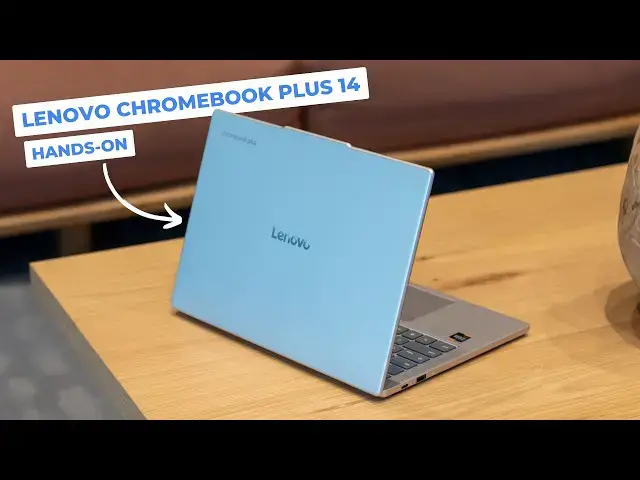
Last week at the latest Google Chromebook showcase event in New York City, there were a ton of new software features announced alongside the undeniable star of the show: the new Lenovo Chromebook Plus 14. Despite its simple name, this Chromebook is absolutely packed with incredible hardware, and it's clear that Google and Lenovo have positioned this to be the new go-to recommendation for anyone seeking a high-end Chromebook Plus experience.
Read more: https://chromeunboxed.com/
☕ Fueled by Fresh Roasted Coffee! Buy the special edition Chrome Unboxed bag here: https://chromeunboxed.com/coffee
Subscribe to the channel: http://bit.ly/2xFuj6L
Follow us: https://x.com/chromeunboxed
Show More Show Less View Video Transcript
0:00
so we are at the Google Chromebook
0:02
showcase event and the big star of the
0:06
show is this device right here it is the
0:09
new Lenovo Chromebook Plus 14 in and
0:12
despite the kind of plain and simple
0:15
naming of this device it is packed full
0:17
of all kinds of really great hardware
0:19
and it is a device that Lenovo and
0:21
Google want to be the device that you
0:24
recommend to people that are looking for
0:26
a really nice high-end Chromebook Plus
0:29
and I think in a lot of ways they've
0:31
nailed it
0:33
[Music]
0:37
all right so here it is on the desk and
0:39
don't be fooled by its kind of
0:41
commonplace appearance uh there's a lot
0:43
going on here under the hood but we'll
0:45
get to that in just a second uh on the
0:47
outside we're looking at a pretty
0:48
standard aluminum Chromebook here but on
0:50
the base you might notice as I kind of
0:53
move it through this light hopefully
0:54
that's picking up the riged bottom
0:58
returns from the Pixelbook Go and I'm
1:01
not kidding between the kind of rounded
1:03
corners here and the way that this thing
1:05
feels in hand um I it kind of gives me
1:08
Pixelbook Go vibes and Lenovo and uh
1:11
Google work together very hard on this
1:13
device and so that's not surprising at
1:15
all see a couple speaker grills and you
1:17
notice there's a lack of fan ports
1:19
because this is an ARM powered device
1:21
we're going to get to the rest of that
1:22
here in just a second but we got a
1:24
couple uh two of the four total speakers
1:26
down here uh so we're expecting some
1:29
good things there it comes with Dolby
1:30
Atmos the first Chromebook that's
1:32
shipping with Dolby Atmas and uh let's
1:35
just get inside here so I can talk about
1:36
a few of these things uh that make this
1:39
device so special so once we get to the
1:41
inside you note the upward-facing
1:43
speakers so again you've got downward
1:44
facing and upward facing speakers Dolby
1:47
Atmas branding but right underneath
1:48
there is the allimportant MediaTek
1:50
compan
1:52
so this is the first Chromebook that is
1:54
shipping with that new processor we've
1:56
been tracking for quite some time now
1:57
and as you may have noted if you've
2:00
followed along on Chrome and Box this is
2:02
the most powerful processor period bar
2:04
none that's ever been in uh any
2:07
Chromebook and so it's also ARM powered
2:09
and Google is claiming uh Lenovo's
2:12
claiming 17 hours of battery life on
2:14
this thing so not only is it wildly
2:16
powerful uh it's going to go a long time
2:18
on battery and not require any fans it's
2:21
just got passive cooling going on in
2:23
here uh but overall the thing feels good
2:25
it's it's firm it's not like ultra ultra
2:28
like Samsung Galaxy Chromebook or
2:30
Pixelbook Go firm but very firm like in
2:32
the hand feels great 2 1/2 lb uh so
2:35
that's awesome 14 in 16 by10 uh AMOLED
2:39
screen here it might just be OLED i'm
2:41
sorry amoled's like Samsung's marketing
2:44
uh but it super bright it's probably
2:46
blowing the camera out uh but gorgeous
2:48
gorgeous looking display here um I'm am
2:51
curious they didn't never say the
2:54
resolution on it let's see it's
2:55
definitely in a demo mode here but I
2:58
will look real fast and see if we can go
3:04
it looks like it's 1920 x 1200 native so
3:08
um so not quad HD which on a 14-in
3:10
display not really a problem at all
3:13
everything looks really sharp it looks
3:15
fantastic uh it's super bright uh inky
3:18
blacks all that good stuff oled's
3:20
awesome um and probably going to hurt
3:22
that battery a little bit I would guess
3:23
if you go up but we'll have to we'll
3:24
have to hold on to that for review uh
3:26
feels like a glass trackpad really
3:28
really nicely uh placed in here not
3:30
flopping around
3:32
great click mechanism um and again just
3:35
overall really good build quality that
3:36
just kind of makes me feel like it's an
3:38
updated Pixelbook Go you've got rounded
3:40
edges up here on the screen a 5
3:42
megapixel camera on the inside we're
3:44
looking at 12 or 16 gigs of RAM and
3:47
we've been told 128 or 256 gigs of
3:50
storage uh though during the slideshow
3:52
in the presentation they just said 256
3:54
so we'll kind of have to wait and see
3:56
once this device hits stores which is
3:58
should be happening anytime now as this
4:00
video comes out uh this device should be
4:02
available at Best Buy and on Lenovo and
4:05
the cool part is it's starting at $649
4:08
now that that version of this Chromebook
4:10
won't have a touch screen so it'll just
4:11
be a standard OLED screen uh no touch
4:14
and I think it I definitely know it'll
4:17
take it down to 12 gigs of RAM and it
4:19
might take it down to 128 gigs of
4:20
storage so um I did get clarification
4:23
the higherend spec so the one we have
4:25
right here in front of us is 750 so 749
4:27
actually um so for 100 bucks more if
4:30
that storage discrepancy is there you're
4:32
talking about double the storage four
4:33
extra gigs of RAM and a touchcreen for
4:35
100 bucks and so uh at 650 or 750 this
4:38
is a a massive package when it comes to
4:42
uh uh Chromebooks and and Chromebook
4:44
plus and Google talked about all sorts
4:46
of different features we're going to do
4:47
a whole separate uh we'll we'll do a
4:49
blog post on that and once we have
4:51
hands-on have this thing uh in the
4:53
studio uh we'll talk about some of those
4:55
features and and demo them but there's a
4:56
lot more ondevice AI features coming
5:00
specifically for this device and you
5:02
know some of those features include
5:03
stuff like auto tab grouping um I don't
5:06
know how to show you that exactly right
5:08
here right now but as you're like
5:10
collecting tabs and stuff like your
5:11
virtual desks it will suggest Oh here
5:13
you go it's right there suggested group
5:15
organize a new desk we'll just see what
5:17
it does um learn about the sun so
5:21
yeah so we've got a desk that just it
5:23
just pulled the ones there a bunch of
5:25
tabs open about you know space and sun
5:27
stuff so the idea is you know using
5:30
ondevice AI to like reorganize tabs and
5:33
there's uh ondevice image editing uh
5:35
there's uh ondevice image creation so in
5:39
in the right places so like if you're in
5:40
a messaging app or I think there was one
5:42
that had a dock let's see I said this
5:45
thing is heavily in demo mode um so yeah
5:48
if I go say into this doc right here now
5:50
with quick insert I can do cool stuff
5:52
like uh create image and do AI image
5:55
creation so I'm hungry we're at this
5:57
event so I'm going to do a image of a
6:01
hamburger
6:04
and just let AI right here right in Flow
6:06
just do its thing and again a lot of
6:07
this stuff's happening on device now
6:09
Google continued to say like certain
6:11
stuff is going to happen in the cloud
6:12
certain stuff's going to happen on
6:13
device they made mention of Gemini Live
6:16
we've got Notebook LM now on the shelf
6:18
out of the box and you can see boom here
6:20
we go i'm going to put a hamburger in
6:22
there and while it's doing it um just
6:25
tell you that I I like everything I'm
6:27
seeing uh about this Chromebook right
6:29
now man that looks great u again I'm
6:31
really hungry so that looks that looks
6:33
really good um the screen looks awesome
6:35
this trackpad feels great the keyboard
6:37
is back lit as well you've got all the
6:39
extra function keys that um you know we
6:41
saw last year with the new Samsung
6:43
Galaxy Chromebook Plus uh you've got the
6:45
new quick insert key all that stuff but
6:47
I I think I'm most excited about a
6:50
device like this that's coming with this
6:52
MediaTek companip this Ultra um to see
6:55
how it really performs in in day-to-day
6:57
use to see how some of the uh more
6:59
intensive like Android games and Android
7:01
applications run on a native ARM
7:02
processor like this to see how a device
7:04
like this can get by with 17 hours and
7:07
no fans and more power than we've ever
7:09
had on another Chromebook like this
7:11
thing has got me excited and like I said
7:14
the plain exterior might kind of fool
7:16
you into thinking that this is just you
7:18
know an average other Chromebook uh but
7:21
I believe it's going to be anything but
7:22
um and man I'm telling you the Pixelbook
7:25
Go vibes are strong with this thing and
7:27
so we're excited to get this thing uh in
7:29
the office and actually do a review and
7:31
a full unboxing on it and start spending
7:33
some time with it but for now that is
7:35
the Lenovo Chromebook Plus 14in from the
7:40
Google Chromebook Showcase if you like
7:42
this video guys give us a thumbs up head
7:44
down there hit that subscribe button and
7:45
be sure to ring the notification icon as
7:47
well if you'd like to be alerted when we
7:49
make future videos just like this one
7:50
till next time we'll see you
7:53
[Music]
#Computers & Electronics