

Support our independent tech coverage. Chrome Unboxed is written by real people, for real people—not search algorithms. Join Chrome Unboxed Plus for just $2 a month to get an ad-free experience, access to our private Discord, and more. Learn more about membership here.
START FREE TRIAL (MONTHLY)START FREE TRIAL (ANNUAL)
Over the years, ChromeOS quietly built one of the best, most fluid window management setups of any operating system. Between the intuitive four-finger trackpad swipe, the ability to label workspaces, moving windows freely across setups, and the persistent shelf indicator, virtual desks became an indispensable cornerstone of my daily productivity workflow.
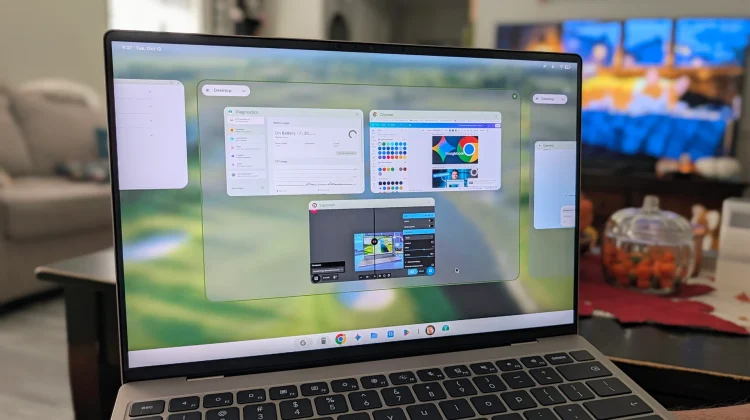
So, as I’ve started to settle into Googlebook OS, I expected Google to carry over that refined experience from the get-go. Instead, what we’ve been handed is the absolute most basic version of virtual desks that can still technically still be referred to as virtual desks.
Can I put things on separate desks to organize my laptop a bit more than I could with a single home screen? Yes. But is there far more this feature should do based on what was already figured out quite well on ChromeOS? Also yes.
Where are the trackpad gestures and shelf controls?
The first thing you notice when setting up a multi-desk workflow on Googlebook OS is the complete absence of simple navigation.
On a Chromebook, switching contexts takes milliseconds: you simply swipe left or right with four fingers on the trackpad. That gesture is completely missing here. Instead, you have to hit the brakes and rely on keyboard combinations like G key + CTRL + [ or ] just to slide between spaces. The shortcut works fine, but losing the far more natural, physical swipe feels clumsy.
Equally absent is the dedicated desk switcher on the taskbar. ChromeOS made it effortless to see exactly which desk you were on right from the shelf, allowing you to click directly into another space or toggle between them with zero friction. On Googlebook, that just doesn’t exist.
Basic organization tools are mysteriously missing
Navigation woes aside, the bigger disappointment lies in attempting to reorganize and manage your workspaces. Googlebook OS currently leaves out foundational features that have been standard on ChromeOS, macOS, and Windows for years:
- You can’t name your desks: Naming workspaces based on specific projects, media playback, or active research is critical for staying organized. On Googlebook OS, you are stuck with generic, uneditable placeholders.
- You can’t reorder your desks: If your workflow shifts throughout the day, you cannot drag and drop desks into a different sequence. Once a desk is created, its position is locked in place.
- You can’t move windows between desks: Perhaps the most jarring omission of all is the fact that there is no way to drag an open app or browser window from one virtual desk to another. If you open a research tab on Desk 1 and realize you need it in your project workspace on Desk 2, you need to close it and re-open in the proper desk.
A version 1.0 experience that needs urgent attention
For power users who treat virtual workspaces as essential tools rather than gimmicks, Googlebook OS currently feels like a massive step in the wrong direction.
I understand that building an entirely new Android-based desktop platform from the ground up takes time, and early software is always subject to growing pains. But window and desk management aren’t experimental features; they are foundational pieces of many users’ workflows, and stripping them down to this sort of bare-bones implementation is just disappointing.
Other parts of the equation have been getting attention fairly quickly, so I’m very hopeful that ends up being the case with virtual desks. Of the things holding back Googlebook OS from being a more productive platform, this is one of the primary issues I’ve run into over the course of my first full week with these devices. Here’s hoping that virtual desks get a big update soon.
SUBSCRIBE TO UPSTREAM
Get Chrome Unboxed delivered straight to your inbox
Upstream is our flagship, curated newsletter with the top stories, most click-worthy deals, giveaways, and trending articles from Chrome Unboxed sent directly to your inbox a few times a week. Join 31,000+ subscribers.

