


Support our independent tech coverage. Chrome Unboxed is written by real people, for real people—not search algorithms. Join Chrome Unboxed Plus for just $2 a month to get an ad-free experience, access to our private Discord, and more. Learn more about membership here.
START FREE TRIAL (MONTHLY)START FREE TRIAL (ANNUAL)
Back at CES 2023, NVIDIA announced a new upgrade rolling out to their GeForce NOW servers that brings an upgraded RTX 4080 GPU to the mix, delivering the absolute best in terms of graphics and framerates for a game streaming service. It’s the latest $20-per-month Ultimate teir, and here’s how NVIDIA explains it:
Powered by the NVIDIA Ada Lovelace architecture, upgraded GeForce NOW RTX 4080 SuperPODs will deliver over 64 teraflops of graphics horsepower to an individual user, which is more than 5x that of an Xbox Series X and nearly 1.75x over the previous-generation SuperPODs.
via NVIDIA
Testing this out at CES 2023, we were placed in front of 3 screens, each with a PC tower next to it. After testing all three, the group we were with had a general consensus that one of the gaming experiences was better than the others, and that was the one streaming GeForce NOW Ultimate. This was against a local machine running a pretty beefy setup with an RTX 3080 inside, so it’s not like NVIDIA set this up as a rigged comparison. And we were running off of servers that were a few hundred miles away, too.
Where I already think GeForce NOW is stellar as a gaming service, this added backend hardware takes things to the next level. Games look better, framerates stay higher, and with all that overhead, input lag is far better, too. It comes down to a myriad of reasons, but these new SuperPOD servers deliver games with latency that rivals what you get on consoles that you are using locally and in-person. Here’s the more-technical take from NVIDIA on how this is happening:
NVIDIA RTX technologies introduced with the Ultimate membership are lifting cloud gaming to new heights. NVIDIA Reflex 240-fps mode brings frame-pacing technology to the cloud, which helps streamline the execution of game simulation, rendering and encoding on the server. When paired with an NVIDIA G-SYNC® monitor, GeForce NOW will vary the streaming rate to the client for the first time, delivering smooth and instantaneous frame updates to client screens on Reflex-enabled games — further driving down total latency.
via NVIDIA
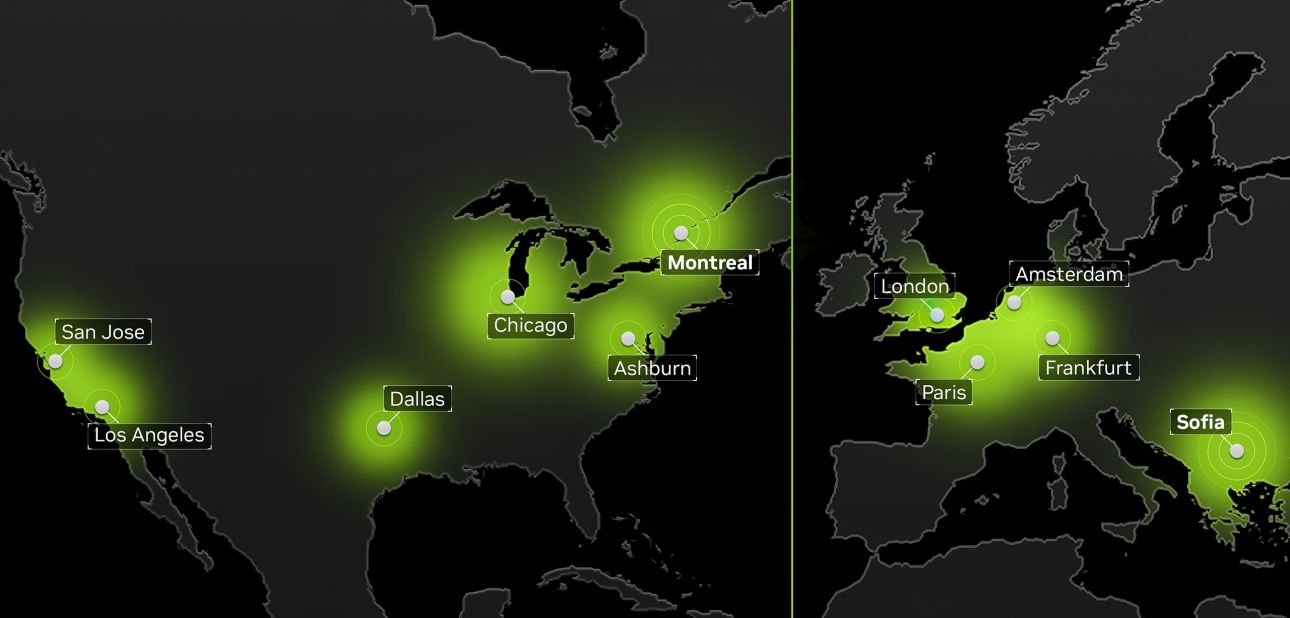
When this was all announced, the map was pretty sparse. The closest server to us was the one just outside of New York, but that wasn’t close enough to give it a proper test. Unfortunately, even the latest coverage map doesn’t yet have the US South server lit up, so we’re still in the waiting mode. But for many of you, the servers that are now live might give you the chance to experience this top-tier gaming experience, and you should know how to find out if you have access.
How to check your GeForce NOW server
First, you need to know how to locate the server GeForce NOW puts you on. It used to be a simpler process, but if you know where to look, it still is relatively straightforward. You’ll need to be in a game and once you are, you can simply hit CTRL+N to bring up the in-game statistics overlay and in the bottom-right, you can see your server. For me, it is US South. (Though my account looks to possibly be pulling from the Montreal server at the moment and we’re unsure why that is.)
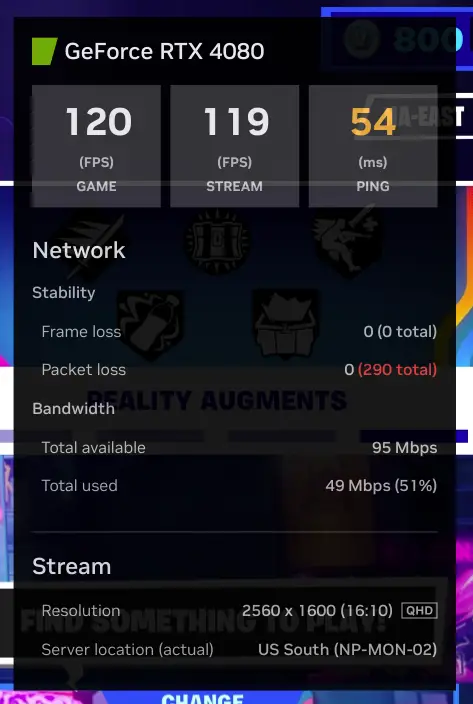
With this info in-hand, you can then look at NVIDIA’s official GeForce NOW server list and see if the upgraded servers on their recent update impact you or not. As a reference, on the map shown below, the RTX 4080 upgrade is lit up for the Ashburn server, and looking at NVIDIA’s server list, you can see that it coincides with the US East server.

How to manually change GeForce NOW servers
Even better, if you aren’t in one of the regions where RTX 4080 support is live, you can simply switch your server in the settings. For some of you, that is going to hurt your latency too much to warrant the swap, but for me, it means I can manually switch to US East (Ashburn) and start taking advantage of lower latency gaming right away.
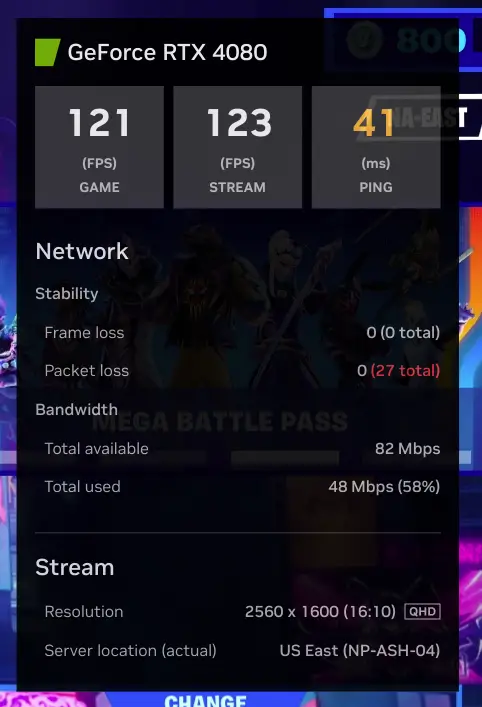
To change servers, you just need to go to your Settings > Server Location in GeForce NOW and manually choose one of the servers that works best for you based on the info above. For those not close to one of these upgraded servers, that may not be an option for you with your network latency going through the roof while trying to access a far-off server. However, there are many of you that may be able to take full advantage of better graphics and gameplay right now with these simple steps.
Between the US and the EU, NVIDIA has turned on quite a few of these upgraded servers in pretty quick fashion. If you aren’t close enough to one to take advantage of it just yet, it may not be long before you are. Keep an eye on NVIDIA’s blog and check back here in the future as we’ll update the next time more of these RTX 4080 servers go online. Happy gaming!
SUBSCRIBE TO UPSTREAM
Get Chrome Unboxed delivered straight to your inbox
Upstream is our flagship, curated newsletter with the top stories, most click-worthy deals, giveaways, and trending articles from Chrome Unboxed sent directly to your inbox a few times a week. Join 31,000+ subscribers.

