


Support our independent tech coverage. Chrome Unboxed is written by real people, for real people—not search algorithms. Join Chrome Unboxed Plus for just $2 a month to get an ad-free experience, access to our private Discord, and more. Learn more about membership here.
START FREE TRIAL (MONTHLY)START FREE TRIAL (ANNUAL)
Google’s NotebookLM is, without a doubt, one of the most-used AI tools the company produces. It’s a one-of-a-kind “thinking companion” that has fundamentally changed how users approach research. Just yesterday, Google rolled out a massive update that makes NotebookLM’s chat fundamentally smarter, more powerful, and more customizable for everyone. The update is two-fold: a huge set of back-end performance upgrades and the expansion of the “Goals” feature to all users.
A massive boost in power and memory
First, Google has made fundamental upgrades to how chat works in NotebookLM, all powered by the latest Gemini models. This isn’t just a small tweak; it’s a massive enhancement to its core capabilities.
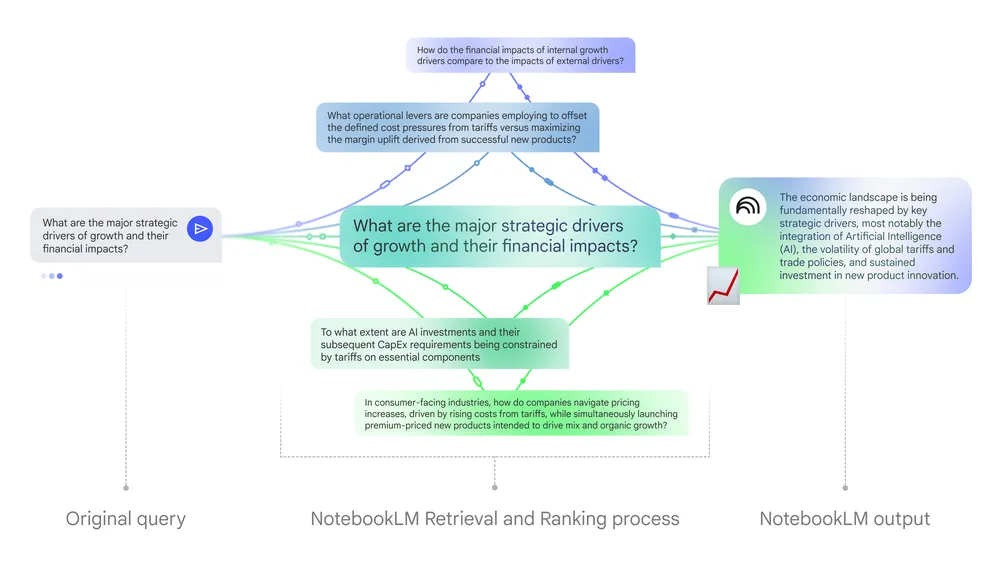
- 1 Million Token Context Window: NotebookLM chat now has access to the full 1 million token context window of Gemini across all plans. This is an 8x increase and dramatically improves its ability to analyze and find insights in extremely large collections of documents.
- 6x Longer Conversation Memory: The capacity for multi-turn conversations has been increased more than sixfold. This means you can have much longer, more extended interactions without NotebookLM “forgetting” what you were talking about, leading to more coherent and relevant results.
- Saved Conversation History: In a much-needed quality-of-life update, your conversations will now be automatically saved. You can close a session and resume it later without losing your chat history. This will start rolling out over the next week.
These back-end improvements have already shown a 50% improvement in user satisfaction with responses that use large amounts of source material.
Personalize your AI with custom ‘Goals’
The second major update is that the “Goals” feature is now available to all users. This is a powerful customization tool that allows you to set a specific goal, voice, or role for your chat assistant in each notebook.
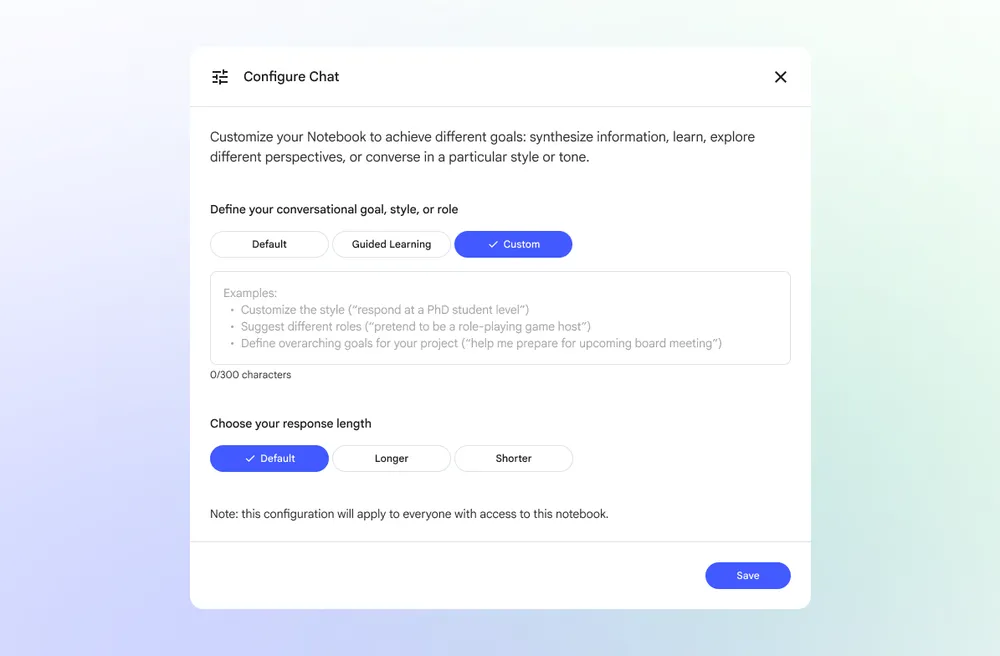
By clicking the configuration icon in the chat, you can write how you want the AI to behave. Google provides some fantastic examples to try:
- For rigorous feedback: “Treat me like a PhD candidate: You are my research advisor. Rigorously challenge every assumption. Ask probing questions, identify logical fallacies and force me to defend my work from the ground up.”
- For quick action: “Act as a lead marketing strategist: Your response must be an immediate action plan. Be analytical and direct…”
- For deep analysis: “Analyze the provided material from three distinct perspectives: As a strict academic… as a creative strategist… and as a skeptical reviewer…”
- For fun: “Act as a Game Master for a text-based simulation. Present a high-stakes scenario with a specific goal and a step limit…”
This is a fantastic set of upgrades that makes NotebookLM an even more useful tool. The massive boost in contextual understanding and memory, combined with the ability to set custom personas for your AI assistant, unlocks new levels of productivity and creativity for any research project.
SUBSCRIBE TO UPSTREAM
Get Chrome Unboxed delivered straight to your inbox
Upstream is our flagship, curated newsletter with the top stories, most click-worthy deals, giveaways, and trending articles from Chrome Unboxed sent directly to your inbox a few times a week. Join 31,000+ subscribers.

