
• Skip to main content
  • Skip to primary sidebar
  • Deals
  • Features
  • Guides
  • Chromebooks
  • Videos
  • Podcast
  • More +
    • Reviews
    • Unboxing
    • Upcoming Devices
    • Chromebook Plus
    • Chrome
    • ChromeOS
    • Chrome OS Flex
  • Search
  • Sign Up
  • Log In
Chrome Unboxed – The Latest Chrome OS News

Chrome Unboxed - The Latest Chrome OS News

A Space for All Things Chrome, Google, and More!

  • Deals
  • Features
  • Guides
  • Chromebooks
  • Videos
  • Podcast
  • More +
    • Reviews
    • Unboxing
    • Upcoming Devices
    • Chromebook Plus
    • Chrome
    • ChromeOS
    • Chrome OS Flex
  • Search
  • Sign Up
  • Log In

NotebookLM now has the ability to generate mind maps for better comprehension

March 27, 2025 By Robby Payne View Comments

Support our independent tech coverage. Chrome Unboxed is written by real people, for real people—not search algorithms. Join Chrome Unboxed Plus for just $2 a month to get an ad-free experience, access to our private Discord, and more. Learn more about membership here.
START FREE TRIAL (MONTHLY)START FREE TRIAL (ANNUAL)

Google is continuing to refine NotebookLM – their powerful AI-driven research tool – and the recent addition of generated mind maps are a step in a very positive direction for a service that is bent towards helping users make sense of big data sets.

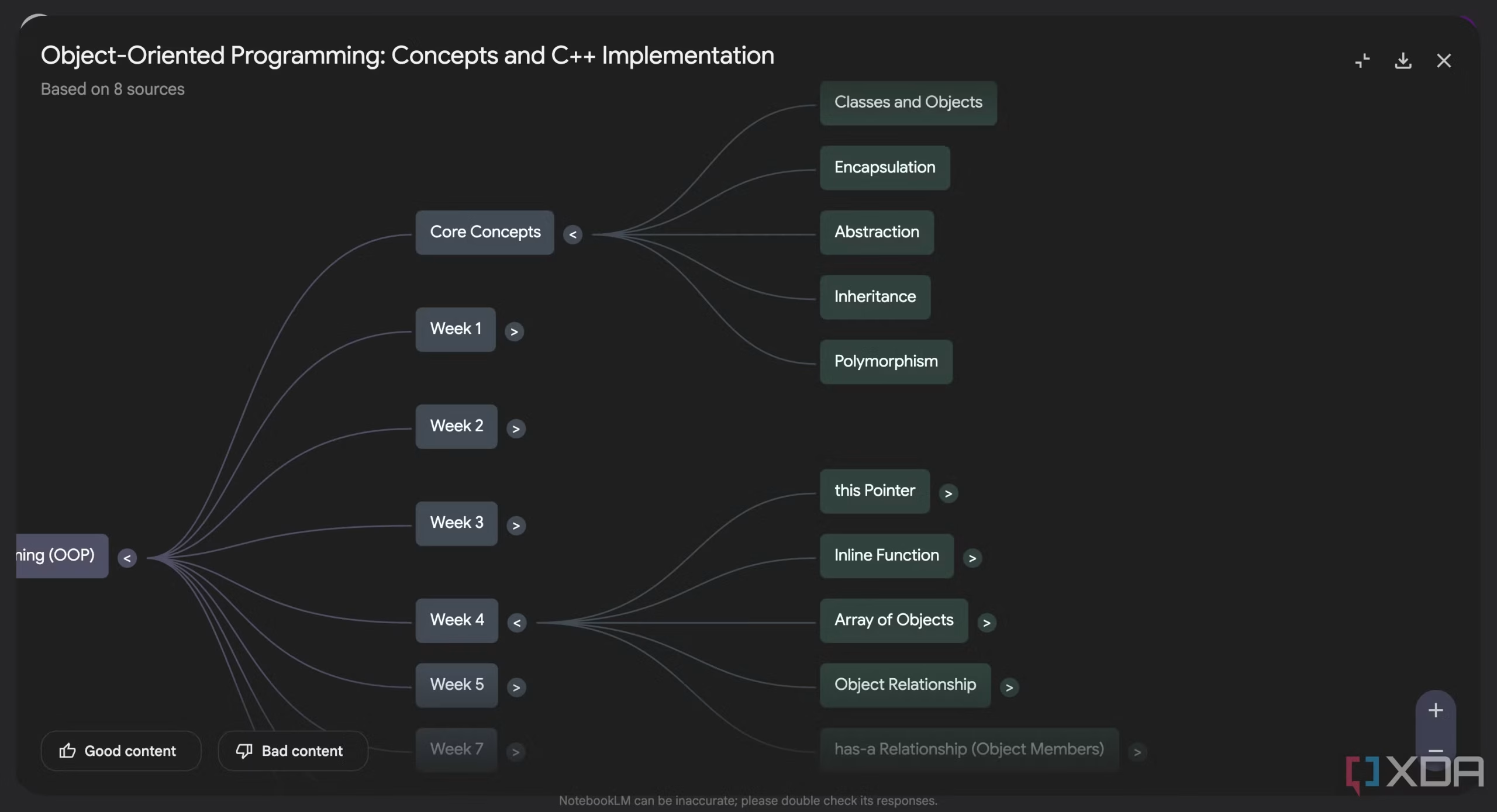
Mind maps present an interactive way to dissect and explore the connections within your uploaded documents. As Google points out, imagine a biology student tackling the complexities of Coral Reef Ecosystem Decline. Instead of sifting through dense research papers, NotebookLM now generates a dynamic mind map, highlighting key concepts like “Ocean Acidification,” “Rising Sea Temperatures,” “Pollution,” and “Overfishing.” This allows you to visually trace the relationships between these factors, offering a more intuitive grasp of the subject matter.
Xremove ads
example mind map via XDA

The implementation is seamless, too. Within the Chat pane, you’ll now find “Mind Map” alongside the existing shortcuts. These maps are then stored in your Notes list, and you can even expand them to a fullscreen interface for a more detailed view. Plus, the ability to download these maps as static images is a welcome addition for sharing or further analysis. Tapping on a branch allows you to minimize it and interact with the chat, making this feature a nice blend of visual exploration and conversational AI.

It’s always important to highlight Google’s commitment to data privacy and security. As they’ve explicitly stated, user data—uploads, queries, and model responses—remains within the user’s control. This information isn’t used for model training or shared outside the organization’s trust boundary without explicit permission. Moreover, access to source materials is limited to documents the user has permission to view within Workspace, and users retain control over notebook permissions.

Featured Videos

Xremove ads

The new Mind Map feature should be rolling out now for all users, consumer and Workspace accounts alike. You don’t need NotebookLM+, either, so even standard users will be able to access this new feature.

SUBSCRIBE TO UPSTREAM

Get Chrome Unboxed delivered straight to your inbox

Upstream is our flagship, curated newsletter with the top stories, most click-worthy deals, giveaways, and trending articles from Chrome Unboxed sent directly to your inbox a few times a week. Join 31,000+ subscribers.

SUBSCRIBE HERE!

Filed Under: AI, Gemini, New & Upcoming Features, News

About Robby Payne

As the founder of Chrome Unboxed, Robby has been reviewing Chromebooks for over a decade. His passion for ChromeOS and the devices it runs on drives his relentless pursuit to find the best Chromebooks, best services, and best tips for those looking to adopt ChromeOS and those who've already made the switch.

Primary Sidebar

Googlebook

Googlebook OS is getting keyboard shortcuts for play/pause and previous/next in media

By Robby Payne
November 28, 2026

Flagships, tablets, or budget laptops: why the Googlebook launch was always going to be a gamble

By Robby Payne
November 25, 2026

Googlebook ‘Pelion’ borrows its battery from one of my favorite Acer Chromebooks

By Robby Payne
November 25, 2026

Entry-level Googlebooks might finally be coming with Snapdragon C silicon

By Robby Payne
November 24, 2026

When I need to get technical work done, I still reach for a Chromebook over a Googlebook

By Robby Payne
November 24, 2026

More Googlebook

Xremove ads

Deals

The best Black Friday Googlebook and Chromebook deals

By Robby Payne
November 27, 2026

The first Googlebook deals are here, slashing up to $300 off two 3K OLED models

By Robby Payne
November 20, 2026

My favorite convertible Chromebook is $150 off right now and primed for Googlebook OS

By Robby Payne
September 29, 2026

Google Pixel Buds 2a in Hazel bundled with a new Googlebook laptop at Best Buy

Score a free $129 pair of Pixel Buds 2a with any Googlebook pre-order at Best Buy

By Robby Payne
September 28, 2026

The best Chromebook ever made is $350 off at Best Buy right now

By Robby Payne
August 21, 2026

More Deals

Xremove ads

Reviews

My brutally honest thoughts on Googlebook after one month [VIDEO]

By Robby Payne
November 2, 2026

Acer Chromebook Plus Spin 514 Review: the best convertible you can buy [VIDEO]

By Robby Payne
July 1, 2026

Lenovo Chromebook Plus 2-in-1 Review: pretty great in a vacuum

By Robby Payne
April 23, 2026

My review after 6 weeks with the Lenovo Chromebook Plus 14 [VIDEO]

By Robby Payne
August 11, 2025

One week with the best small Android tablet you can buy, and I’m sold

By Robby Payne
May 9, 2025

More Reviews

Xremove ads

TWITTER · FACEBOOK · INSTAGRAM · YOUTUBE · EMAIL · ABOUT

Copyright © 2026 · Chrome Unboxed · Chrome is a registered trademark of Google Inc.
We are participants in various affiliate advertising programs designed to provide a means for us to earn fees by linking to affiliated sites.

PRIVACY POLICY