


Support our independent tech coverage. Chrome Unboxed is written by real people, for real people—not search algorithms. Join Chrome Unboxed Plus for just $2 a month to get an ad-free experience, access to our private Discord, and more. Learn more about membership here.
START FREE TRIAL (MONTHLY)START FREE TRIAL (ANNUAL)
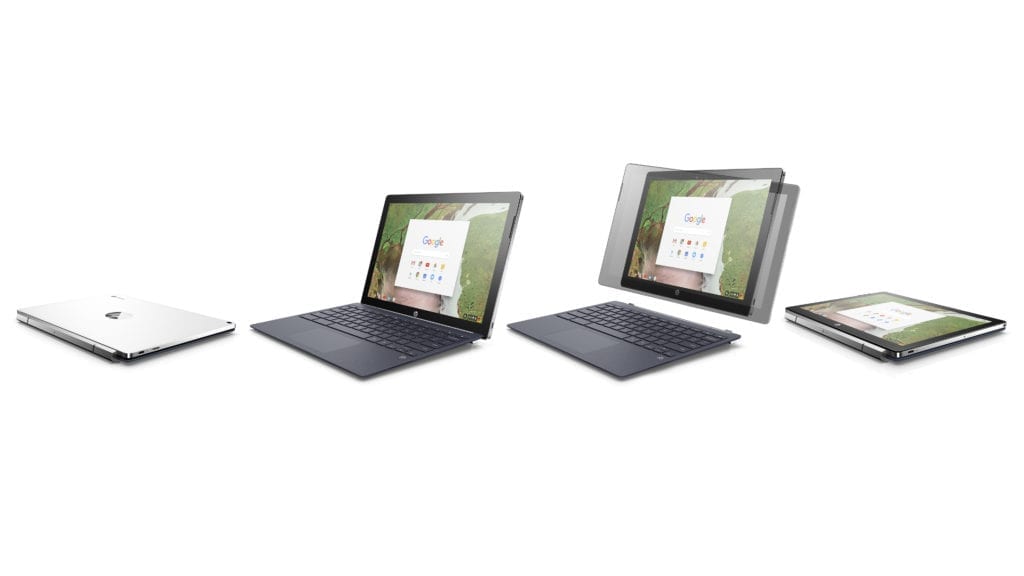 When I spoke with my contacts at HP a few weeks back, they were a tad evasive about whether or not they were making variants of the recently released HP Chromebook x2. One thing they did make clear was the fact that the only model currently available (the $599, Core m3) was never intended to have a backlit keyboard. Their exact words were “the particular “SKU” that is selling from Best Buy does not have that feature.”
While HP wasn’t about to give me a yes or no on other iterations of the Chromebook x2, the conversation left me believing they were definitely in the works. That, combined with the fact that I know of the existence of a pre-production Core i5/m5, 8GB model (with a backlit keyboard), makes me pretty confident we will eventually see some variants of the world’s first detachable Chromebook. As to when we could see them is a question that will just have to remain unanswered for the time being.
Fast forward to yesterday evening.
Robby and I were chatting about Microsoft’s latest machine, the Surface Go and out of curiosity, I started researching the Pentium chip that powers the new Windows detachable. Much to my surprise, I stumbled upon a PDF that documents technical specifications and servicing instructions for the HP Chromebook x2.
Not only did I find proof of the Core i5/m5 model but there are actually FIVE adaptations of the high-res Chrome OS detachable. Here are some of the specifics.
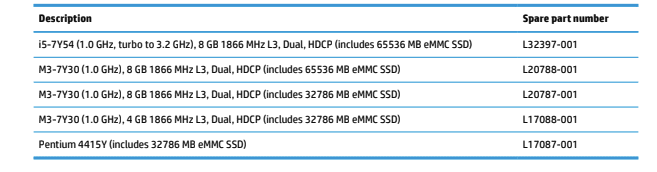
So, on top of a more powerful Core model, we see three variations of the current Core m3 that include upgrades to the RAM and storage. Below that, you can see a Pentium model that is powered by the very same chip that’s inside Microsoft’s new Surface Go.
We’ve used a few Pentium Chromebooks here in the office and for the average user, they have plenty of power. The big plus here could be a price that will compete the new Surface Go. If HP can market the Pentium Chromebook x2 at $499 (or less would be even better), it could take some of the wind out of Microsoft’s sails in their hunt to compete with Apple’s iPad.
The fifty-seven-page document I found is filled mostly with technical jargon and teardowns that were meant for authorized service technicians. My guess is that it was never meant for public consumption in the first place. I won’t bore you with all the details of the manual but there are couple more items that caught my attention and may be good news for many a Chromebook user.
We know that a version of the Chromebook x2 exists (albeit not officially) with a backlit keyboard and the service manual confirms that HP did or does have it in the blueprints. It also confirms a United Kingdom keyboard layout which is exciting news for so many readers who have emailed and commented wanting to know if HP would be bringing the detachable across the pond.

HP is well known for their slightly eccentric Chromebook variations. With the release of the HP Chromebook 13 G1, they presented a number of models that ranged all over the place and pricing made little to no sense when you threw in their “configurable” models that almost doubled the price but added practically zero hardware upgrades. Don’t get me wrong, the 13 G1 was and still is a beautiful, powerful Chromebook but it is my hope that HP will get their pricing structures figured out before the launch of any of these Chromebook x2 variations.

