

Support our independent tech coverage. Chrome Unboxed is written by real people, for real people—not search algorithms. Join Chrome Unboxed Plus for just $2 a month to get an ad-free experience, access to our private Discord, and more. Learn more about membership here.
START FREE TRIAL (MONTHLY)START FREE TRIAL (ANNUAL)
 Each year, Google uses its flagship phone to deliver new and interesting features to Android. The past couple years, these features have become even more exclusive with the introduction of the Pixel line. Just like any other phone maker, Google wants to launch handsets with interesting new features that give it a slight edge over the competition. When the Nexus line was Google’s baby, we knew all the cool features those phones possessed would be in the new version of Android for everyone at some point.
With the Pixel phones, that path to those new features hasn’t been so clear. Some of that is hardware based and some of it is Google keeping certain features for its own hardware. Eventually, as it turns out, most of the Pixel’s greatest features trickle down into the main builds of Android for everyone else to enjoy.
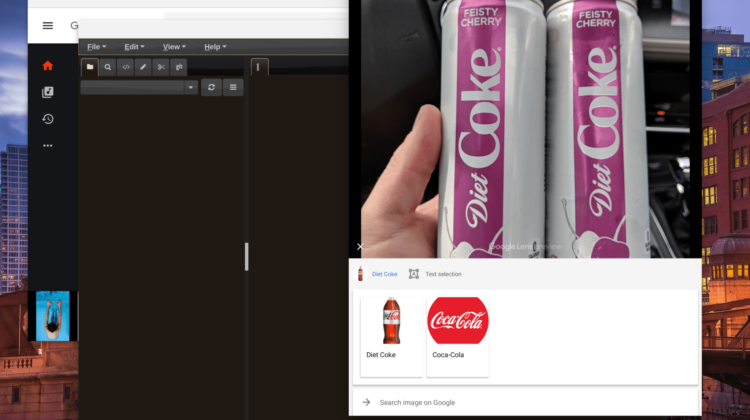
Google Lens is one of those features, and it is pretty awesome. Limited to only Pixel phones until now, Google has finally taken the shackles of this service and made it widely available across all Android phones via the Google Photos app. Snap a photo of anything, open it in Google Photos, and you can now leverage the power of Google Lens to run searches against products, find the name of a car, get more info on a book, etc. The service is pretty awesome but will become much more powerful as more users take advantage of it.
After seeing this story go around, I was immediately curious if this could be leveraged on a Chromebook. It absolutely can.
Sure, photos.google.com won’t take advantage of Google Lens just yet, but that doesn’t stop any of us from installing the Google Photos Android app and using Google Lens to our heart’s content. Granted, those of you with a Pixelbook have been able to do a similar trick with the Pixelbook Pen, but this opens up photo-driven search for everyone, and that is exciting!
So, go grab the app and start using this very handy tool from Google and let us know in the comments how it helps you out!

