
• Skip to main content
  • Skip to primary sidebar
  • Deals
  • Features
  • Guides
  • Chromebooks
  • Videos
  • Podcast
  • More +
    • Reviews
    • Unboxing
    • Upcoming Devices
    • Chromebook Plus
    • Chrome
    • ChromeOS
    • Chrome OS Flex
  • Search
  • Sign Up
  • Log In
Chrome Unboxed – The Latest Chrome OS News

Chrome Unboxed - The Latest Chrome OS News

A Space for All Things Chrome, Google, and More!

  • Deals
  • Features
  • Guides
  • Chromebooks
  • Videos
  • Podcast
  • More +
    • Reviews
    • Unboxing
    • Upcoming Devices
    • Chromebook Plus
    • Chrome
    • ChromeOS
    • Chrome OS Flex
  • Search
  • Sign Up
  • Log In

Google’s Game of The Year 2018 Is A Shining Example of The Future Of Web Apps

December 29, 2018 By Robby Payne View Comments

Support our independent tech coverage. Chrome Unboxed is written by real people, for real people—not search algorithms. Join Chrome Unboxed Plus for just $2 a month to get an ad-free experience, access to our private Discord, and more. Learn more about membership here.
START FREE TRIAL (MONTHLY)START FREE TRIAL (ANNUAL)

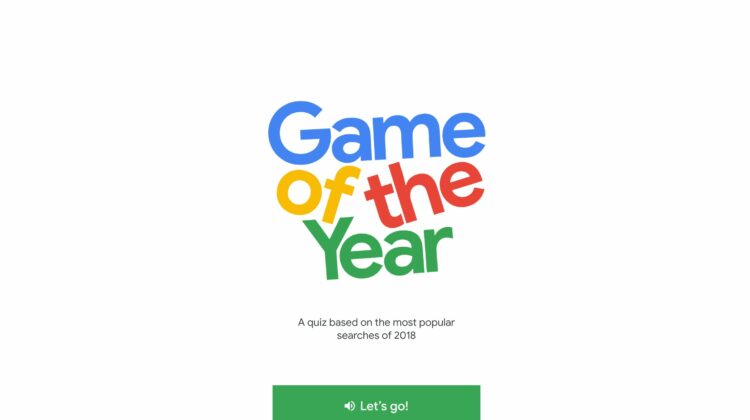
You may have seen it around the internet already, but if you haven’t let me introduce you to Google’s latest web-driven piece of entertainment: Game of The Year 2018. In the quiz-based game, players are met with up to 20 questions (and a couple bonus rounds) about search trends throughout the year of 2018.

What was searched more: Laurel or Yanny? Which Rocket was searched more? Falcon Heavy or James Harden?

Xremove ads

I’ll leave you to those answers and more if you head over and play the game. It is a ton of fun and beautiful to behold, honestly. I’ve played multiple times just to appreciate the subtle design, smooth animations, lack of any need to download or install anything, and complete disregard for device or screen size.

Sure, the quiz itself is fun and I’ve learned some fun trivia along the way, but I’m way more interested in what Google has done with this web app from a technical standpoint.

Featured Videos

Xremove ads

If you want to be even more impressed by how well this all works, add it as a shortcut in Chrome OS or add it to your home screen on your phone. For your Chromebook, make sure to right click the shortcut and choose “open as window” and now on any device you’ll be met with a windowed app that feels just as native as any app you’d download and install on your device.

As I said above, this web app doesn’t care even one bit what size your screen is. It seems almost infinitely adaptable and changes size with no issue whatsoever.

How Google is acheiveing this is likely tied to the same things that are making the powerful and useful web app Squoosh so buttery-smooth. It is development that is over my head and likely over most of yours, too, but the takeaway is the same either way: these newer web-driven technologies allow rich, interactive, smooth experiences to be delivered via the web. Frame rates and animations in the Game of the Year app are so fluid that it feels completely native and installed.

Xremove ads

None of this requires a separate plugin, extension or install. This is all being rendered and served in Chrome and it is so encouraging to see. After all, I’ve shared my thoughts on web apps as the best possible end-game for app delivery, but up until recently, the experiences just weren’t good enough to see that eventuality.

Coming down the stretch in 2018, I’m more hopeful than ever that we might finally start seeing big, beautiful, fun, productive, and game-changing apps delivered via the web in a big way sooner than I’d ever thought possible. As it happens, Chromebooks are sitting at the ready to be the machines best equipped to live in that web-app-dominated future.

Check Out Chrome Unboxed’s Top Picks On Amazon

Xremove ads

Filed Under: Apps, Chrome, News

About Robby Payne

As the founder of Chrome Unboxed, Robby has been reviewing Chromebooks for over a decade. His passion for ChromeOS and the devices it runs on drives his relentless pursuit to find the best Chromebooks, best services, and best tips for those looking to adopt ChromeOS and those who've already made the switch.

Primary Sidebar

Xremove ads

Deals

The best Chromebook deals today

By Robby Payne
March 30, 2026

The Acer Chromebook Plus Spin 714 hits a new all-time low at $270 off

By Robby Payne
March 25, 2026

You can score $40 off Google’s battery-powered Nest Doorbell right now

By Joseph Humphrey
March 20, 2026

The touchscreen Lenovo Chromebook Slim 3 is a steal at under $200

By Robby Payne
March 16, 2026

Google TV Streamer and Remote held in front of a wall-mounted TV

The premium Google TV Streamer 4K is back down to $80

By Joseph Humphrey
March 16, 2026

More Deals

Xremove ads

Reviews

Acer Chromebook Plus Spin 514 Review: Kompanio Ultra power in a convertible

By Robby Payne
December 24, 2025

My review after 6 weeks with the Lenovo Chromebook Plus 14 [VIDEO]

By Robby Payne
August 11, 2025

One week with the best small Android tablet you can buy, and I’m sold

By Robby Payne
May 9, 2025

Best Chromebooks of 2024 [VIDEO]

By Robby Payne
November 28, 2024

Samsung Galaxy Chromebook Plus Review: Samsung is back! [VIDEO]

By Robby Payne
October 28, 2024

More Reviews

Xremove ads

Guides

This Chromebook trackpad shortcut is definitely not new, but is blowing my mind

By Robby Payne
March 11, 2024

How to reduce broadcast delay on YouTube TV to stop live spoilers

By Robby Payne
December 8, 2023

Windows PC keyboard and Chromebook

How to use a Windows keyboard with a Chromebook

By Joseph Humphrey
December 8, 2023

How reset and revert your Chromebook to the previous version of Chrome OS

By Robby Payne
November 29, 2023

My Chromebook Plus features disappeared: here’s how I fixed it

By Robby Payne
November 24, 2023

More Guides

TWITTER · FACEBOOK · INSTAGRAM · YOUTUBE · EMAIL · ABOUT

Copyright © 2026 · Chrome Unboxed · Chrome is a registered trademark of Google Inc.
We are participants in various affiliate advertising programs designed to provide a means for us to earn fees by linking to affiliated sites.

PRIVACY POLICY