


Support our independent tech coverage. Chrome Unboxed is written by real people, for real people—not search algorithms. Join Chrome Unboxed Plus for just $2 a month to get an ad-free experience, access to our private Discord, and more. Learn more about membership here.
START FREE TRIAL (MONTHLY)START FREE TRIAL (ANNUAL)
 Our favorite OS just keeps evolving, and in a few respects Chrome OS really needs this evolution to happen quickly. With so much changing in and around Chromebooks in the last year, there’s a lot of stuff that feels a bit half-baked still.
One of those places is most definitely tablet mode. Let’s face it – Chromebooks are becoming convertibles at a very high rate. With the Pixelbook, Samsung Chromebook Pro/Plus and ASUS C302 being the top dogs for the time being, the devices that are the major face for the platform are all convertibles. Add on to this the fact that we know a detachable and tablet Chromebook are likely in our near future, we need tablet mode on Chrome OS to simply be better.
First Steps
Right now, in tablet mode, every app runs in full screen. It feels like a workaround and is not great for doing much other than playing a game or watching a movie. Sure, when using a tablet-type device, most people don’t want to be managing a bunch of windows.
However, only seeing one thing at a time on such a large display sometimes feels like a terrible waste of space.
Many times, it is exactly that.
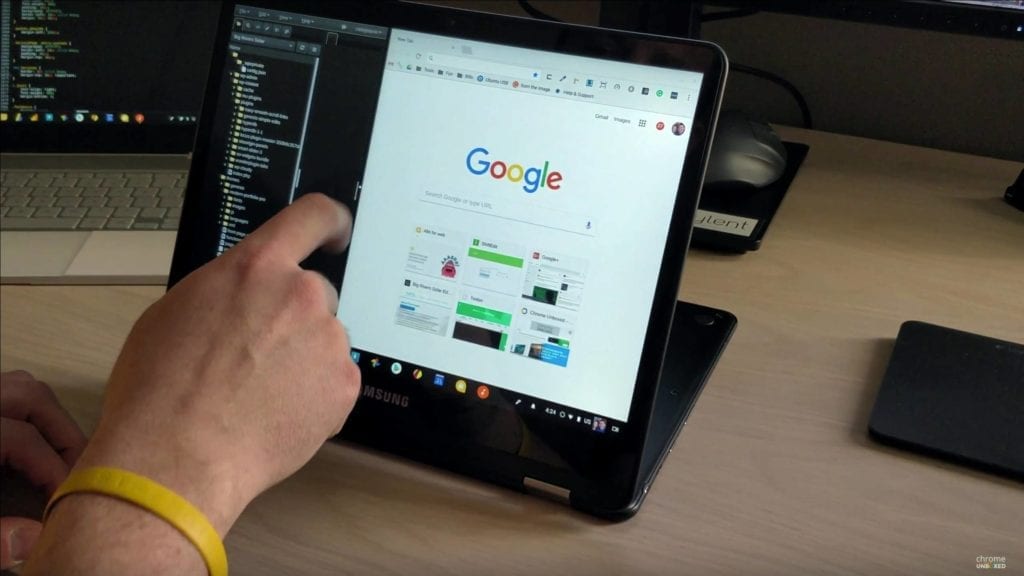
We saw an early preview of split screen functioning just a month ago, but it was pretty broken at the time. François Beaufort has shared today that this feature is now in the Dev Channel of Chrome OS and can be flipped on with a simple flag. Just go to chrome://flags/#enable-tablet-splitview and enable it.
As long as you are in the Dev Channel, you can take the whole thing for a quick spin. Check out the video below for a quick look at how it works. It is simple and intuitive and answers the need for a simpler way to multitask when in Tablet mode on a Chromebook. Hit the overview button, drag the app you want to one side of the screen, and release it. Drag the bar in between to resize.
Simple!
At this point, Android Apps don’t play nice with this at all. My hope is that those apps that support screen resizing will eventually be able to be used in this fashion. But another hope I have is that we would be able to toggle tablet mode on and off. There are times I’d love to put my Pixelbook in display mode and still be using windowed apps on my extended display. More options are always a good thing!
Fun tip: the video below is obviously showing the Samsung Chromebook Pro, so this feature isn’t just limited to the Pixelbook right now. If you want to give it a go, just switch to the Dev Channel and try it out!

