
• Skip to main content
  • Skip to primary sidebar
  • Deals
  • Features
  • Guides
  • Chromebooks
  • Videos
  • Podcast
  • More +
    • Reviews
    • Unboxing
    • Upcoming Devices
    • Chromebook Plus
    • Chrome
    • ChromeOS
    • Chrome OS Flex
  • Search
  • Sign Up
  • Log In
Chrome Unboxed – The Latest Chrome OS News

Chrome Unboxed - The Latest Chrome OS News

A Space for All Things Chrome, Google, and More!

  • Deals
  • Features
  • Guides
  • Chromebooks
  • Videos
  • Podcast
  • More +
    • Reviews
    • Unboxing
    • Upcoming Devices
    • Chromebook Plus
    • Chrome
    • ChromeOS
    • Chrome OS Flex
  • Search
  • Sign Up
  • Log In

Google Testing USB Titan Security Key On Chromebooks

December 18, 2017 By Gabriel Brangers View Comments

Support our independent tech coverage. Chrome Unboxed is written by real people, for real people—not search algorithms. Join Chrome Unboxed Plus for just $2 a month to get an ad-free experience, access to our private Discord, and more. Learn more about membership here.
START FREE TRIAL (MONTHLY)START FREE TRIAL (ANNUAL)


When it comes to security, Google isn’t a one-trick-pony with their world-dominating Chrome browser. Now a giant in the cloud arena, Google continues to push forward in the area of online data protection in the form of both software and hardware.

Google’s Online Security Blog keeps running updates of how you, the user, benefit from the ever-evolving defenses created by developers but these updates only scratch the surface of what’s going on behind the scenes in Mountain View.

Xremove ads

Announced earlier this year, Google has designed its own micro-controller to combine hardware and software security measures to be deployed in their own data centers. The Titan security chip combines multiple levels of software verification and the additional strength of hardware authentication.

Think YubiKey only on a much grander scale.
Featured Videos

Xremove ads

The depth at which Titan creates levels of security goes so deep I admittedly got lost trying to make sense of it all. If you want to know more about Titan and how it works, you can do so at the Cloud Platform Blog here.

Moving on.

Xremove ads

Google is known to issue employees YubiKeys for their 2FA (two-factor authentication) and these type of U2F keys have been supported by Chrome some time now. A recent discovery in the Chromium repository points to an attempt by Google to bring security key hardware in-house using the Titan hardware.

power: Add Google Titan key to autosuspend whitelist
Added to list of security keys.


The commit, added last week, continues to confirm the runtime status of the Titan key via USB.

Xremove ads

TEST==Check that device suspends when not being used when attached to a Chromebook with this patch, by checking cat <path of usb device>/power/runtime_status

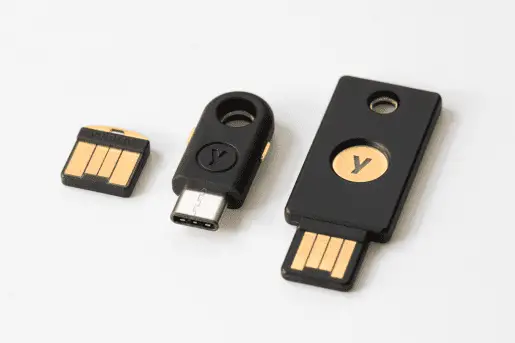
In case you’re wondering how a device designed for data centers could be utilized in something the size of a USB security key, well just look.

Image credit: Google Cloud Platform

Yeah, it’s really, really small. 

A source familiar with the project has confirmed that the Titan key is being tested internally by Google. Likely, the new key will be exclusive to Googler’s and issued and maintained by the company.

Xremove ads

This will be only the fourth security key supported by Chrome OS and could potentially become the exclusive security key used by Google as it continues to harden the security of its infrastructure.

Shop Chromebooks On Amazon

Source: Chromium Repository

Filed Under: Chromebooks, ChromeOS, News

About Gabriel Brangers

Lover of all things coffee. Foodie for life. Passionate drummer, hobby guitar player, Web designer and proud Army Veteran. I have come to drink coffee and tell the world of all things Chrome. "Whatever you do, Carpe the heck out of that Diem" - Roman poet, Horace. Slightly paraphrased.

Primary Sidebar

Xremove ads

Deals

The best Chromebook deals today

By Robby Payne
March 24, 2026

You can score $40 off Google’s battery-powered Nest Doorbell right now

By Joseph Humphrey
March 20, 2026

The touchscreen Lenovo Chromebook Slim 3 is a steal at under $200

By Robby Payne
March 16, 2026

Google TV Streamer and Remote held in front of a wall-mounted TV

The premium Google TV Streamer 4K is back down to $80

By Joseph Humphrey
March 16, 2026

Pixel Buds Pro 2 running

I still love the Pixel Buds Pro 2 and they are $60 off right now

By Joseph Humphrey
March 13, 2026

More Deals

Xremove ads

Reviews

Acer Chromebook Plus Spin 514 Review: Kompanio Ultra power in a convertible

By Robby Payne
December 24, 2025

My review after 6 weeks with the Lenovo Chromebook Plus 14 [VIDEO]

By Robby Payne
August 11, 2025

One week with the best small Android tablet you can buy, and I’m sold

By Robby Payne
May 9, 2025

Best Chromebooks of 2024 [VIDEO]

By Robby Payne
November 28, 2024

Samsung Galaxy Chromebook Plus Review: Samsung is back! [VIDEO]

By Robby Payne
October 28, 2024

More Reviews

Xremove ads

Guides

This Chromebook trackpad shortcut is definitely not new, but is blowing my mind

By Robby Payne
March 11, 2024

How to reduce broadcast delay on YouTube TV to stop live spoilers

By Robby Payne
December 8, 2023

Windows PC keyboard and Chromebook

How to use a Windows keyboard with a Chromebook

By Joseph Humphrey
December 8, 2023

How reset and revert your Chromebook to the previous version of Chrome OS

By Robby Payne
November 29, 2023

My Chromebook Plus features disappeared: here’s how I fixed it

By Robby Payne
November 24, 2023

More Guides

TWITTER · FACEBOOK · INSTAGRAM · YOUTUBE · EMAIL · ABOUT

Copyright © 2026 · Chrome Unboxed · Chrome is a registered trademark of Google Inc.
We are participants in various affiliate advertising programs designed to provide a means for us to earn fees by linking to affiliated sites.

PRIVACY POLICY