


Support our independent tech coverage. Chrome Unboxed is written by real people, for real people—not search algorithms. Join Chrome Unboxed Plus for just $2 a month to get an ad-free experience, access to our private Discord, and more. Learn more about membership here.
START FREE TRIAL (MONTHLY)START FREE TRIAL (ANNUAL)
Chrome OS version 70 has just begun rolling out to some devices and with it comes some much-anticipated UI changes that focus on a more tablet-centric user experience. Before you get too excited, I did say “some” of devices. Roughly, around 33% of all Chrome devices have received the update and many that have are older machines.
Below you can see the list of Chromebooks, Chromeboxes and even a Chromebit that are currently running Chrome OS 70 in the Stable channel.
Chrome OS 70
- Acer C720 Chromebook
- Acer Chromebase
- Acer Chromebase 24
- Acer Chromebook 13 (CB5-311)
- Acer Chromebook 15 (CB3-531)
- Acer Chromebox
- Acer Chromebox CXI2
- AOpen Chromebox Commercial
- ASI Chromebook
- ASUS Chromebit CS10
- ASUS Chromebook C201PA
- ASUS Chromebook C300MA
- ASUS Chromebox CN60
- ASUS Chromebox CN62
- Bobicus Chromebook 11
- Chromebook 11 (C730 / CB3-111)
- Chromebook 11 (C735)
- Consumer Chromebook
- Crambo Chromebook
- CTL N6 Education Chromebook
- Dell Chromebook 11 (3120)
- Education Chromebook
- eduGear Chromebook R
- Edxis Chromebook
- Edxis Education Chromebook
- Haier Chromebook 11
- Haier Chromebook 11 G2
- HEXA Chromebook Pi
- HP Chromebook 11 1100-1199 / HP Chromebook 11 G1
- HP Chromebook 11 2000-2099 / HP Chromebook 11 G2
- HP Chromebook 11 2100-2199 / HP Chromebook 11 G3
- HP Chromebook 11 2200-2299 / HP Chromebook 11 G4/G4 EE
- HP Chromebook 14
- HP Chromebook 14 ak000-099 / HP Chromebook 14 G4
- HP Chromebook 14 x000-x999 / HP Chromebook 14 G3
- JP Sa Couto Chromebook
- Lenovo 100S Chromebook
- Lenovo N20 Chromebook
- Lenovo N21 Chromebook
- Lenovo ThinkPad 11e Chromebook
- LG Chromebase 22CB25S
- LG Chromebase 22CV241
- M&A Chromebook
- Medion Akoya S2013
- RGS Education Chromebook
- Samsung Chromebook
- Samsung Chromebook 2 11″
- Samsung Chromebook 2 13″
- Senkatel C1101 Chromebook
- Toshiba Chromebook
- True IDC Chromebook
- True IDC Chromebook 11
- Videonet Chromebook
- Xolo Chromebook
The good news is that the Beta channel is on the exact same version for most devices so we’ve already gotten a good look at what to expect. Check out Robby’s video highlighting the new tablet features that will arrive when you get your update to 70.
In addition to the redesigned launcher and system tray, you will soon see your shelf icons centered and slightly larger for optimal use when in tablet mode. There’s also the addition of a true floating keyboard that feels way more Android and a lot less Chrome OS. In the accessibility features, enabling the onscreen keyboard brings up the familiar layout but clicking the “undock” icon at the top of the keyboard will give you this.

You can even toggle to handwriting mode and take advantage of text-detection to transcribe what you jot down. Simply click into a text field in any app or webpage and the floating keyboard will pop up. Select the handwriting tool and as you write you will see suggested words at the top. Select the word you want and it will automatically transcribe to the text field you clicked.
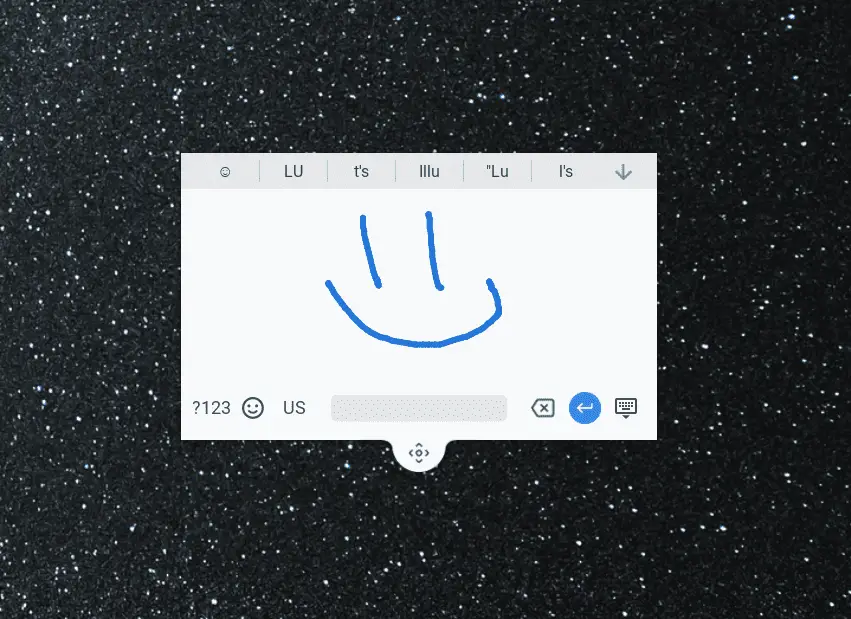
Yes, it will even suggest emojis. 🙂
New Android app shortcuts, material design and keyboards aren’t all that’s new in 70. Autofill features now have the ability to be separated between payment methods and addresses should you need that function.
On the security front, users will now have the ability to restrict extensions to accessing only sites of their choosing. More details about that can be found on the Chromium blog.
Last up is the addition of the AV1 codec decoder that is the industries leading platform for delivering better video in smaller packages. The feature is decoding only at the moment for the Chrome browser. No encoding capabilities are being shipped in this update.
I’m still tinkering around with some other features I’ve uncovered in Chrome OS 70 Stable and will follow up ASAP with my findings. I suspect there is more to this update than the official release notes shared. Stay tuned.
Check Out Chrome Unboxed’s Top Picks On Amazon
Source: Chrome Releases

