Support our independent tech coverage. Chrome Unboxed is written by real people, for real people—not search algorithms. Join Chrome Unboxed Plus for just $2 a month to get an ad-free experience, access to our private Discord, and more. Learn more about membership here. START FREE TRIAL (MONTHLY)START FREE TRIAL (ANNUAL)
Accordingly, sites that do not meet the standards of the Coalition for Better Ads will have their advertising blocked completely in the Chrome browser. Today, we received a deeper look at how Chrome will handle these intrusive and deceptive advertisements. We also get some insight into Google’s ultimate goal behind the new ad blocking system.
While most advertising on the web is respectful of user experience, over the years we’ve increasingly heard from our users that some advertising can be particularly intrusive. As we announced last June, Chrome will tackle this issue by removing ads from sites that do not follow the Better Ads Standards. We’ve previously discussed some of the details surrounding how Chrome protects users from intrusive ads, but as we approach the launch date of February 15, we wanted to go under the hood and discuss how this feature works in more detail.
What are the Better Ads Standards?
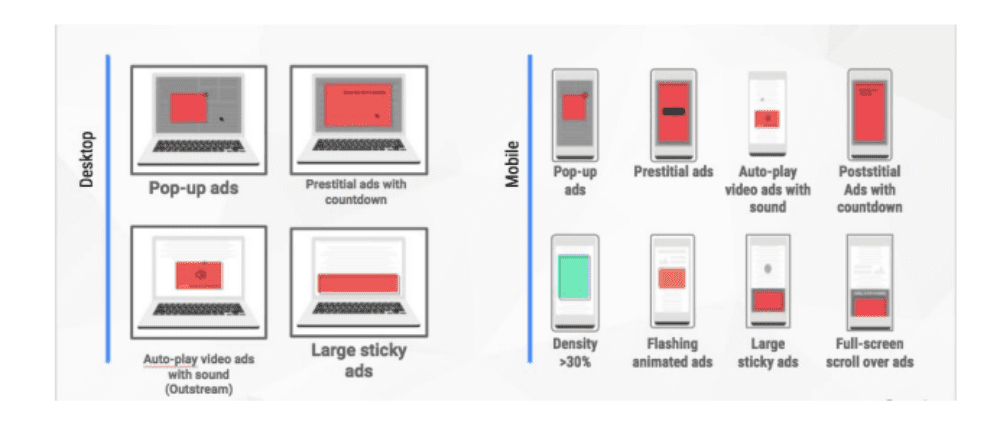
The Better Ads Standards are the result of public consumer research by the Coalition for Better Ads, an industry group focused on improving users’ experience with online advertising. Over 40,000 internet users in North America and Europe participated in surveys where they were shown common ad experiences and asked to evaluate how intrusive the experiences were. The most intrusive ad experiences include prestitial ads (those full-page ads that block you from seeing the content on the page) and flashing animated ads. More details about the research and methodology can be found on the Coalition’s website.
Although a few of the ad experiences that violate the Better Ads Standards are problems in the advertisement itself, the majority of problematic ad experiences are controlled by the site owner — such as high ad density or prestitial ads with a countdown. This result led to the approach Chrome takes to protect users from many of the intrusive ad experiences identified by the Better Ads Standards: evaluate how well sites comply with the Better Ads Standards, inform sites of any issues encountered, provide the opportunity for sites to address identified issues, and remove ads from sites that continue to maintain a problematic ads experience.
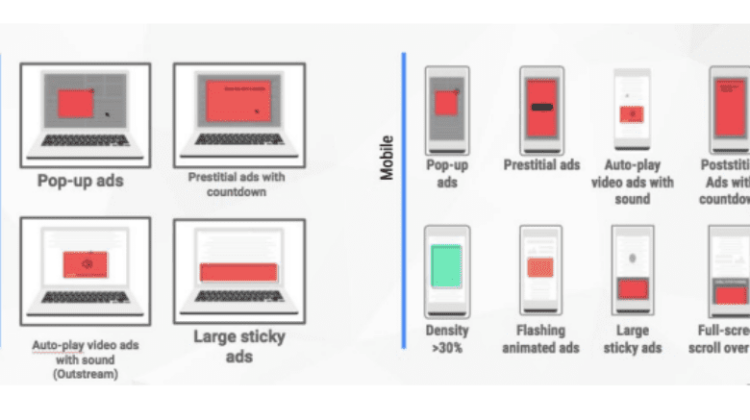
Today, the Better Ads Standards consists of 12 ad experiences that research found to be particularly annoying to users. Image Source: Coalition for Better Ads.
Evaluating sites for violations
Sites are evaluated by examining a sample of pages from the site. Depending on how many violations of the Better Ads Standards are found, the site will be evaluated as having a status of Passing, Warning, or Failing. The evaluation status of sites can be accessed via the Ad Experience Report API. Site owners can also see more detailed results, such as the specific violations of the Better Ads Standards that were found, via the Ad Experience Report in Google’s Search Console. From the Report site owners can also request that their site be re-reviewed after they have addressed the non-compliant ad experiences.
The Ad Experience Report in Google’s Search Console allows site owners to see their overall site evaluation status, as well as the specifics of any violations identified on their site.
Filtering on sites at the network level
At a technical level, when a Chrome user navigates to a page, Chrome’s ad filter first checks if that page belongs to a site that fails the Better Ads Standards. If so, network requests on the page — such as those for JavaScript or images — are checked against a list of known ad-related URL patterns. If there is a match, Chrome will block the request, preventing the ad from displaying on the page. This set of patterns is based on the public EasyList filter rules and includes patterns matching many ad providers including Google’s own ad platforms, AdSense and DoubleClick.
What this looks like in Chrome
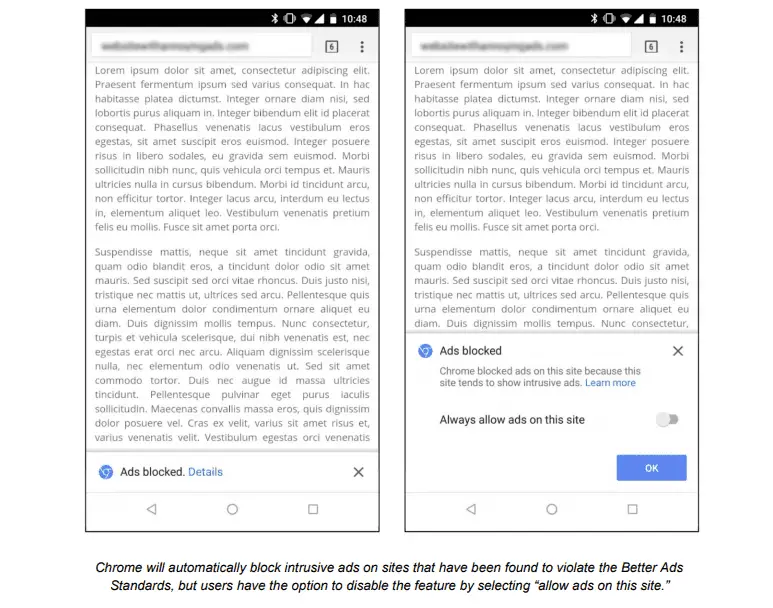
Chrome will automatically block ads on sites that fail the Better Ads Standards, using the approach described above. When at least one network request has been blocked, Chrome will show the user a message indicating that ad blocking has occurred as well as an option to disable this setting by selecting “allow ads on this site.” For desktop users, the notification in Chrome’s address bar will look similar to Chrome’s existing pop-up blocker. Android users will see a message in a small infobar at the bottom of their screen and can tap on “details” to see more information and override the default setting.
Early results show positive progress for users
While the result of this action is that Chrome users will not see ads on sites that consistently violate the Better Ads Standards, our goal is not to filter any ads at all but to improve the experience for all web users. As of February 12, 42% of sites which were failing the Better Ads Standards have resolved their issues and are now passing. This is the outcome we are were hoping for — that sites would take steps to fix intrusive ads experiences themselves and benefit all web users. However, if a site continues to maintain non-compliant ad experiences 30 days after being notified of violations, Chrome will begin to block ads on that site.
We’re encouraged by early results showing industry shifts away from intrusive ad experiences and look forward to continued collaboration with the industry toward a future where Chrome’s ad filtering technology will not be needed.
Chris Bentzel, Engineering Manager @ Google
This is very proactive work being done by the Chrome Team and whats more encouraging is that Google has made it clear that this isn’t a witch hunt to shut down advertiser. Instead, it is more an industry nudge to help make a better web experience for all users.
The simple fact that the new ad block interface will actually allow users to turn non-compliant ads back on is proof positive that Google has the interests of the masses at the forefront of Chrome development. If all goes as scheduled, the new ad block system will begin rolling out tomorrow, February 15th.
Lover of all things coffee. Foodie for life. Passionate drummer, hobby guitar player, Web designer and proud Army Veteran. I have come to drink coffee and tell the world of all things Chrome. "Whatever you do, Carpe the heck out of that Diem" - Roman poet, Horace. Slightly paraphrased.


 Yesterday, developers gave us a sneak peak at Chrome’s new ad blocking policies that will take effect less than 24 hours from now.