

Support our independent tech coverage. Chrome Unboxed is written by real people, for real people—not search algorithms. Join Chrome Unboxed Plus for just $2 a month to get an ad-free experience, access to our private Discord, and more. Learn more about membership here.
START FREE TRIAL (MONTHLY)START FREE TRIAL (ANNUAL)
For personal reasons, I found myself with my family in a nice, comfortable hotel last night. I’ll be there tonight as well and I’m already dreading the final few hours of the evening we’ll inevitably spend winding down in the room together after a busy day. Why? Don’t worry. It’s not from the close contact to my kids and wife for hours on end. In fact, I quite enjoy that part of getting out of town. No, my dread comes from the fact that I’m going to have to attempt to navigate the hotels ridiculously-slow, failing attempt at internet television in the room just to watch a few episodes of The Office before bed.
First world problem? Absolutely, but this particular version of hotel TV last night was the worst digital thing I’ve interacted with in a very long time. I’m honestly not sure how the companies that deploy these ‘solutions’ can look their clients in the face and sell them a product this bad. Let me paint a quick picture for you.
One of the ‘features’ of this service was to allow me to sign into multiple content streaming services to use while here in the hotel. I don’t love doing this because I’m always a bit dubious that my stuff will really be removed when I depart, but I did so anyway. I used the authentication code via my phone to log into Prime Video and after attempting to navigate the UI for a couple minutes, I just gave up. Freezes, jumping cursors, and failed playback quickly clued me it to the fact that I needed to look elsewhere.
So I went right to the standby favorite: Netflix. This app was a straight-up on-screen keyboard login scenario that is already a bit awful on smooth, fast UI. This interface was anything but. Getting into the login screen was quick enough, but then it was time to start scooting my cursor across the keyboard to enter both my email address and rather long password. I’m not kidding you when I say this took nearly 10 minutes. The remote would allow me about 4 clicks before becoming unresponsive and, after counting to 5 or so, I could get a few more clicks in. My email address is nearly 20 characters long and my password is 15. It was excruciating.
The new Chromecast is the answer
All I could think the entire time I was doing this was how the new Chromecast with Google TV would save me from this scenario in the future. While I’ve been a bit of a casting purist for years and have long thought Google was right for leaving Android TV a bit on the sidelines, my outlook completely and utterly changed last night as I spent 10 minutes of my life simply trying to get logged into Netflix.
In the event you’ve never attempted it, using a Chromecast in a hotel is generally impossible using hotel Wi-Fi, and this reason alone has made it a terrible travel companion. When any Wi-Fi is bound by a captive portal (where you have to interact with a web interface to gain access to the network) there is no workaround to get your Chromecast set up on the network. With no on-screen controls or any real interface, the Chromecast simply can’t navigate those pesky captive portals.
You can get it working on a phone hotspot or a pocketable Wi-Fi repeater, but only those who travel frequently are going to bother to bring all that hardware for a simple Chromecast setup. Instead, most do what I do and simply opt to deal with whatever atrocity the hotel offers up to its guests.
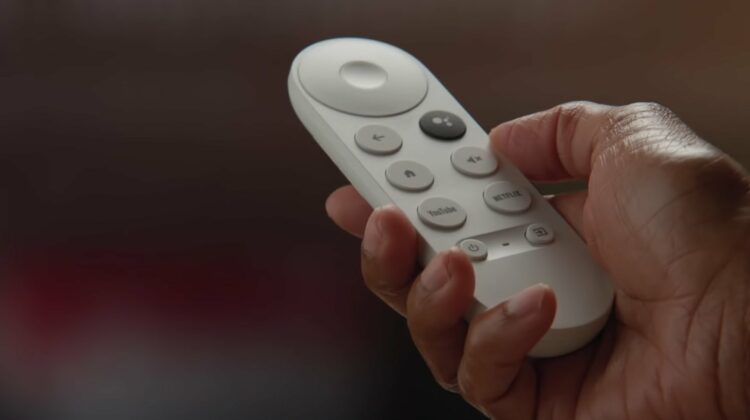
The new Chromecast fixes all of this by simply giving users a remote for navigation and a clean UI. With those two things, I could have easily plugged in my Chromecast, pointed it to the hotel Wi-Fi, navigated the captive portal, and been on my way. Not only would it have been 10x faster to get up and running, but I wouldn’t have had all the playback and navigation issues I had last night and all my accounts would already be logged in on my hardware: not the hotel’s.
The new Chromecast I have access to right now technically belongs to Chrome Unboxed, but I immediately regretted not bringing it with me last night. I remember leaving it at the office on purpose so the guys could begin experimenting with it a bit in my absence if the mood struck them right. I even went as far as to remark that I wouldn’t really have any use for it over the next few days. Boy was I wrong and boy, that was a dumb thing to say. Now that this article is finished, I’m hopping over to Best Buy to order a new Chromecast. Right now.
SUBSCRIBE TO UPSTREAM
Get Chrome Unboxed delivered straight to your inbox
Upstream is our flagship, curated newsletter with the top stories, most click-worthy deals, giveaways, and trending articles from Chrome Unboxed sent directly to your inbox a few times a week. Join 31,000+ subscribers.

