
• Skip to main content
  • Skip to primary sidebar
  • Deals
  • Features
  • Guides
  • Chromebooks
  • Videos
  • Podcast
  • More +
    • Reviews
    • Unboxing
    • Upcoming Devices
    • Chromebook Plus
    • Chrome
    • ChromeOS
    • Chrome OS Flex
  • Search
  • Sign Up
  • Log In
Chrome Unboxed – The Latest Chrome OS News

Chrome Unboxed - The Latest Chrome OS News

A Space for All Things Chrome, Google, and More!

  • Deals
  • Features
  • Guides
  • Chromebooks
  • Videos
  • Podcast
  • More +
    • Reviews
    • Unboxing
    • Upcoming Devices
    • Chromebook Plus
    • Chrome
    • ChromeOS
    • Chrome OS Flex
  • Search
  • Sign Up
  • Log In

Google is adding more Material You touches to Nearby Share

November 22, 2022 By Johanna Romero View Comments

Nearby Share Material You

Ever since Nearby Share arrived on Chromebooks back with version 91 and on Android in mid-2020, Google’s answer to Apple’s Airdrop has become perhaps one of the most important features that exists right now as part of the Google Ecosystem. Nearby Share has gone through several iterations and updates. Most recently, it is making its way to the Android 13 Clipboard Manager as yet another way that you can share text and images with your other devices.

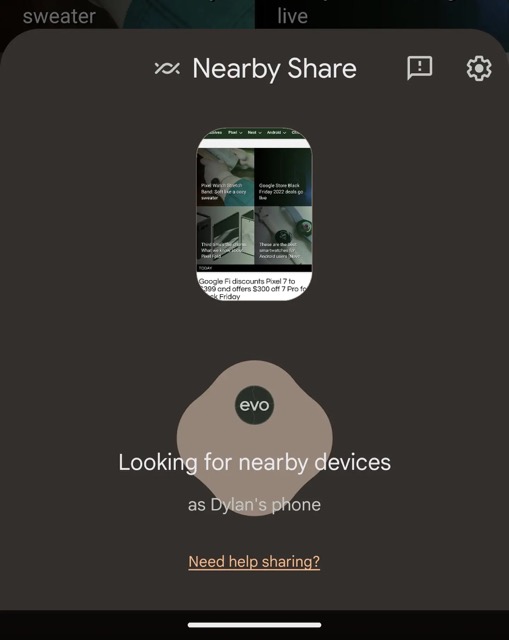
In a recent APK teardown, the folks over at 9to5Google discovered that more work is being done to the look and feel of Nearby Share, at least on Android. According to their findings, when you start the Nearby Share feature, a sheet will slide up and start the “Looking for nearby devices” process. In the past, Google would indicate that this was happening by using a wave that moved from left to right. Now, with this minor update, Nearby Share makes use of a variety of Material You shapes that will expand and then fade away from behind your profile avatar.
Xremove ads
Source: 9to5Google

It was also noted that the text on this panel is now a little bit bigger and centered, while the Nearby Share icon has been added to the top. Google has also made the previews of what is being shared bigger and put them in a card with icons, which makes it easier to see what is being shared. There will also be previews of the images.

This new look for Nearby Share is not yet live and will reportedly roll out via a server-side update to the latest version of Google Play Services. In the meantime, I’m enjoying these new improvements to Nearby Share and strengthens my hope that it will someday expand to cover PCs and Macs, and maybe even iOS as well by a PWA, instead of just Android and ChromeOS. That is the one missing piece to make Nearby Share the better option when it comes to sharing content with your friends and family.

Featured Videos

Xremove ads

Join Chrome Unboxed Plus

Introducing Chrome Unboxed Plus – our revamped membership community. Join today at just $2 / month to get access to our private Discord, exclusive giveaways, AMAs, an ad-free website, ad-free podcast experience and more.

Plus Monthly

$2/mo. after 7-day free trial

Pay monthly to support our independent coverage and get access to exclusive benefits.

Xremove ads
Start free trial

Plus Annual

$20/yr. after 7-day free trial

Pay yearly to support our independent coverage and get access to exclusive benefits.

Start free trial

Our newsletters are also a great way to get connected. Subscribe here!

Click here to learn more and for membership FAQ

Xremove ads

Filed Under: Android Tagged With: android, material you, nearby share

Primary Sidebar

Xremove ads

Deals

The best Chromebook deals today

By Robby Payne
December 29, 2025

The Acer Chromebook Plus Spin 514 hits an all-time low price of $499

By Robby Payne
December 23, 2025

Save $220 on the powerful, versatile Acer Chromebook Plus Spin 714

By Robby Payne
December 10, 2025

The Google Pixel 9a just hit its lowest price ever at $150 off

By Joseph Humphrey
December 8, 2025

At $349, this Lenovo Chromebook Plus is one of the best value laptops you can buy

By Joseph Humphrey
December 3, 2025

More Deals

Xremove ads

Reviews

Acer Chromebook Plus Spin 514 Review: Kompanio Ultra power in a convertible

By Robby Payne
December 24, 2025

My review after 6 weeks with the Lenovo Chromebook Plus 14 [VIDEO]

By Robby Payne
August 11, 2025

One week with the best small Android tablet you can buy, and I’m sold

By Robby Payne
May 9, 2025

Best Chromebooks of 2024 [VIDEO]

By Robby Payne
November 28, 2024

Samsung Galaxy Chromebook Plus Review: Samsung is back! [VIDEO]

By Robby Payne
October 28, 2024

More Reviews

Xremove ads

Guides

This Chromebook trackpad shortcut is definitely not new, but is blowing my mind

By Robby Payne
March 11, 2024

How to reduce broadcast delay on YouTube TV to stop live spoilers

By Robby Payne
December 8, 2023

Windows PC keyboard and Chromebook

How to use a Windows keyboard with a Chromebook

By Joseph Humphrey
December 8, 2023

How reset and revert your Chromebook to the previous version of Chrome OS

By Robby Payne
November 29, 2023

My Chromebook Plus features disappeared: here’s how I fixed it

By Robby Payne
November 24, 2023

More Guides

TWITTER · FACEBOOK · INSTAGRAM · YOUTUBE · EMAIL · ABOUT

Copyright © 2025 · Chrome Unboxed · Chrome is a registered trademark of Google Inc.
We are participants in various affiliate advertising programs designed to provide a means for us to earn fees by linking to affiliated sites.

PRIVACY POLICY