

Support our independent tech coverage. Chrome Unboxed is written by real people, for real people—not search algorithms. Join Chrome Unboxed Plus for just $2 a month to get an ad-free experience, access to our private Discord, and more. Learn more about membership here.
START FREE TRIAL (MONTHLY)START FREE TRIAL (ANNUAL)
I stayed up all night fawning over the Steam Deck and how I would use it when I receive it next year. No, seriously, I was looking up emulation videos, Heroic Launcher tutorials, and more so that when it lands in my hands it can become the ultimate gaming machine. To my surprise, I stumbled across something similar, but completely different and left field while browsing twitter – a cloud gaming handheld.
Now, there are plenty of devices out there that could be used for cloud gaming, like the RG552, the new Retroid Pocket 3, and even the Steam Deck’s direct competitor, the Aya Neo Air Pro. However, none of these are literally created to be a cloud gaming handheld like this wild, new Logitech device that just leaked online thanks to Evan Blass (who has since deleted his tweet media showing it off thanks to Logitech issuing a takedown complaint). The Verge still had the images up, so we were able to grab them.
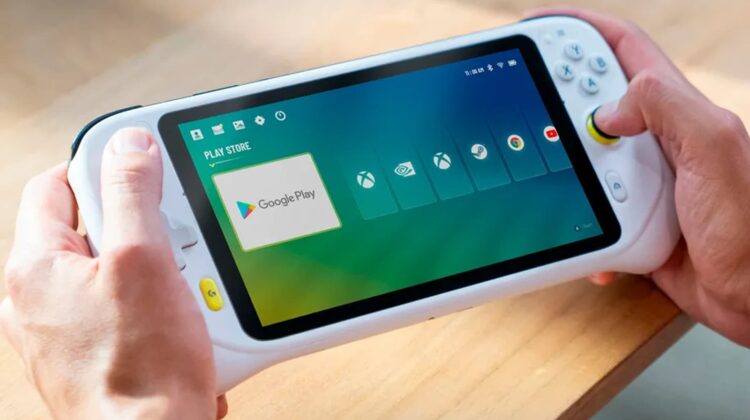
Seriously, check this thing out – it’s rocking all of the expected apps like Xbox Cloud Gaming, Nvidia GeForce NOW, and Steam (what we presume to be Steam Link, not the full client or Steam Deck software), but it has one big secret. This “Logitech G Gaming Handheld” also has a dedication to Google Play Games and the Play Store!

While there was no mention of Google Stadia in the images or in the accompanying tweet, I’m assuming that this will also have Google’s cloud gaming platform, because, well, why not? Oh, and there’s also a Chrome logo for a built-in web browser and a YouTube app since that’s also a streaming service. It looks like this thing is keeping a light profile so it can boast a longer battery life than its competitors.
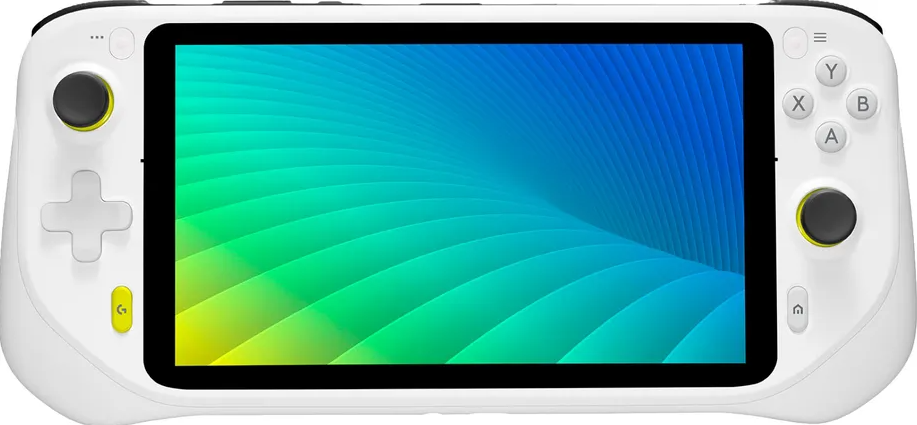
The device hardware has A, B, X, and Y buttons and two concave thumbsticks (which look rather small and uncomfortable as if they were an afterthought) as well as a nice-looking D-pad. You can also make out a Logitech button at the bottom left, a “Home” button at the bottom right, a start and select button near the top, and what looks like a micro SD card port, mute switch, and a volume rocker as well as your suspected shoulder and trigger buttons on the back.
I’m in love with cloud and mobile gaming, and am always looking to cover Stadia, GeForce NOW, and Steam Link/Deck news. I’m always on a quest to find which games work best with a gamepad on Android via the Google Play Store and hope that having a handheld that caters to all of these things specifically will help myself and others game more often on the go or from the comfort of our couch. It sure beats having to sit at the PC, in front of the TV, or having to place our phones into something like the Backbone One or GameSir X3 accessories which, while awesome, still feel like an incomplete solution.
With the success of the Steam Deck, Aya Neo, and GPDWin among other handheld devices coming into prominence over the past few years, I’m excited beyond belief to have something more comprehensive than the Nintendo Switch for cloud gaming and retro emulation.
SUBSCRIBE TO UPSTREAM
Get Chrome Unboxed delivered straight to your inbox
Upstream is our flagship, curated newsletter with the top stories, most click-worthy deals, giveaways, and trending articles from Chrome Unboxed sent directly to your inbox a few times a week. Join 31,000+ subscribers.

