


Support our independent tech coverage. Chrome Unboxed is written by real people, for real people—not search algorithms. Join Chrome Unboxed Plus for just $2 a month to get an ad-free experience, access to our private Discord, and more. Learn more about membership here.
START FREE TRIAL (MONTHLY)START FREE TRIAL (ANNUAL)
Lenovo just dropped a slew of new products including a leather-wrapped Yoga PC, the slimmest Legion laptop every created and a new Tab M10 that features and industry-first addition of Google’s Kid Space. Kid Space by Google offers an integrated hub where kids can explore and discover new content to help them learn and create. We’ll cover more on that later. The more-relevant announcement from Lenovo was the addition of a new Google Assistant speaker to the company’s growing line of smart-home devices.
As some of you may know, Lenovo’s current Smart Clock with the Google Assistant is my favorite smart display with their 7″ full-featured model coming in as a close second. The 4″ bedside clock is the perfect marriage of alarm clock and smart display. You don’t get video playback or a camera but I don’t want those features on my nightstand so it’s perfect. The latest addition hones down the nightstand experience to an even smaller device called the Lenovo Smart Clock Essential.
Lenovo is once again extending our smart home solutions with the launch of the new, mainstream Lenovo Smart Clock Essential, a connected digital smart clock designed for every room in the home

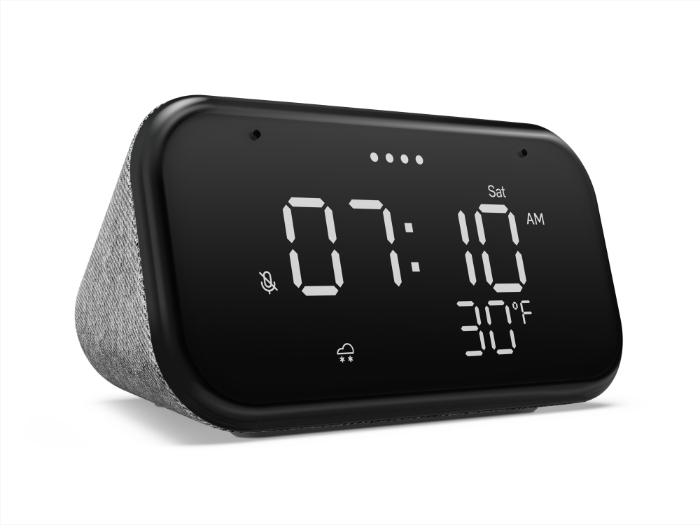


The Smart Clock Essential features the same 1.5″ 3W speaker found in the larger clock from Lenovo which means it should be a decent-sounding device. I’d put my current one up against the Nest Mini any day of the week. Like its larger sibling, the Essential Smart Clock features a USB port on the back for charging your phone or whatever other accessory you have sitting around. I use it to charge my Tic Watch Pro and it works perfectly. The smaller display foregoes a touchscreen and instead, offers a true alarm clock style interface.
Like the 4″ Smart Clock, the Essential features soft touch volume buttons on the top of the fabric-encased chassis but this model adds a dedicated alarm button and a play/pause button. Lenovo has also added a “night light” to this model to help you navigate your bedroom when you have to get up in the middle of the night. I’m not sure if this will simply be a sensor-activated brightening of the display or if it actually has an in-built light. You’ll also get a button on the back for muting the microphone which should be standard on any smart speaker. Like any Assistant speaker, you’ll be able to control all of your connected things from the Essential and it even has a weather widget on the display so you can keep an eye on the temperature.
The Lenovo Smart Clock Essential goes on sale next month and will retail for $49.99. That means we’ll likely see some really great prices come the holiday shopping season. In the mean time, the larger Smart Clock happens to be on sale at Best Buy right now for the same $49.99. While I definitely see the appeal of this smaller, more discrete model, $50 for the current Smart Clock is a solid deal and still my recommendation.
4″ Lenovo Smart Clock at Best Buy
SUBSCRIBE TO UPSTREAM
Get Chrome Unboxed delivered straight to your inbox
Upstream is our flagship, curated newsletter with the top stories, most click-worthy deals, giveaways, and trending articles from Chrome Unboxed sent directly to your inbox a few times a week. Join 31,000+ subscribers.

