

Support our independent tech coverage. Chrome Unboxed is written by real people, for real people—not search algorithms. Join Chrome Unboxed Plus for just $2 a month to get an ad-free experience, access to our private Discord, and more. Learn more about membership here.
START FREE TRIAL (MONTHLY)START FREE TRIAL (ANNUAL)
Later this week, we’re planning a video out about the thoughts I’ve put together around the Lenovo Chromebook 10e tablet. My time with this device has completely been about experiment and trial, not really about suggesting you buy it or skip it. You see, this device will likely never be a tablet I suggest most consumers go run out and buy. It is geared towards the classroom and that is clear in a few very specific ways, namely the lack of a keyboard/trackpad accessory. Sure, there will be a folio case with a keyboard on it coming soon, but that still means I’d need to be at a table or desk to use a mouse input.
Ultimately, I’ll suggest the upcoming Lenovo Chromebook Duet for general consumers, but this experiment is helping me get my head around life with a Chrome OS tablet. I’m still forming all those opinions and thoughts right now, so I don’t want to talk too much about my time with the tablet just yet. Overall, its going well and there’s really a lot to like about Chrome OS in this form factor. That being said, there’s one big request I have for the Chrome OS developers when it comes to really using a tablet like I want to use a tablet: Chrome OS, iPad OS, Android or otherwise. Can we please, PLEASE, get pattern unlock made available?
I, like many of you out there, keep my devices locked behind a password or biometric ID. Having your Chromebook that is fully attached to your Google account left wide open to anyone who comes across you device is not only irresponsible – it is foolish. Our devices simply have too much access to too many things in our lives to just leave the front door wide open all the time. Since that is the case, a key part of an always-on, always-ready device is a swift, simple way to unlock it on a regular basis. Our phones have had fingerprint scanners for years and now many of them have intricate face identification abilities as well. These methods give us a simple and fast way to get the device unlocked while still maintaining a high level of security.
Chromebooks have lagged behind in these efforts and we’re just now at the point where quite a few should ship with fingerprint scanners this year. Honestly, if fingerprint authentication was a given across the board for Chromebooks cheap and expensive, we wouldn’t be having this conversation to begin with. That just isn’t the case, though, and the only way to get logged into most Chromebooks comes down to a choice between your Google password and a 6-digit pin. Sure, there’s smart unlock, but as we can do more and more from just our Chromebooks, we shouldn’t have to also have our phone on our hip just to log in. Oh, and it can be painfully slow to actually register that your phone is close by and unlocked anyway, so I usually end up just punching in the code or password.
These shortcomings are more of a nag than a real issue on a device with a keyboard always attached, but for a tablet without a fingerprint scanner, this shortcoming starts to feel like a real problem. My chief complaint about the experience with the Lenovo 10e up to this point is the annoyance of always having to type in my PIN or password every single time the screen goes to sleep. At least 6 digits have to be poked in on the screen every single time the tablet screen powers down and after a few days of this, I’m about sick of it.
My current workaround is to pair my Fitbit Versa 2 to my phone and using Smart Unlock on my Pixel 4XL, my phone is technically unlocked when the watch is nearby. This setup then allows my 10e tablet to recognize my phone as unlocked and thus, allows for a one-click entrance past my lock screen. This works some times and others it fails, but it is far better than punching in a PIN on a number pad that simply cannot be reached with a single hand on the small-ish tablet. Right after typing this, I grabbed the 10e off the couch to see how it would react after being left idle for an hour or so and, after it thought about it for about 10 seconds, it did let me unlock with just a tap on the screen.
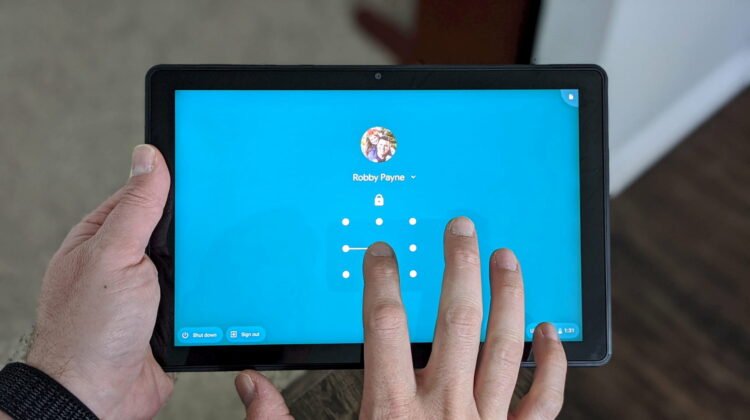
I suppose that is just fine, but there’s a much simpler, much more effective, tried, tested, beloved unlock mechanism that Google has in its back pocket and it needs to unleash it for Chromebooks – specifically for tablets. You know it and so do I: pattern unlock needs to be an option on Chrome OS. Period. There’s simply no reason this isn’t already a thing, and yet we can find nothing about this being worked on for Chrome OS at all. Why?? Why wouldn’t Google implement this quick, gesture-based unlocking mechanism for a touch-based operating system? I have no clue. Sure, Chrome OS wasn’t built on touch out of the gate, but that simply isn’t reality any longer. We have touchscreen clamshell Chromebooks, convertible touchscreen Chromebooks, detachable touchscreen Chromebooks and Chromebook tablets.
With touch interaction clearly being a focus point of the Chrome OS experience, why is a touch and gesture-based way to log in not also part of the experience at this point? I have no answer for that, but I have a request. If anyone reading this has the ability to get the wheels moving on a new pattern unlock setup for Chromebooks, can you do that? And if you do, can you let us know it is coming?
I know I’m not alone in championing the idea of affordable, enjoyable tablets running Chrome OS. I think the Lenovo Chromebook Duet is going to absolutely be the best device at the right price for a ton of potential users. I love that something so fun to use will be so accessible to so many because of the price and I realize that means skipping out on things like fingerprint scanners and face unlocking modules. I get it. It is in that spirit that I am asking for pattern unlock to be a thing on Chrome OS. Pattern unlock was the precursor to fingerprint scanners on Android and is still BY FAR my most preferred backup when our fancy, newer unlocking mechanisms fail.
So, what about it Chrome OS developers? Can we get pattern unlock on Chrome OS? Can you just take the existing function of the PIN unlock and add a new option that allows us to get into our device with a quick, simple gesture on the screen? I’m sure I’m not alone in this and as an absolute ton of people will likely attest to once they buy and begin using the Lenovo Chromebook Duet, this is likely a simply addition that will make the affordable tablet experience on Chrome OS miles better than it is right now.
Shop All The Latest Chromebook Deals
SUBSCRIBE TO UPSTREAM
Get Chrome Unboxed delivered straight to your inbox
Upstream is our flagship, curated newsletter with the top stories, most click-worthy deals, giveaways, and trending articles from Chrome Unboxed sent directly to your inbox a few times a week. Join 31,000+ subscribers.

