
• Skip to main content
  • Skip to primary sidebar
  • Deals
  • Features
  • Guides
  • Chromebooks
  • Videos
  • Podcast
  • More +
    • Reviews
    • Unboxing
    • Upcoming Devices
    • Chromebook Plus
    • Chrome
    • ChromeOS
    • Chrome OS Flex
  • Search
  • Sign Up
  • Log In
Chrome Unboxed – The Latest Chrome OS News

Chrome Unboxed - The Latest Chrome OS News

A Space for All Things Chrome, Google, and More!

  • Deals
  • Features
  • Guides
  • Chromebooks
  • Videos
  • Podcast
  • More +
    • Reviews
    • Unboxing
    • Upcoming Devices
    • Chromebook Plus
    • Chrome
    • ChromeOS
    • Chrome OS Flex
  • Search
  • Sign Up
  • Log In

You can no longer buy Kindle books through the Amazon app on Android

May 22, 2022 By Michael Perrigo View Comments

Support our independent tech coverage. Chrome Unboxed is written by real people, for real people—not search algorithms. Join Chrome Unboxed Plus for just $2 a month to get an ad-free experience, access to our private Discord, and more. Learn more about membership here.
START FREE TRIAL (MONTHLY)START FREE TRIAL (ANNUAL)

While I’m personally all in on the Google Play Books ecosystem for eBooks and audiobooks, I can understand that there is a much larger percentage of people that prefer Kindle and Audible for their content. Because Android is the dominant handheld operating system, it stands to reason that most of those same individuals also have a Samsung, Pixel, or other Android device and that they’re accustomed to purchasing their books through the Amazon app.

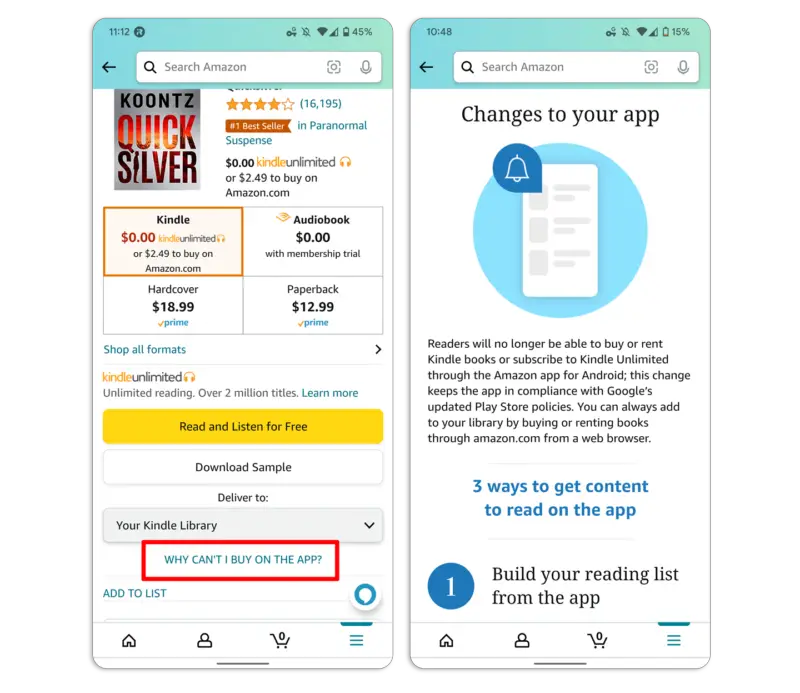
Unfortunately, this will no longer be possible as of June 1, 2022 – that’s just about a week away! As you can see in the image below from Ars Technica, the Amazon app now shows users a “Changes to your app” message when they attempt to purchase a Kindle eBook.
Xremove ads
Source: Ars Technica

Readers will no longer be able to buy or rent Kindle books or subscribe to Kindle Unlimited through the Amazon app for Android; this change keeps the app in compliance with Google’s updated Play Store policies. You can always add to your library by buying or renting books through amazon.com from a web browser.

Google Play billing policies state that any app available through the Play Store must utilize it to process payments, and not their own payment processing service. This has undoubtedly caused lots of frustration with major app providers like Epic Games, Barnes & Noble and now Amazon, especially as Google Play takes a 30% cut of in-app purchases!

Last month, Audible was no longer allowed to offer audiobook purchases or rentals either (you can still spend free purchase vouchers in the app though). For now, it looks like Amazon is playing ball, stating that they’ve made the appropriate changes to keep its apps in line with Google’s wishes, but I imagine it won’t take this lying down.

Featured Videos

Xremove ads

Barnes & Noble actually had to completely end digital purchases on the Nook HD 10″ due to this billing update since the Nook runs Android. Google claims that it has implemented a strict policy against other payment processes to keep users from getting confused with the Android user experience and so that there are no additional charges in the app. Basically, it wanted to limit the amount of communication a developer could do within their app in a billing sense, instead encouraging devs to communicate freely outside of the app for such things.

Did you ever buy Kindle eBooks or Audible audiobooks through the Amazon app on Android? Let me know in the comments what you think about the Play Store billing policy update and whether or not you agree with it. I can understand why Google is doing this, but I can also see where Apple has built a better setup by encouraging the opposite.

SUBSCRIBE TO UPSTREAM

Get Chrome Unboxed delivered straight to your inbox

Upstream is our flagship, curated newsletter with the top stories, most click-worthy deals, giveaways, and trending articles from Chrome Unboxed sent directly to your inbox a few times a week. Join 31,000+ subscribers.

Xremove ads
SUBSCRIBE HERE!

Filed Under: Apps, News, Privacy and Security, Updates

About Michael Perrigo

Known as "Google Mike" to his customers, Michael worked at Best Buy as a Chromebook Expert who dedicated his time to understanding the user experience from a regular Chromebook owner's perspective. Having spent nearly 20 years meeting you face-to-face, he strives to help you understand your technology through carefully crafted guides and coverage, relentlessly seeking out the spark in what's new and exciting about ChromeOS.

Primary Sidebar

Xremove ads

Deals

You can score $40 off Google’s battery-powered Nest Doorbell right now

By Joseph Humphrey
March 20, 2026

The touchscreen Lenovo Chromebook Slim 3 is a steal at under $200

By Robby Payne
March 16, 2026

Google TV Streamer and Remote held in front of a wall-mounted TV

The premium Google TV Streamer 4K is back down to $80

By Joseph Humphrey
March 16, 2026

The best Chromebook deals today

By Robby Payne
March 16, 2026

Pixel Buds Pro 2 running

I still love the Pixel Buds Pro 2 and they are $60 off right now

By Joseph Humphrey
March 13, 2026

More Deals

Xremove ads

Reviews

Acer Chromebook Plus Spin 514 Review: Kompanio Ultra power in a convertible

By Robby Payne
December 24, 2025

My review after 6 weeks with the Lenovo Chromebook Plus 14 [VIDEO]

By Robby Payne
August 11, 2025

One week with the best small Android tablet you can buy, and I’m sold

By Robby Payne
May 9, 2025

Best Chromebooks of 2024 [VIDEO]

By Robby Payne
November 28, 2024

Samsung Galaxy Chromebook Plus Review: Samsung is back! [VIDEO]

By Robby Payne
October 28, 2024

More Reviews

Xremove ads

Guides

This Chromebook trackpad shortcut is definitely not new, but is blowing my mind

By Robby Payne
March 11, 2024

How to reduce broadcast delay on YouTube TV to stop live spoilers

By Robby Payne
December 8, 2023

Windows PC keyboard and Chromebook

How to use a Windows keyboard with a Chromebook

By Joseph Humphrey
December 8, 2023

How reset and revert your Chromebook to the previous version of Chrome OS

By Robby Payne
November 29, 2023

My Chromebook Plus features disappeared: here’s how I fixed it

By Robby Payne
November 24, 2023

More Guides

TWITTER · FACEBOOK · INSTAGRAM · YOUTUBE · EMAIL · ABOUT

Copyright © 2026 · Chrome Unboxed · Chrome is a registered trademark of Google Inc.
We are participants in various affiliate advertising programs designed to provide a means for us to earn fees by linking to affiliated sites.

PRIVACY POLICY