

Support our independent tech coverage. Chrome Unboxed is written by real people, for real people—not search algorithms. Join Chrome Unboxed Plus for just $2 a month to get an ad-free experience, access to our private Discord, and more. Learn more about membership here.
START FREE TRIAL (MONTHLY)START FREE TRIAL (ANNUAL)

Recent reports have shed light on a new feature that may be coming to Chrome OS in the near future. “Instant Tethering” is a method of sharing your phones internet connection with nearby devices seamlessly without having to manually enable a hotspot.
The feature rolled out in the latest update of Android Nougat 7.1.1 and now it appears that Chromebooks may be able to take advantage of the option in the near future. Here’s a quick synopsis of how Instant Tethering works.
You can automatically share a mobile data connection between certain Pixel and Nexus devices via Wi-Fi when they’re signed in to the same Google Account. For example, you can automatically connect your tablet to the Internet using your phone’s data connection.
Google Support
We have seen some articles as of late stating that the tethering feature has shown up in the Canary channel of Chrome OS but I was actually able to find the option in the less volatile Developer channel. Before we go any further I can say the feature is not functioning at this point but it is there.
By default this feature is disabled but under chrome://flags we see the tethering option and the brief description:
Instant Tethering Chrome OS
Enables Instant Tethering. Instant Tethering allows your nearby Google phone to share its Internet connection with this device.
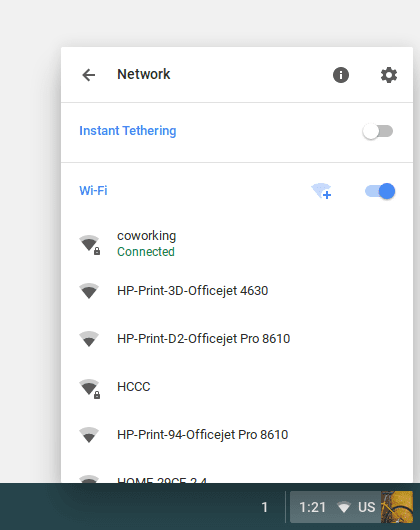 To clarify, this will not allow you to share your Chromebooks connection. Rather, you will be able to tether to certain mobile devices should your Chromebook lose its wi-fi connection for whatever reason. With the feature enable your Chrome OS device should automatically connect to your smart phone via wi-fi and utilize its data connection.
For now the only devices that allow the Instant Tethering feature are the Google Pixel, Pixel XL, Nexus 6, Nexus 5X, and Nexus 6P running Android 7.1.1 and up. If you use one of these devices you can navigate to Settings>Personal and tap Google. From there tap Instant Tethering and “Provide data connection.”

On current devices that can access the tethering feature you simple follow the same procedure and click “get data connection.” You will need to make sure your Bluetooth and wi-fi are enabled and that both devices are signed into the same Google account.
Once enabled, if your device drops its internet connection you will receive a prompt asking you if you want to connect to the Instant Tether device. Note: if the tethered connection is idle for more than ten(10) minutes it will automatically disconnect to save data.
Again, this feature isn’t functional in Chrome OS at the moment but it is clear developer are working to make it a reality. You can learn more about Instant Tethering, how it works and what devices can currently use the feature on Google’s Support Page.
Source: ChromeStory

