

• Skip to main content
  • Skip to primary sidebar
  • Deals
  • Features
  • Guides
  • Chromebooks
  • Videos
  • Podcast
  • More +
    • Reviews
    • Unboxing
    • Upcoming Devices
    • Chromebook Plus
    • Chrome
    • ChromeOS
    • Chrome OS Flex
  • Search
  • Sign Up
  • Log In
Chrome Unboxed – The Latest Chrome OS News

Chrome Unboxed - The Latest Chrome OS News

A Space for All Things Chrome, Google, and More!

  • Deals
  • Features
  • Guides
  • Chromebooks
  • Videos
  • Podcast
  • More +
    • Reviews
    • Unboxing
    • Upcoming Devices
    • Chromebook Plus
    • Chrome
    • ChromeOS
    • Chrome OS Flex
  • Search
  • Sign Up
  • Log In

In a win for the web, Google Home finally gets device controls from the browser

September 9, 2025 By Robby Payne View Comments

Support our independent tech coverage. Chrome Unboxed is written by real people, for real people—not search algorithms. Join Chrome Unboxed Plus for just $2 a month to get an ad-free experience, access to our private Discord, and more. Learn more about membership here.
START FREE TRIAL (MONTHLY)START FREE TRIAL (ANNUAL)

The Google Home web app at home.google.com has been a fantastic addition for smart home users, finally giving us a way to view all of our camera feeds on a large desktop or laptop screen. But since its launch, it has had one massive, glaring omission: the ability to actually control the rest of our smart home devices.

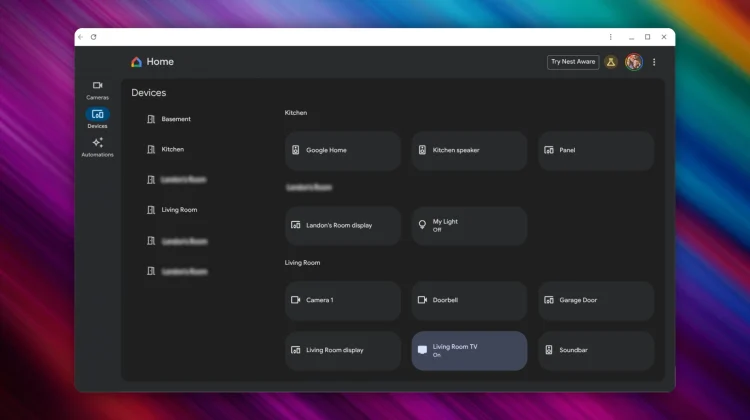
Well, that is finally changing. As reported by 9to5Google, a massive update is now rolling out to the Google Home for web Public Preview that adds a new “Devices” tab and brings controls for lights, thermostats, and more right to your browser.

Xremove ads

Your smart home, now on your desktop

This long-awaited update adds a new “Devices” tab to the left-hand navigation rail of the web app. The interface will look very familiar to anyone who has used the Google Home app on a tablet, with a grid of all your smart home devices organized by room.

From this new dashboard, you can now finally control your core smart home gadgets. You can:

Featured Videos

Xremove ads
  • Turn lights on or off with a simple click.
  • Adjust the brightness of your lights by dragging on the tile.
  • Control your Nest Thermostat’s temperature and switch between modes (Heat, Cool, etc.).
  • Operate smart locks and plugs.

This is a huge leap forward, making it infinitely easier to manage your smart home when you’re sitting at your desk on a Chromebook or any other computer.

It’s still a work in progress

It’s important to note that this is still a Public Preview, and the feature set isn’t complete just yet. For instance, while you can adjust the brightness of your lights, there is no color picker available at this time.

The biggest limitation is with media devices. While your speakers, smart displays, and Chromecasts will appear in the grid, they cannot be controlled yet. Google is aware of this, displaying a message that “More device types and controls are coming soon.”

Xremove ads

Even with these limitations, this is a fantastic and very welcome update. The ability to control our most-used devices like lights and thermostats from the web is a game-changer. You can try out the new experience for yourself by heading over to home.google.com.

SUBSCRIBE TO UPSTREAM

Get Chrome Unboxed delivered straight to your inbox

Upstream is our flagship, curated newsletter with the top stories, most click-worthy deals, giveaways, and trending articles from Chrome Unboxed sent directly to your inbox a few times a week. Join 31,000+ subscribers.

SUBSCRIBE HERE!

Filed Under: Nest, News, Smart Home

About Robby Payne

As the founder of Chrome Unboxed, Robby has been reviewing Chromebooks for over a decade. His passion for ChromeOS and the devices it runs on drives his relentless pursuit to find the best Chromebooks, best services, and best tips for those looking to adopt ChromeOS and those who've already made the switch.

Primary Sidebar

Googlebook

Your Android phone might soon double as a wireless mouse for Googlebook

By Robby Payne
September 5, 2026

Google’s John Solomon explains why Googlebook is Google’s next Chromebook moment

By Robby Payne
September 4, 2026

Googlebook is designed for AI, but that’s not why I’m excited for it

By Robby Payne
September 3, 2026

Leaked Googlebook ‘Look up’ app appears on the Play Store ahead of launch

By Robby Payne
September 2, 2026

Acer teases its first Googlebook at IFA ahead of Google’s press event

By Robby Payne
September 2, 2026

More Googlebook

Xremove ads

Deals

The best Chromebook deals today

By Robby Payne
September 2, 2026

The best Chromebook ever made is $350 off at Best Buy right now

By Robby Payne
August 21, 2026

The excellent, powerful Acer Chromebook Plus Spin 514 is $150 off right now

By Robby Payne
August 12, 2026

Acer’s new Chromebook 315 is wildly affordable and points to the real future of Chromebooks

By Robby Payne
August 11, 2026

You can score the massively upgraded ASUS CX54 Chromebook Plus for just $599 right now

By Joseph Humphrey
July 28, 2026

More Deals

Xremove ads

Reviews

Acer Chromebook Plus Spin 514 Review: the best convertible you can buy [VIDEO]

By Robby Payne
July 1, 2026

Lenovo Chromebook Plus 2-in-1 Review: pretty great in a vacuum

By Robby Payne
April 23, 2026

My review after 6 weeks with the Lenovo Chromebook Plus 14 [VIDEO]

By Robby Payne
August 11, 2025

One week with the best small Android tablet you can buy, and I’m sold

By Robby Payne
May 9, 2025

Best Chromebooks of 2024 [VIDEO]

By Robby Payne
November 28, 2024

More Reviews

Xremove ads

TWITTER · FACEBOOK · INSTAGRAM · YOUTUBE · EMAIL · ABOUT

Copyright © 2026 · Chrome Unboxed · Chrome is a registered trademark of Google Inc.
We are participants in various affiliate advertising programs designed to provide a means for us to earn fees by linking to affiliated sites.

PRIVACY POLICY