


Support our independent tech coverage. Chrome Unboxed is written by real people, for real people—not search algorithms. Join Chrome Unboxed Plus for just $2 a month to get an ad-free experience, access to our private Discord, and more. Learn more about membership here.
START FREE TRIAL (MONTHLY)START FREE TRIAL (ANNUAL)
A few days ago, Google dropped a bunch of new AI-powered features for Chromebook Plus that help users be more productive and creative. But these new features aren’t just for consumers, Google is also thinking about how these AI features can help businesses and teams, too. In a recent post on the Google Cloud, the company outlined several ways you can use Google AI to seriously amp up your team’s productivity, creativity, and collaboration.
Work smarter, not harder
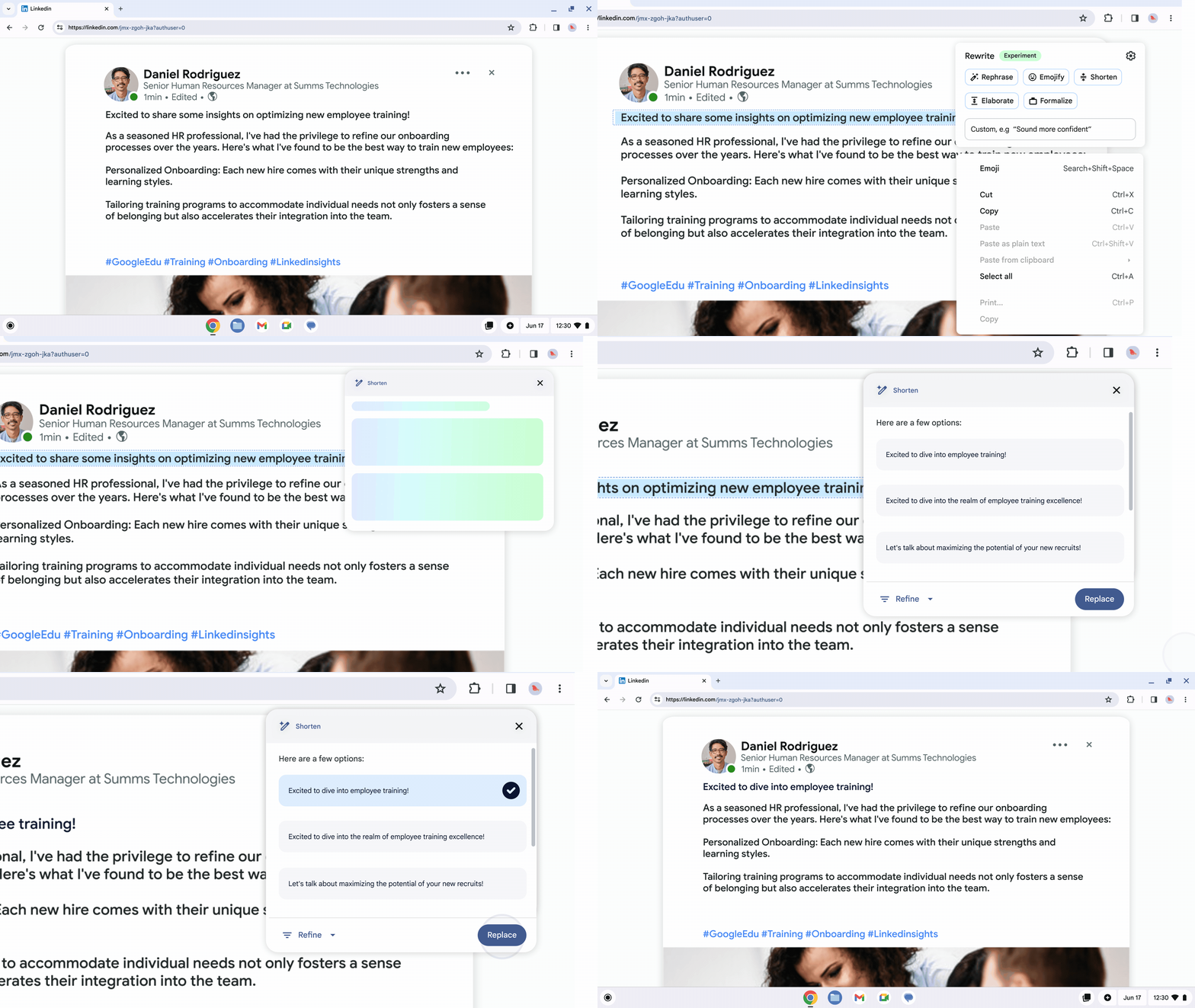
Ever wished you had a writing assistant to help you refine an email to a coworker? Well, now you do! Help me write on Chromebook Plus is like having a personal editor and writing assistant to help you create and refine any text across the web and in various apps. If you’re already using Gemini in Docs or Slides, you know the power of this tool to help you create and edit content but with Help me write on Chromebook Plus, you can use this tool anywhere, in any text field.
If you’re tied to your to-do list like me, you can now easily manage your list with the new Google Tasks and Calendar integration. Now a single click of the date in the bottom right corner of your shelf can give you easy access to your to-do list.
And later this year, you will be able to jump right back into your workflow after logging in with window summaries that show you previously open windows. This way you can minimize the temptation to work on something else and stay focused on the task that you were working on when you were last on your Chromebook Plus. You will also soon be able to avoid distractions with the new Focus mode that’s coming soon, too.
Last in the productivity department, Help me read is coming later this year too to help your team better understand and analyze websites or PDFs. This new tool will summarize the content and even let you ask follow-up questions.
Creativity and collaboration
In addition to these productivity tools, Google AI is also here to help teams be more creative and allow for easy collaboration. First up, Google has updated the already excellent screencast tool to not only let you easily record, edit, and share content, but now you even translating those recordings into 12 languages and create GIFs to easily share a quick demo of something on your screen.
Whether you’re working remotely or in the office, Chromebook Plus devices also have several AI-powered video call features that make you look and sound your best. Noise cancellation and improved lighting allow you to fine-tune your setup in any video conferencing app. If you want to spice up your background, generative AI video call backgrounds can create a unique look for your call and also work across any application. Additionally, Google says they are bringing new video call controls later this year that will allow users to customize the sound and picture quality directly from the Chromebook shelf.
On the management side of things, Google says they are trying to make managing a fleet of Chromebooks a breeze with the enhancements to the Google Admin console. With Device Hub, IT admins can get a centralized look at all your device info and can even receive recommendations based on potential issues.
Chromebook Plus for Enterprise
Here at Chrome Unboxed, we’re obviously excited to see new consumer Chromebook Plus devices and features, but we also run a business that uses Workspace and are excited about how we might be able to leverage these new AI-powered tools. And we know that many of our readers also run businesses or IT departments and are using Workspace, Chromebooks, and Google services to get work done. While all of the Chromebook Showcase presentation last week was focused on consumers, it’s interesting to look at these new AI-powered features from the enterprise perspective and realize how they might be used to supercharge productivity and creativity.
If you are a business owner or IT admin, be on the lookout for these new features rolling out soon via an automatic update, starting with ChromeOS version 126 which is slated to be released in June. Google also points out that while these features may not be immediately available on managed devices, they are working to build out robust IT controls and that businesses deploying Chromebook Plus devices have “much to look forward to this year.” Let us know in the comments how you’re planning on using Chromebook Plus devices and these new AI features to get work done.
SUBSCRIBE TO UPSTREAM
Get Chrome Unboxed delivered straight to your inbox
Upstream is our flagship, curated newsletter with the top stories, most click-worthy deals, giveaways, and trending articles from Chrome Unboxed sent directly to your inbox a few times a week. Join 31,000+ subscribers.

