

• Skip to main content
  • Skip to primary sidebar
  • Deals
  • Features
  • Guides
  • Chromebooks
  • Videos
  • Podcast
  • More +
    • Reviews
    • Unboxing
    • Upcoming Devices
    • Chromebook Plus
    • Chrome
    • ChromeOS
    • Chrome OS Flex
  • Search
  • Sign Up
  • Log In
Chrome Unboxed – The Latest Chrome OS News

Chrome Unboxed - The Latest Chrome OS News

A Space for All Things Chrome, Google, and More!

  • Deals
  • Features
  • Guides
  • Chromebooks
  • Videos
  • Podcast
  • More +
    • Reviews
    • Unboxing
    • Upcoming Devices
    • Chromebook Plus
    • Chrome
    • ChromeOS
    • Chrome OS Flex
  • Search
  • Sign Up
  • Log In

How to set your Chromebook’s Calendar View widget to start on Mondays

August 28, 2022 By Johanna Romero View Comments

Featured image of the ChromeOS Calendar View widget

Support our independent tech coverage. Chrome Unboxed is written by real people, for real people—not search algorithms. Join Chrome Unboxed Plus for just $2 a month to get an ad-free experience, access to our private Discord, and more. Learn more about membership here.
START FREE TRIAL (MONTHLY)START FREE TRIAL (ANNUAL)

Ever since Google introduced the Calendar View widget to ChromeOS in version 104, many discussions have been had about how to improve it. One of the most requested features for it, besides having the ability to integrate all of your Google Calendars, is how to change the starting day of the week to Monday instead of Sunday. Many thought this setting could be controlled by changing your weekly start day directly in Calendar, but unfortunately, this did not translate to switching it on the widget.
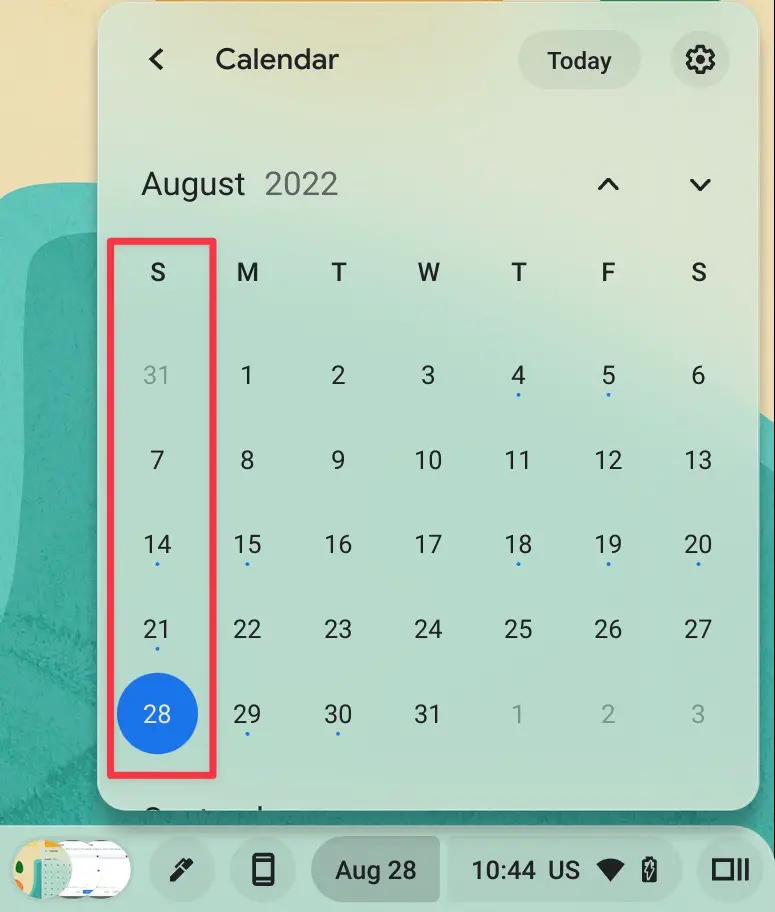
ChromeOS Calendar View widget in the U.S. showing Sunday as the first day of the week

Fortunately, the question came up again on Reddit, where u/guzman77 offered a solution he came across by trying to do the opposite and changing his start day to Sunday instead. This solution was spotted by About Chromebooks, who reported on it. The trick relies on changing your Chromebook’s device language to that of a location where Monday is considered the first day of the week.

Xremove ads

This realization took me down an interesting rabbit hole. As an American, I’ve always known Sunday to be the first official day of the week in the calendar, while Monday is the first day of the working week. But, unbeknownst to me, there are places in the world where Monday is actually the first official day of the week. It all has to do with ISO 8601 – an international standard covering the worldwide exchange and communication of date and time-related data – which established that the first day of the week is Monday in the Gregorian calendar. However, although the United States uses the Gregorian calendar as well, it follows the ancient and religious custom of considering Saturday (the Sabbath) the last day of the week and Sunday the most important and thus the first day.

This solution, thus not officially one or a problem that affects anyone outside of the U.S., requires that you choose a language other than “English (United States)” in your language settings. Here’s how you do it:

Featured Videos

Xremove ads

Change your ChromeOS device language

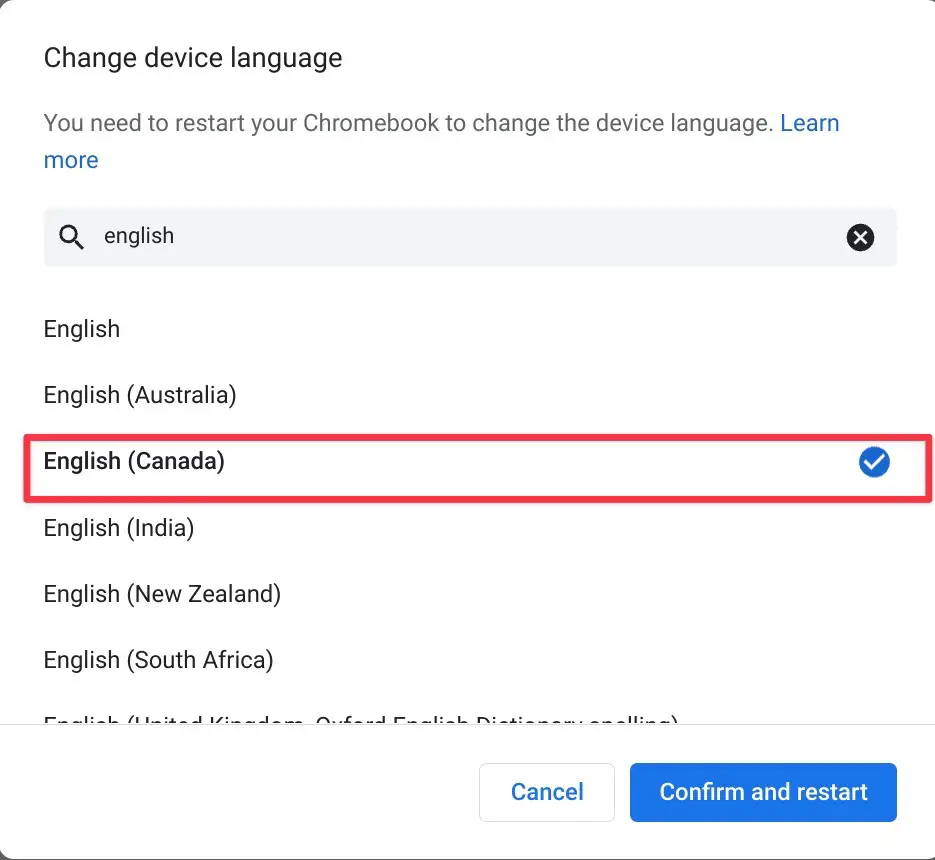
In your Chromebook settings, navigate to the “Languages and inputs” section. Once there, tap on the first option, which is for the device language, not to be confused with your input and keyboard language. This will bring up a popup to select a language from a long list. For English speakers, type in “English” in the search field, and select “English (Canada)” from the search results.
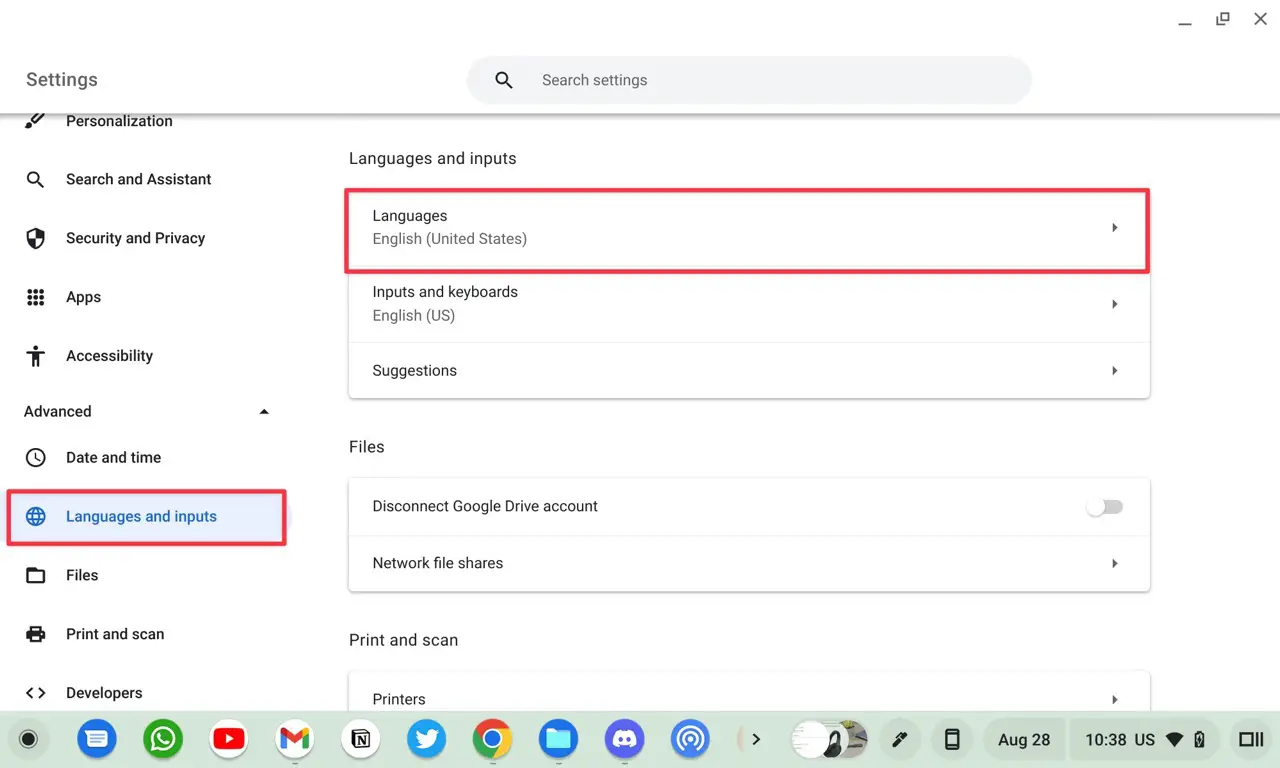
Chromebook settings page annotated to highlight "Language and inputs," then "Languages" section.
Chromebook device language settings annotated to highlight "English (Canada".

You will be prompted to confirm and restart for the change to take effect. Once your Chromebook restarts, you will notice that the calendar view widget will now show Monday as the first day of the week, as well as show the order in which the date appears underneath in “Day Month” format instead of “Month Day” as customary in the U.S.
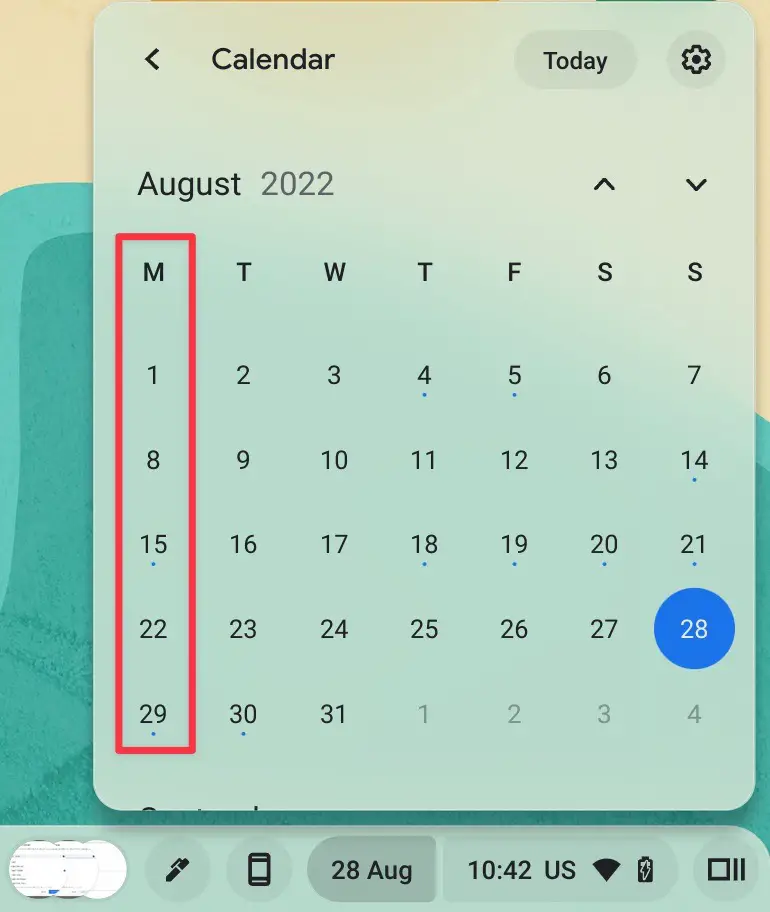
ChromeOS Calendar View widget using "English (Canada)" language showing Monday as the first day of the week
ChromeOS Calendar View widget using “English (Canada)” language showing Monday as the first day of the week
I just want the steps!
    ​
  1. In your Chromebook’s settings, navigate to the “Languages and inputs” section.
  2. Tap on the first option, which is for the device language.
  3. For English, type in “English” in the search field.
  4. Select “English (Canada)” from the options.
  5. Confirm and restart your Chromebook.

SUBSCRIBE TO UPSTREAM

Get Chrome Unboxed delivered straight to your inbox

Upstream is our flagship, curated newsletter with the top stories, most click-worthy deals, giveaways, and trending articles from Chrome Unboxed sent directly to your inbox a few times a week. Join 31,000+ subscribers.

Xremove ads
SUBSCRIBE HERE!

Filed Under: ChromeOS, Guides and How-To's Tagged With: calendar view, chromebook, chromeos, how to, widget

Primary Sidebar

Googlebook

BentoBar almost makes me love the Googlebook status bar

By Robby Payne
November 4, 2026

If your Dell XPS Googlebook volume is fluctuating on its own, you aren’t crazy

By Robby Payne
November 3, 2026

A new budget-friendly Dell Googlebook is officially in the works

By Robby Payne
November 3, 2026

HP Googlebook 14 unboxing and hands-on: this is Elite [VIDEO]

By Robby Payne
November 3, 2026

Googlebook OS’ top bar needs to move to the bottom of the screen for desktop mode

By Robby Payne
November 2, 2026

More Googlebook

Xremove ads

Deals

My favorite convertible Chromebook is $150 off right now and primed for Googlebook OS

By Robby Payne
September 29, 2026

Google Pixel Buds 2a in Hazel bundled with a new Googlebook laptop at Best Buy

Score a free $129 pair of Pixel Buds 2a with any Googlebook pre-order at Best Buy

By Robby Payne
September 28, 2026

The best Chromebook deals today

By Robby Payne
September 2, 2026

The best Chromebook ever made is $350 off at Best Buy right now

By Robby Payne
August 21, 2026

The excellent, powerful Acer Chromebook Plus Spin 514 is $150 off right now

By Robby Payne
August 12, 2026

More Deals

Xremove ads

Reviews

My brutally honest thoughts on Googlebook after one month [VIDEO]

By Robby Payne
November 2, 2026

Acer Chromebook Plus Spin 514 Review: the best convertible you can buy [VIDEO]

By Robby Payne
July 1, 2026

Lenovo Chromebook Plus 2-in-1 Review: pretty great in a vacuum

By Robby Payne
April 23, 2026

My review after 6 weeks with the Lenovo Chromebook Plus 14 [VIDEO]

By Robby Payne
August 11, 2025

One week with the best small Android tablet you can buy, and I’m sold

By Robby Payne
May 9, 2025

More Reviews

Xremove ads

TWITTER · FACEBOOK · INSTAGRAM · YOUTUBE · EMAIL · ABOUT

Copyright © 2026 · Chrome Unboxed · Chrome is a registered trademark of Google Inc.
We are participants in various affiliate advertising programs designed to provide a means for us to earn fees by linking to affiliated sites.

PRIVACY POLICY