• Skip to main content
  • Skip to primary sidebar
  • Deals
  • Features
  • Guides
  • Chromebooks
  • Videos
  • Podcast
  • More +
    • Reviews
    • Unboxing
    • Upcoming Devices
    • Chromebook Plus
    • Chrome
    • ChromeOS
    • Chrome OS Flex
  • Search
  • Sign Up
  • Log In
Chrome Unboxed – The Latest Chrome OS News

Chrome Unboxed - The Latest Chrome OS News

A Space for All Things Chrome, Google, and More!

  • Deals
  • Features
  • Guides
  • Chromebooks
  • Videos
  • Podcast
  • More +
    • Reviews
    • Unboxing
    • Upcoming Devices
    • Chromebook Plus
    • Chrome
    • ChromeOS
    • Chrome OS Flex
  • Search
  • Sign Up
  • Log In

How to opt-in for emergency weather alerts on Android

September 27, 2022 By Johanna Romero View Comments

Featured image of pixel phone with a tornado watch alert

Support our independent tech coverage. Chrome Unboxed is written by real people, for real people—not search algorithms. Join Chrome Unboxed Plus for just $2 a month to get an ad-free experience, access to our private Discord, and more. Learn more about membership here.
START FREE TRIAL (MONTHLY)START FREE TRIAL (ANNUAL)

Presently, as powerful Hurricane Ian continues its track toward Florida, many residents are scrambling to find the most up-to-date information in order to stay safe. The simplest way of staying in the know is by registering to get local weather alerts by using Wireless Emergency Alerts (WEA), which was formerly known as Commercial Mobile Alert System (CMAS). These alerts are sent by the National Weather Service (NWS) and are supported by most modern smartphones.

This setting should be available on more recent models of Apple iOS and Android phones, as well as on older phones that have been upgraded to a more recent operating system. However, the setting is normally disabled before these phones are sent out to be sold to customers, which means the phone owner is required to enable it manually. In Android phones, the exact location of the setting can vary. However, in the interest of making these instructions as simple as possible, we will narrow them down to enabling them from within the Google Messages app on a Pixel device.

Xremove ads

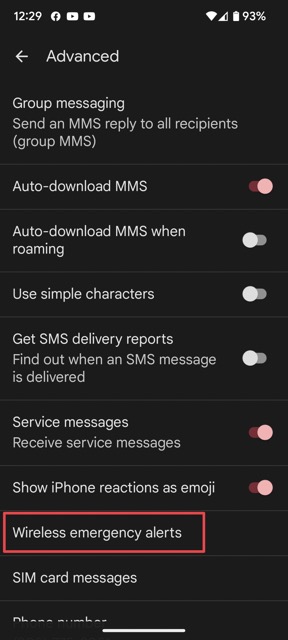
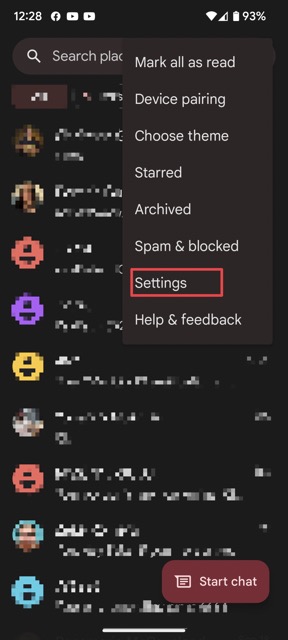
To turn on WEA (Wireless Emergency Alerts) from the “Messages” app, tap on the three-dot menu and tap on “Settings.” Next, from the settings section, select “Advanced,” followed by “Wireless emergency alerts.”
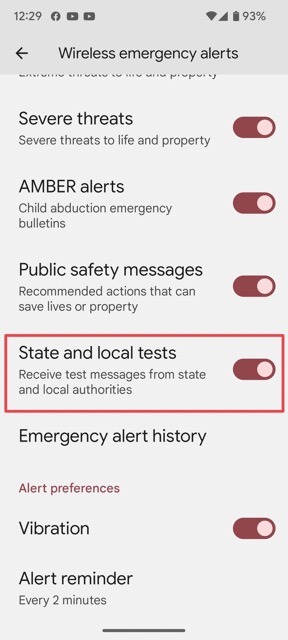
You will then see several options for emergency alerts. The one that alerts you on weather events is called “State and local tests,” which, in my opinion, is poorly named. Since that alert is not enabled by default, you will most likely find it disabled. Go ahead and enable it. Once enabled, you should start receiving alerts for local weather emergencies.
Featured Videos

Xremove ads

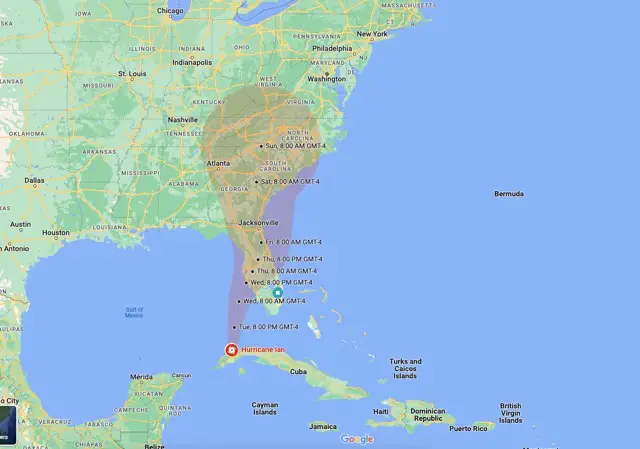
For those that are currently awaiting the landfall of Hurricane Ian, here’s a neat little trick: Search for “Hurricane Ian” in Google Maps, and you will see the real-time location of the storm along with its projected track. This works for both desktop and mobile.

I just want the steps!

1. Open the Messages app

2. Tap on the three-dot menu

3. Tap on Settings

4. Select Advanced

5. Select Wireless emergency alerts

6. Enable State and local tests

Filed Under: Android, Guides and How-To's Tagged With: android, pixel, wea, weather

Primary Sidebar

Googlebook

Google’s John Solomon explains why Googlebook is Google’s next Chromebook moment

By Robby Payne
September 4, 2026

Googlebook is designed for AI, but that’s not why I’m excited for it

By Robby Payne
September 3, 2026

Leaked Googlebook ‘Look up’ app appears on the Play Store ahead of launch

By Robby Payne
September 2, 2026

Acer teases its first Googlebook at IFA ahead of Google’s press event

By Robby Payne
September 2, 2026

Adobe just released a Premiere beta for Android, but Googlebook will need much more

By Joseph Humphrey
September 1, 2026

More Googlebook

Xremove ads

Deals

The best Chromebook deals today

By Robby Payne
September 2, 2026

The best Chromebook ever made is $350 off at Best Buy right now

By Robby Payne
August 21, 2026

The excellent, powerful Acer Chromebook Plus Spin 514 is $150 off right now

By Robby Payne
August 12, 2026

Acer’s new Chromebook 315 is wildly affordable and points to the real future of Chromebooks

By Robby Payne
August 11, 2026

You can score the massively upgraded ASUS CX54 Chromebook Plus for just $599 right now

By Joseph Humphrey
July 28, 2026

More Deals

Xremove ads

Reviews

Acer Chromebook Plus Spin 514 Review: the best convertible you can buy [VIDEO]

By Robby Payne
July 1, 2026

Lenovo Chromebook Plus 2-in-1 Review: pretty great in a vacuum

By Robby Payne
April 23, 2026

My review after 6 weeks with the Lenovo Chromebook Plus 14 [VIDEO]

By Robby Payne
August 11, 2025

One week with the best small Android tablet you can buy, and I’m sold

By Robby Payne
May 9, 2025

Best Chromebooks of 2024 [VIDEO]

By Robby Payne
November 28, 2024

More Reviews

Xremove ads

TWITTER · FACEBOOK · INSTAGRAM · YOUTUBE · EMAIL · ABOUT

Copyright © 2026 · Chrome Unboxed · Chrome is a registered trademark of Google Inc.
We are participants in various affiliate advertising programs designed to provide a means for us to earn fees by linking to affiliated sites.

PRIVACY POLICY