

• Skip to main content
  • Skip to primary sidebar
  • Deals
  • Features
  • Guides
  • Chromebooks
  • Videos
  • Podcast
  • More +
    • Reviews
    • Unboxing
    • Upcoming Devices
    • Chromebook Plus
    • Chrome
    • ChromeOS
    • Chrome OS Flex
  • Search
  • Sign Up
  • Log In
Chrome Unboxed – The Latest Chrome OS News

Chrome Unboxed - The Latest Chrome OS News

A Space for All Things Chrome, Google, and More!

  • Deals
  • Features
  • Guides
  • Chromebooks
  • Videos
  • Podcast
  • More +
    • Reviews
    • Unboxing
    • Upcoming Devices
    • Chromebook Plus
    • Chrome
    • ChromeOS
    • Chrome OS Flex
  • Search
  • Sign Up
  • Log In

How to disable YouTube’s super annoying ‘Inline Preview’ feature when hovering over thumbnails

May 12, 2022 By Michael Perrigo View Comments

Support our independent tech coverage. Chrome Unboxed is written by real people, for real people—not search algorithms. Join Chrome Unboxed Plus for just $2 a month to get an ad-free experience, access to our private Discord, and more. Learn more about membership here.
START FREE TRIAL (MONTHLY)START FREE TRIAL (ANNUAL)

Over what I feels like the past few weeks, a strange, new feature has appeared on YouTube while browsing my feed. At first, I thought it was due to a Chrome extension I had chosen to install, but nope – just another annoying Google update that I could live without. While perusing on the home screen, hovering over any video thumbnail causes it to zoom in, and begin playing in real-time.

This sounds great and all until you think about it the hover preview worked before – no zoom in, no animation delay, and you could still see several frames from the video to get an idea of whether or not you wanted to click on it to watch the whole thing. This is called an “Inline preview”, and I’ve dealt with it for quite a while now, being too lazy to figure out how to turn it off.

Xremove ads

However, because I would have to wait for the entire video thumbnail to enlarge as it zooms toward me and then wait for the video to start previewing “inline”, it’s been a lot more tedious to add things to my Watch Later list using the small clock icon at the corner of the video. I can’t tell you how annoying this is!
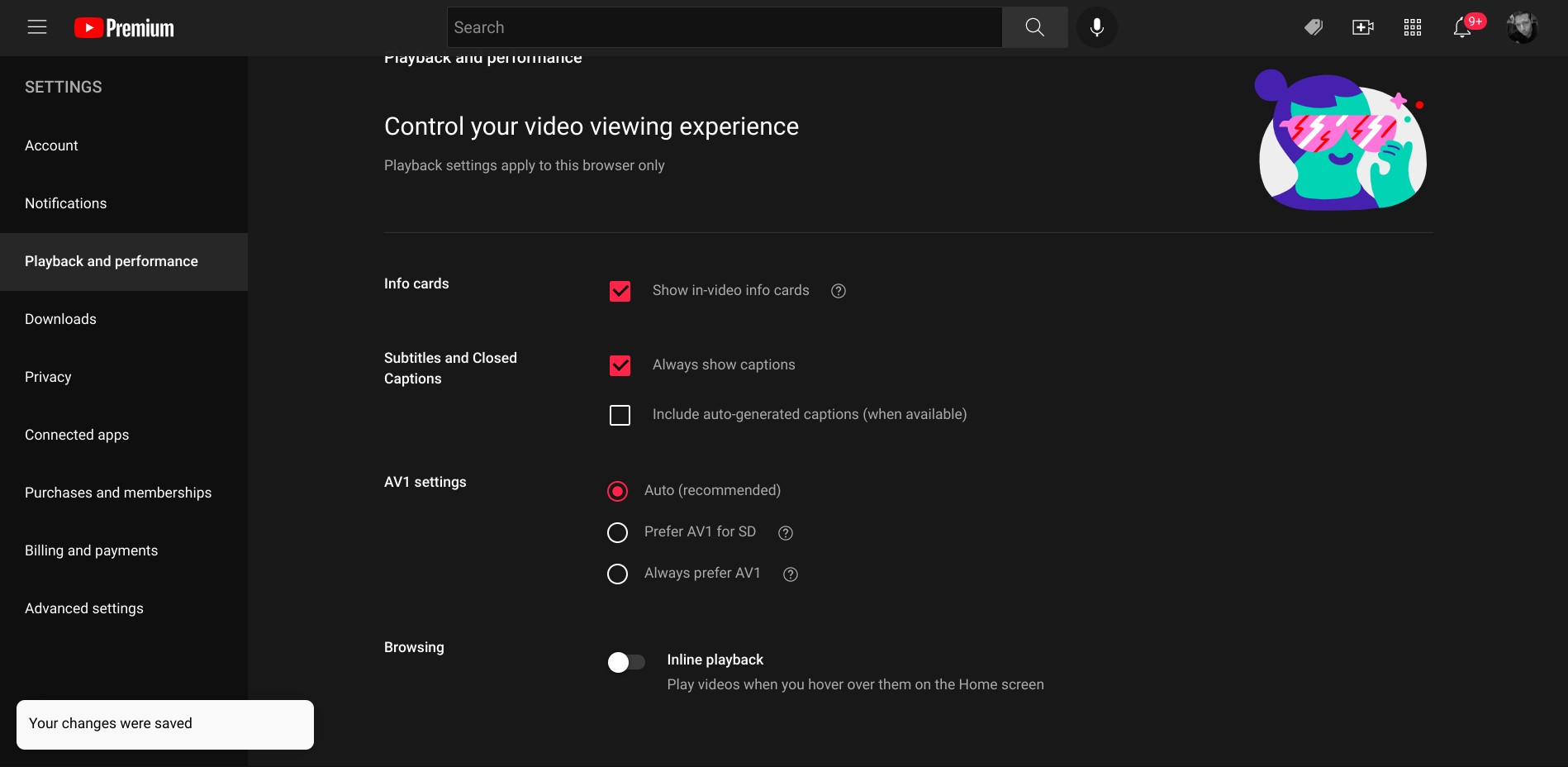
If you click on your profile image at the top-right of the YouTube window, and then go to “Settings”, you can turn off “Inline playback” under the “Playback and Performance” section. Anyone who has also been frustrated by this update will immediately get a breath of fresh air upon revisiting the home screen of the video service as hovering over videos will simply play a handful of frames without the zoom effect!

Featured Videos

Xremove ads

I just want the steps

1. Click your profile image at the top-right of YouTube.com
2. Visit the “Playback and performance” section on the left hand side
3. Scroll down to the “Browsing” section and toggle the “Inline playback” feature
4. “Your changes were saved” will appear at the bottom-left of the screen (see above)
5. Return to the YouTube home screen and enjoy!

Let me know in the comments if you prefer inline playback to be turned on or off. Are still frames from the video enough to entice you to click on them, or do you need sound and a larger preview to appear on screen when you place your mouse over it? I would personally be fine with this update if Google allowed the video to play in full with audio on hover (like it does on my living room TV), but the whole enlarged player with a delayed animation just kind of irks me, perhaps more than it ought to!

SUBSCRIBE TO UPSTREAM

Get Chrome Unboxed delivered straight to your inbox

Upstream is our flagship, curated newsletter with the top stories, most click-worthy deals, giveaways, and trending articles from Chrome Unboxed sent directly to your inbox a few times a week. Join 31,000+ subscribers.

SUBSCRIBE HERE!

Filed Under: Apps, Guides and How-To's, New & Upcoming Features, News, Updates, YouTube

About Michael Perrigo

Known as "Google Mike" to his customers, Michael worked at Best Buy as a Chromebook Expert who dedicated his time to understanding the user experience from a regular Chromebook owner's perspective. Having spent nearly 20 years meeting you face-to-face, he strives to help you understand your technology through carefully crafted guides and coverage, relentlessly seeking out the spark in what's new and exciting about ChromeOS.

Primary Sidebar

Googlebook

With the Googlebook launch, the length of the support window will matter a great deal

By Robby Payne
September 7, 2026

Your Android phone might soon double as a wireless mouse for Googlebook

By Robby Payne
September 5, 2026

Google’s John Solomon explains why Googlebook is Google’s next Chromebook moment

By Robby Payne
September 4, 2026

Googlebook is designed for AI, but that’s not why I’m excited for it

By Robby Payne
September 3, 2026

Leaked Googlebook ‘Look up’ app appears on the Play Store ahead of launch

By Robby Payne
September 2, 2026

More Googlebook

Xremove ads

Deals

The best Chromebook deals today

By Robby Payne
September 2, 2026

The best Chromebook ever made is $350 off at Best Buy right now

By Robby Payne
August 21, 2026

The excellent, powerful Acer Chromebook Plus Spin 514 is $150 off right now

By Robby Payne
August 12, 2026

Acer’s new Chromebook 315 is wildly affordable and points to the real future of Chromebooks

By Robby Payne
August 11, 2026

You can score the massively upgraded ASUS CX54 Chromebook Plus for just $599 right now

By Joseph Humphrey
July 28, 2026

More Deals

Xremove ads

Reviews

Acer Chromebook Plus Spin 514 Review: the best convertible you can buy [VIDEO]

By Robby Payne
July 1, 2026

Lenovo Chromebook Plus 2-in-1 Review: pretty great in a vacuum

By Robby Payne
April 23, 2026

My review after 6 weeks with the Lenovo Chromebook Plus 14 [VIDEO]

By Robby Payne
August 11, 2025

One week with the best small Android tablet you can buy, and I’m sold

By Robby Payne
May 9, 2025

Best Chromebooks of 2024 [VIDEO]

By Robby Payne
November 28, 2024

More Reviews

Xremove ads

TWITTER · FACEBOOK · INSTAGRAM · YOUTUBE · EMAIL · ABOUT

Copyright © 2026 · Chrome Unboxed · Chrome is a registered trademark of Google Inc.
We are participants in various affiliate advertising programs designed to provide a means for us to earn fees by linking to affiliated sites.

PRIVACY POLICY