


Support our independent tech coverage. Chrome Unboxed is written by real people, for real people—not search algorithms. Join Chrome Unboxed Plus for just $2 a month to get an ad-free experience, access to our private Discord, and more. Learn more about membership here.
START FREE TRIAL (MONTHLY)START FREE TRIAL (ANNUAL)
I’m a millennial, so I didn’t have the internet for the first half of my life. When I finally got it, I got in trouble a lot for spending too many hours modifying my MySpace profile page (my very first foray into HTML and CSS) and making music play automatically as snow particles fell down my CRT monitor while Limewire ran in the background.
As you can imagine, the moment Google came into my life, I was so enamored with the ability to learn literally anything and everything my little heart desired. This normally took the form of printing off books full of GameFAQs for Runescape and Kingdom Hearts and thumbing through them to unlock all of the secrets, but as I grew up, so did the internet.
The idea of learning entire skillsets and teaching myself everything that I know today by way of other people who would never even know I existed thanks to their YouTube tutorials and text walkthroughs is now no longer so foreign. To me and many others like me, as well as those both younger and older, and from all walks of life or industries, this has become second nature.
You could say the phrase “Just Google it” has destroyed the concept of social interaction in our society and learning by word of mouth, but I say it’s simply caused us to take it upon ourselves to learn as much and as far as we can by critically thinking and stringing together our findings with the incredible resources we now have at our disposal before pestering someone with what we’re more than capable of.
That’s why it’s so frustrating when someone asks you a question that they could have gotten an answer to faster by Googling it than by waiting for my response. I’m not against helping – far from it, but I do believe that ones confidence can build from being faced with these situations and overcoming them. I’m sure I’m not alone either! You’ve probably had a family member or a friend in your life who has asked you something incredibly simply and to you the answer was obvious. After a while, things like this stack up, and can cause quite a bit of frustration. You’ll find that you’re performing tech support for more people and being less efficient in your own life.
I Just Want the Steps! (frustrated techie)
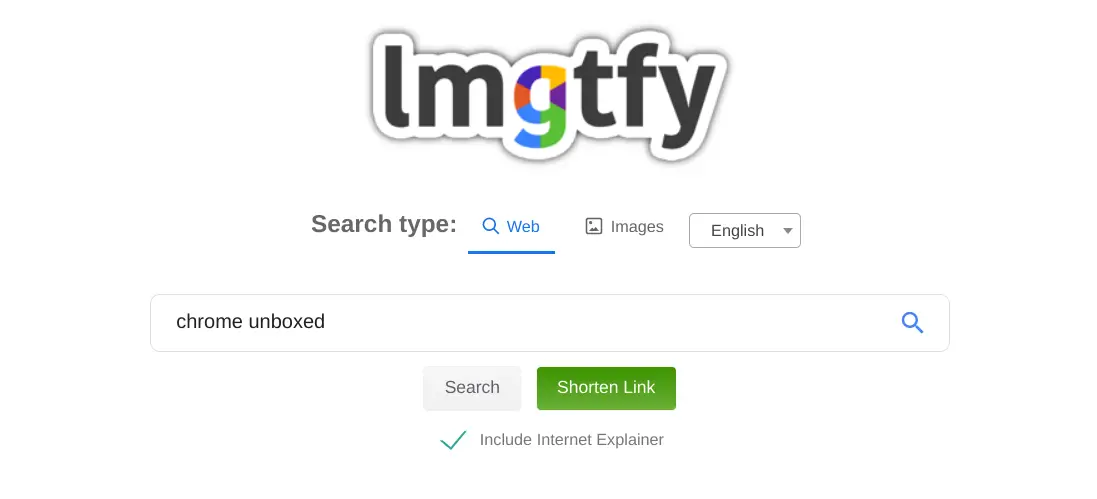
1. Visit LMGTFY on the web
2. Type in your loved one’s search query
3. Click Search (You obviously know this much if you’re here!)
4. Click “Include Internet Explainer” if you are passive aggressive
5. Click “Get Link” (Shortening the link is optional)
6. Read our disclaimer before proceeding
7. Send to your friends and family at your discretion
I Just Want the Steps! (Everyone else)
1. Ask your friend how to do it
2. Receive LMGTFY link
3. Skip steps 1 and 2 to visit Google.com
4. Type in your search query and hit enter on your keyboard
That’s why “Let Me Google That For You” (LMGTFY for short) is such a fun little service and I think you should take advantage of it! This web app lets you type in the search query on behalf of your loved one and it spits out an animated walkthrough teaching them how to type “google.com” into their browser’s search bar, visit the search giant themselves, and look up their own question.
Don’t worry, sending them to this service doesn’t make you a jerk. Well, they may think so at first, but let’s be honest, if you give someone a fish, they eat for a day, but then they’ll just be right back at your doorstep asking you for yet another fish, right? IF you teach them to fish, however, they can fish for themselves…whenever and however they want, eating for a lifetime.
It’s an old adage, but it remains true to this day. In fact, using LMGTFY can be seen as the ultimate expression of love in the 21st century, at least in my opinion. If you are sending a LMGTFY link to someone passive aggressively though, you can check the “Include Internet Explainer” box just below the main search bar on the site, and it will teach the person about the internet and its benefits before performing the search for them. It’s pretty hilarious, but ultimately, you may want to leave this toggled off if you value your relationships.
If you’d like to try out an example we’ve generated, you can click here. We’ve included the Internet Explainer so you can see what it’s like without going through the process, but don’t worry, we still love you. So, the next time someone asks you how to to plug in an HDMI cable or something incredibly basic like that, don’t forget to generate a healthy dose of common sense for them with LMGTFY.
If you’re one of those people, we still love you, but please, go to Google first, and trust your gut. You’re more capable than you give yourself credit for, and everything created can be reverse engineered and understood. Everything was created from basic building blocks, and anything that seems complex is just a bunch of simple systems working together to make something larger. You’ve got this! Now, if you want recipe recipe recommendation or something like that, there’s no shame in asking for someone’s favorite.
Disclaimer: Sending your friends and family to LMGTFY doesn’t make you a jerk. It just means you just care enough about them to teach them to find the answer for themselves, even if they don’t see it that way at first. Chrome Unboxed is not liable for any lost relationships or physical and emotional damage you may incur by using this third party service including, but not limited to being slapped, having your phone number blocked, breaking up with a significant other, or experiencing a sad birthday. Please use responsibly.
SUBSCRIBE TO UPSTREAM
Get Chrome Unboxed delivered straight to your inbox
Upstream is our flagship, curated newsletter with the top stories, most click-worthy deals, giveaways, and trending articles from Chrome Unboxed sent directly to your inbox a few times a week. Join 31,000+ subscribers.

