

Support our independent tech coverage. Chrome Unboxed is written by real people, for real people—not search algorithms. Join Chrome Unboxed Plus for just $2 a month to get an ad-free experience, access to our private Discord, and more. Learn more about membership here.
START FREE TRIAL (MONTHLY)START FREE TRIAL (ANNUAL)
If you feel like you need a data science degree just to keep track of Google’s AI announcements lately, you are definitely not alone. Between the growing library of AI tools in Google’s every-expanding toolbox, the ability for most people to sort the branding on the surface of it all is getting more difficult by the day.
To that end, Google just dropped a major announcement introducing Gemma 4 12B, a brand-new AI model designed to bring heavyweight intelligence straight to regular laptops. It’s a massive technical achievement, but it only makes sense if you actually know what Gemma is in the first place in reference to all the other AI things Google is involved in. So, let’s look at what was announced and take a bit to clear up the naming confusion around Gemini, Gemini Nano, and Gemma.
Gemini vs. Gemma vs. Gemini Nano
To understand the ecosystem, it helps to realize that Google builds different types of AI for completely different purposes. Here is the quick and dirty breakdown:
- Gemini: This is Google’s flagship, closed-source commercial AI. It lives in the cloud, powers the Gemini app and Google Search, and handles massive, complex corporate workloads. You can’t download it for your own personal deployment; you interact with it through Google’s services.
- Gemini Nano: This is the absolute smallest version of the Gemini family. It is highly optimized and built to run entirely offline, locally on smartphone hardware to handle quick tasks like smart replies or voice transcriptions without needing an internet connection.
- Gemma: This is Google’s family of open models. Built using the exact same research and technology behind the flagship Gemini models, Gemma is completely open and accessible under an Apache 2.0 license. Anyone from independent developers to students can download the raw model weights, customize it, and run it locally on their own hardware without paying Google a dime.
Gemma 4 12B: Flagship power on everyday hardware
Now that we’ve established that Gemma is the open, downloadable version of Gemini, we can appreciate exactly what Google just achieved with the release of Gemma 4 12B.
The “12B” stands for 12 billion parameters, which essentially denotes the size and complexity of the model’s brain. In the AI world, there is usually a strict tradeoff: if you want a model small enough to run locally on a standard laptop, you have to settle for something with less reasoning power. If you want deep reasoning, you have to use a massive model that requires a room full of expensive enterprise cloud servers.
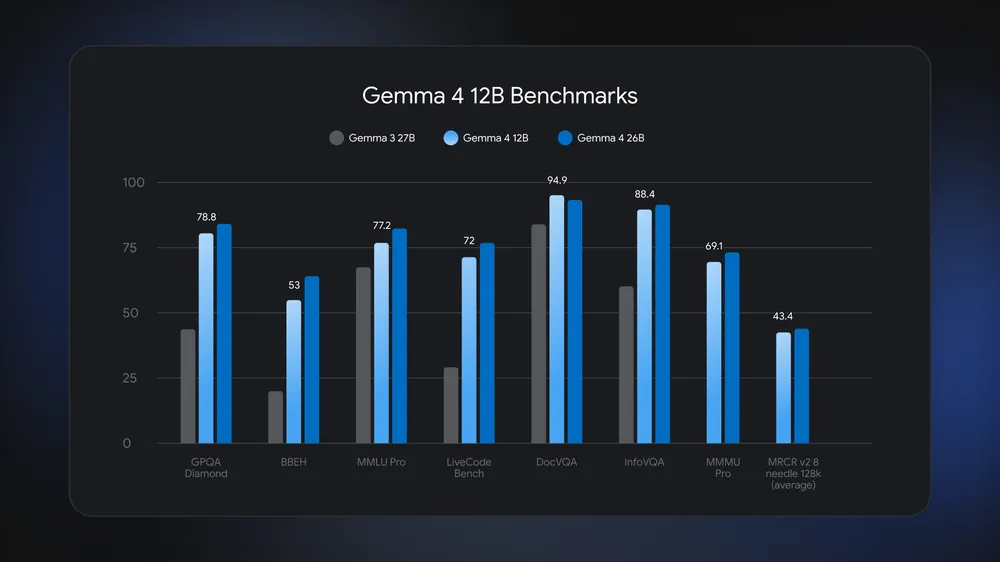
Gemma 4 12B completely upends that compromise. It delivers advanced multi-step reasoning and benchmark performance that comes incredibly close to Google’s massive 26B Mixture of Experts (MoE) model, but it does it at less than half the memory footprint. It is specifically optimized to run locally on a standard consumer laptop with just 16GB of RAM. You can literally run a state-of-the-art AI assistant entirely offline right from your backpack – something that felt impossible just a year ago.
The magic of an encoder-free architecture
The real engineering marvel hiding inside this release is how it handles different types of data. Traditional AI models are a bit clunky behind the scenes; they rely on separate, individual “encoders” to translate images or audio into a language the main AI text model can understand. These extra steps cause noticeable lag and eat up a ton of precious laptop memory.
Google built Gemma 4 12B with a highly unique, encoder-free multimodal architecture. Instead of using a middleman, visual and audio inputs flow directly into the primary core backbone:
- For Vision: Google replaced the heavy vision encoder with a lightweight embedding module consisting of a simple single matrix multiplication. The main language model backbone takes over the visual processing directly.
- For Audio: They simplified it even further by completely removing the audio encoder and projecting the raw audio signal straight into the exact same dimensional space as text tokens.
This makes Gemma 4 12B Google’s very first mid-sized open model to feature native audio inputs. Because it skips the translation layers, it can transcribe, format, and translate voice inputs entirely offline with blazing-fast speed. Google even demonstrated this native speed running completely local via the Google AI Edge Eloquent app.
Why this matters for the mainstream
While Gemma is technically a tool for developers, advancements like this have a massive trickledown effect for regular consumers. By giving creators an open, highly efficient, and incredibly smart model that runs locally on affordable hardware, Google is accelerating the arrival of incredibly fast, private, and offline applications.
The developer community has already racked up over 150 million downloads across the Gemma 4 family, building everything from wearable robotic assistance arms to enterprise-grade local security systems. With the launch of the 12B model and a brand new official Skills Repository to help developers build smarter autonomous agents, the line between cloud-connected supercomputers and the laptop on your desk just got incredibly thin.
SUBSCRIBE TO UPSTREAM
Get Chrome Unboxed delivered straight to your inbox
Upstream is our flagship, curated newsletter with the top stories, most click-worthy deals, giveaways, and trending articles from Chrome Unboxed sent directly to your inbox a few times a week. Join 31,000+ subscribers.

