

• Skip to main content
  • Skip to primary sidebar
  • Deals
  • Features
  • Guides
  • Chromebooks
  • Videos
  • Podcast
  • More +
    • Reviews
    • Unboxing
    • Upcoming Devices
    • Chromebook Plus
    • Chrome
    • ChromeOS
    • Chrome OS Flex
  • Search
  • Sign Up
  • Log In
Chrome Unboxed – The Latest Chrome OS News

Chrome Unboxed - The Latest Chrome OS News

A Space for All Things Chrome, Google, and More!

  • Deals
  • Features
  • Guides
  • Chromebooks
  • Videos
  • Podcast
  • More +
    • Reviews
    • Unboxing
    • Upcoming Devices
    • Chromebook Plus
    • Chrome
    • ChromeOS
    • Chrome OS Flex
  • Search
  • Sign Up
  • Log In

Google’s new Rambler feature for Gboard uses Gemini to fix your messy voice dictation

May 14, 2026 By Robby Payne View Comments

Support our independent tech coverage. Chrome Unboxed is written by real people, for real people—not search algorithms. Join Chrome Unboxed Plus for just $2 a month to get an ad-free experience, access to our private Discord, and more. Learn more about membership here.
START FREE TRIAL (MONTHLY)START FREE TRIAL (ANNUAL)

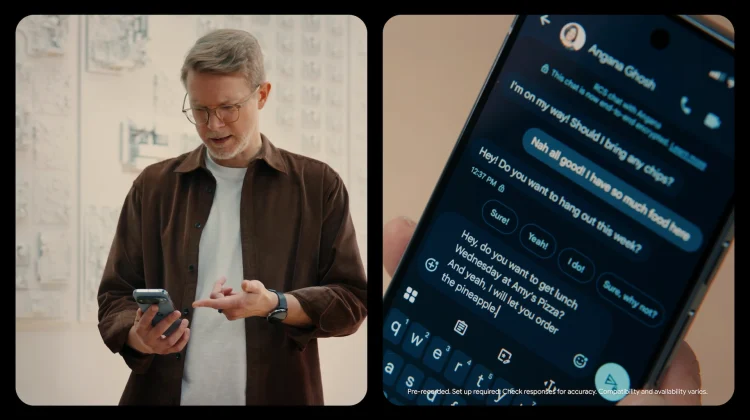
Voice dictation is incredibly convenient, but the reality is that the way we speak rarely matches how we actually want to write. Between the stuttering, self-corrections, and filler words like “ums,” “ahs,” and “likes,” most voice-to-text messages require a lot of manual cleanup before you can hit send. To bridge that gap, Google is introducing a new Gemini Intelligence feature designed specifically for the way people actually speak, appropriately called Rambler.

How Rambler actually works

If you’ve ever tried to dictate a long email or text, you know the struggle of having to perfectly formulate your thoughts before hitting the microphone icon. With Rambler, that anxiety is gone. You can speak completely naturally with all the standard pauses, pivots, and lulls and Gemini works in the background to extract the most important parts of your rambling speech. It then seamlessly fits those thoughts together into a concise, polished message.

Xremove ads

Privacy and multi-lingual support

Google is also taking steps to address privacy concerns with this new tool. When Rambler is enabled, the UI will clearly show you that it is actively converting your voice to text. More importantly, the audio is processed for real-time transcription only and is not stored or saved anywhere.

Beyond just filtering out filler words, Rambler leans heavily into Gemini’s advanced multi-lingual models. If you regularly communicate in multiple languages, Rambler can seamlessly switch between them in a single message. For instance, if you blend English and Hindi while speaking naturally, the model understands the context and nuance of both languages simultaneously. It ensures the final message sounds exactly like you, just significantly more polished.

Featured Videos

Xremove ads

This is a quality of life improvement I think we’ll wonder how we did without after it rolls out later this year. I’m sure it will take me a little while to stop speaking all my commas and periods into my messages, but I’m very much looking forward to opening up WhatsApp and speaking naturally when replying to texts in the very near future.

SUBSCRIBE TO UPSTREAM

Get Chrome Unboxed delivered straight to your inbox

Upstream is our flagship, curated newsletter with the top stories, most click-worthy deals, giveaways, and trending articles from Chrome Unboxed sent directly to your inbox a few times a week. Join 31,000+ subscribers.

SUBSCRIBE HERE!

Filed Under: AI, Gemini, News

About Robby Payne

As the founder of Chrome Unboxed, Robby has been reviewing Chromebooks for over a decade. His passion for ChromeOS and the devices it runs on drives his relentless pursuit to find the best Chromebooks, best services, and best tips for those looking to adopt ChromeOS and those who've already made the switch.

Primary Sidebar

Xremove ads

Deals

The best Chromebook deals today

By Robby Payne
May 5, 2026

Save $40 on the Google Pixel Watch 4 before the Spring Sale ends

By Joseph Humphrey
April 24, 2026

Deal Alert: the excellent Lenovo Chromebook Plus 2-in-1 returns to $429

By Robby Payne
April 20, 2026

Lenovo Legion Tab Gen 3 drops to $399, ahead of the much pricier Gen 5 release

By Joseph Humphrey
April 18, 2026

How to get 50% off YouTube Premium for a full year with Google One

By Robby Payne
April 16, 2026

More Deals

Xremove ads

Reviews

Lenovo Chromebook Plus 2-in-1 Review: pretty great in a vacuum

By Robby Payne
April 23, 2026

Acer Chromebook Plus Spin 514 Review: Kompanio Ultra power in a convertible

By Robby Payne
December 24, 2025

My review after 6 weeks with the Lenovo Chromebook Plus 14 [VIDEO]

By Robby Payne
August 11, 2025

One week with the best small Android tablet you can buy, and I’m sold

By Robby Payne
May 9, 2025

Best Chromebooks of 2024 [VIDEO]

By Robby Payne
November 28, 2024

More Reviews

Xremove ads

Guides

This Chromebook trackpad shortcut is definitely not new, but is blowing my mind

By Robby Payne
March 11, 2024

How to reduce broadcast delay on YouTube TV to stop live spoilers

By Robby Payne
December 8, 2023

Windows PC keyboard and Chromebook

How to use a Windows keyboard with a Chromebook

By Joseph Humphrey
December 8, 2023

How reset and revert your Chromebook to the previous version of Chrome OS

By Robby Payne
November 29, 2023

My Chromebook Plus features disappeared: here’s how I fixed it

By Robby Payne
November 24, 2023

More Guides

TWITTER · FACEBOOK · INSTAGRAM · YOUTUBE · EMAIL · ABOUT

Copyright © 2026 · Chrome Unboxed · Chrome is a registered trademark of Google Inc.
We are participants in various affiliate advertising programs designed to provide a means for us to earn fees by linking to affiliated sites.

PRIVACY POLICY