

Support our independent tech coverage. Chrome Unboxed is written by real people, for real people—not search algorithms. Join Chrome Unboxed Plus for just $2 a month to get an ad-free experience, access to our private Discord, and more. Learn more about membership here.
START FREE TRIAL (MONTHLY)START FREE TRIAL (ANNUAL)
Google’s pursuit of a truly contextual assistant has been a long and winding road. Rumors of a new, on-device assistant codenamed “Pixie” surfaced in 2023, promising a more personalized and intelligent experience for Pixel users. While “Pixie” was expected to launch alongside the Pixel 9, it never materialized. Now, a fresh leak has reignited the excitement. A source inside Google has revealed to Android Authority that a version of “Pixie” will indeed arrive on the Pixel 10, but under a new name: Pixel Sense.
A glimpse into the future of AI assistants
In addition to those claims from Android Authority, we also now have leaked screenshots of the Pixel Sense setup page spotted by 9to5Google in a “Mystic Leaks” Telegram group that offer a preview of its capabilities. The feature promises to deliver “the most personalized experience based on the things you do on your Pixel.”
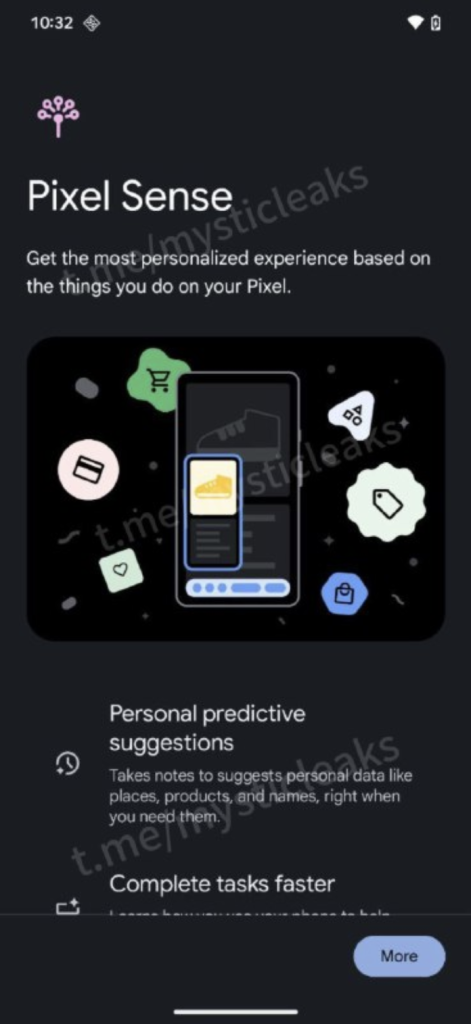
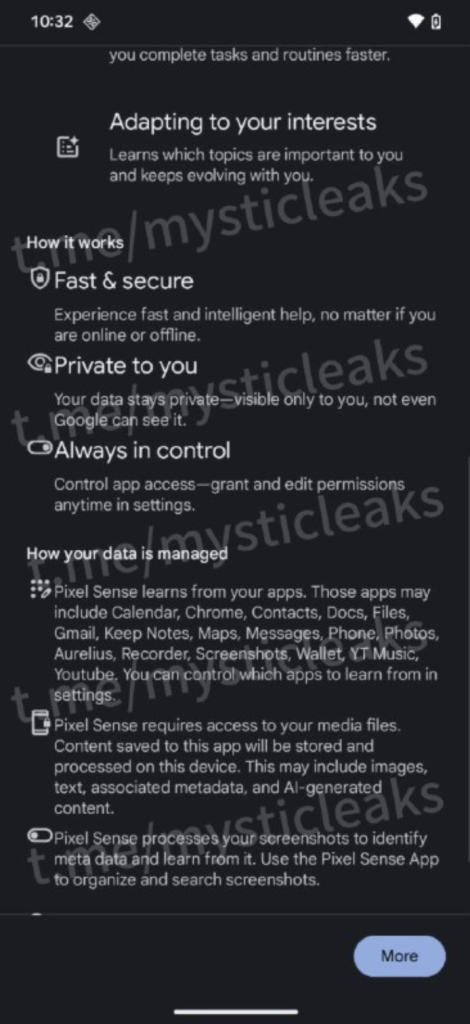
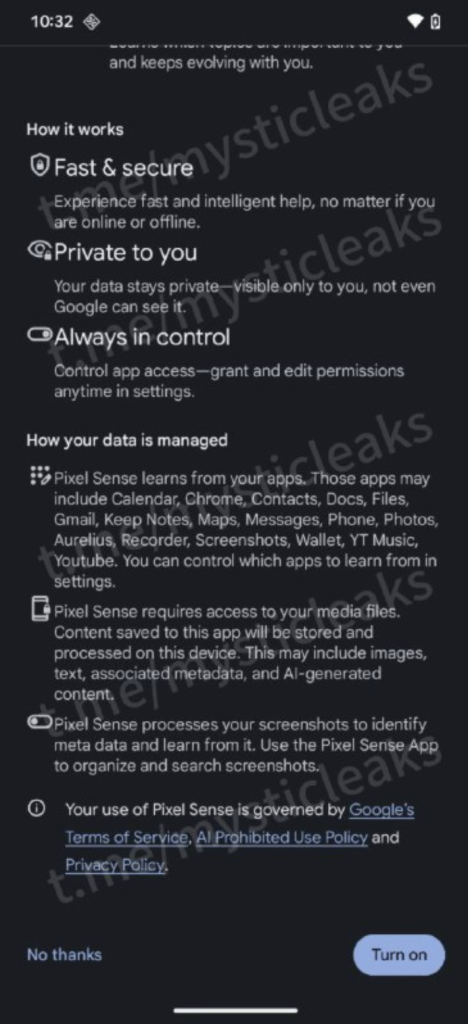
As you can see, Pixel Sense integrates with a wide range of Google apps, including Calendar, Chrome, Contacts, Docs, Files, Gmail, Keep Notes, Maps, Messages, Phone, Photos, Aurelius (unreleased app?), Recorder, Screenshots, Wallet, YouTube Music, and YouTube.
The assistant’s functionality extends beyond app integration. It can process various media files, including text, images, AI-generated content, and associated metadata. Pixel Sense can even analyze screenshots to identify metadata and facilitate organization and search.
Google emphasizes that Pixel Sense prioritizes user privacy. In the screenshots, Google says data processing occurs locally on the device, ensuring that personal information remains confidential. Google assures users that “Your data stays private – visible only to you, not even Google can see it.”
Highlighted on this leaked Pixel Sense page, Google outlines several compelling features:
- Personal predictive suggestions: Takes notes to suggests personal data like places, products, and names, right when you need them.
- Complete tasks faster: Learns how you use your phone to help you complete tasks and routines faster.
- Adapting to your interests: Learns which topics are important to you and keeps evolving with you.
- Fast & Secure: Experience fast and intelligent help, no matter if you are online or offline.
- Private to you: Your data stays private – visible only to you, not even Google can see it.
- Always in control: Control app access – grant and edit permissions anytime in settings.
While I’d imagine there are still plenty of challenges that remain in achieving a fully contextual assistant, Google’s recent advancements in AI and their progress with the Tensor chips suggest that Pixel Sense could be a step in the right direction. The integration of on-device processing, AI capabilities, and privacy-focused design could really change how we interact with our smartphones. Let’s hope the Pixel 10 series, expected to launch later this year, showcases the full potential of Pixel Sense.
SUBSCRIBE TO UPSTREAM
Get Chrome Unboxed delivered straight to your inbox
Upstream is our flagship, curated newsletter with the top stories, most click-worthy deals, giveaways, and trending articles from Chrome Unboxed sent directly to your inbox a few times a week. Join 31,000+ subscribers.

