

Support our independent tech coverage. Chrome Unboxed is written by real people, for real people—not search algorithms. Join Chrome Unboxed Plus for just $2 a month to get an ad-free experience, access to our private Discord, and more. Learn more about membership here.
START FREE TRIAL (MONTHLY)START FREE TRIAL (ANNUAL)
It feels like we say this every few weeks, but the pace of AI development is just staggering. What was considered a state-of-the-art research project just a few months ago is quickly becoming a tool you can access on your phone. Today, Google is taking another massive leap forward by rolling out Deep Think in the Gemini app for its Google AI Ultra subscribers.
And while this new, incredibly powerful feature is a premium offering for now, it gives us a tantalizing preview of the kind of AI that will likely be in the hands of everyday people in the not-too-distant future.
What is ‘Deep Think’?
So, what makes Deep Think so special? This isn’t just a slightly smarter version of Gemini. It’s an enhanced reasoning mode that is a variation of the same Gemini 2.5 Deep Think model that recently achieved the gold-medal standard at this year’s International Mathematical Olympiad (IMO). The version rolling out in the app today is faster and more usable for day-to-day tasks, while still reaching Bronze-level performance on that same complex math benchmark.
It works by using what Google calls “parallel thinking techniques.” Just as a person might explore different angles and weigh potential solutions to a complex problem, Deep Think allows Gemini to generate and consider many ideas at once, giving it an extended “thinking time” to arrive at more creative and thoughtful solutions. It’s designed to help with tasks that require creativity and strategic planning, like:
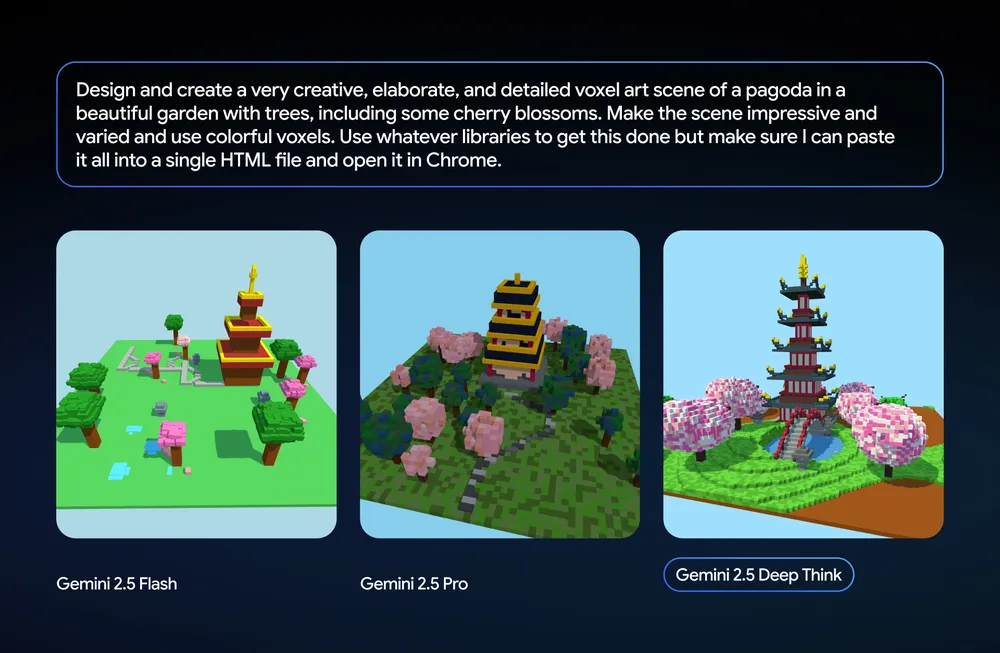
- Iterative development and design, such as improving the look and function of a website.
- Scientific and mathematical discovery, helping researchers explore complex literature or conjectures.
- Tough coding problems where careful consideration is paramount.
The trickle-down effect of AI features
Right now, access to Deep Think in the Gemini app is exclusive to Google AI Ultra subscribers. But if the pattern of the past year is anything to go by, this is a fantastic preview of the kind of power that will likely make its way to more standard users in a few months.
We’ve seen this happen time and again. A groundbreaking feature, like the 1 million token context window in Gemini 1.5 Pro, debuts as a premium or developer-focused tool. Then, as the models become more efficient and refined, that same power “trickles down” and becomes a standard feature for a much wider audience.
What that means is the ability to reason through complex problems, get creative help with design, and solve tough coding challenges is a feature that will likely be accessible to many more of us sooner rather than later. Incredibly powerful AI is on a clear path to being in the hands of everyday people.
It’s amazing to see what AI can do today, and even more exciting to think about what this level of capability will mean when it’s available to everyone. The pace of this innovation is truly something to behold.
SUBSCRIBE TO UPSTREAM
Get Chrome Unboxed delivered straight to your inbox
Upstream is our flagship, curated newsletter with the top stories, most click-worthy deals, giveaways, and trending articles from Chrome Unboxed sent directly to your inbox a few times a week. Join 31,000+ subscribers.

