


Support our independent tech coverage. Chrome Unboxed is written by real people, for real people—not search algorithms. Join Chrome Unboxed Plus for just $2 a month to get an ad-free experience, access to our private Discord, and more. Learn more about membership here.
START FREE TRIAL (MONTHLY)START FREE TRIAL (ANNUAL)
If the rumors are true, Google is preparing to launch a new Chromecast dongle that will be a hybrid of the popular streaming dongle and a full-blown Android TV device. The news has been relatively speculative but a recent leak uncovered by XDA Developers reveals some very solid evidence that the new device will look very much like a Chromecast but house all the app-enabled goodness that comes with larger Android TV boxes. Codenamed ‘Sabrina’, XDA unearthed what appears to be an internal training video of the new device and the dongle looks to be as Google-y as it gets.
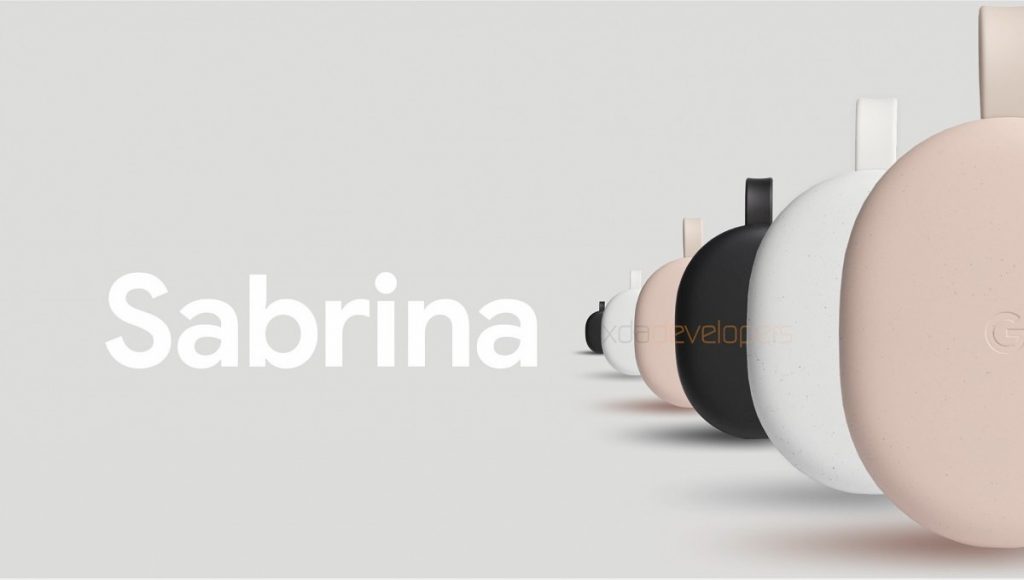
The device and its capabilities seem pretty straightforward and honestly, it doesn’t look like the dongle brings anything new to the Android TV party apart from a refreshed UI. That said, something mind-blowing occurred to me while we were recording this week’s episode of The Chrome Cast. This device, which is presumably going to be branded under the Nest family, could fix one of the biggest complaints users have about Chromecasts and I can’t believe that I’m just realizing it.
Captive Portals!
Android TV boxes are great and they come in all sorts of shapes and sizes but the platform itself is relatively small when you compare it to Apple TV or Roku. Chromecasts, on the other hand, are right in the mix when you look at the top five streaming platforms. A lot of consumers probably have Chromecast-enabled devices in their homes and don’t even realize it. Televisions, smart-display and speakers can be found everywhere with the Cast protocol built-in. More importantly, the majority of streaming services have Cast built into their Android and iOS applications. Netflix, Disney+, YouTube and even Amazon Prime Movies will allow you to cast your video to a Chromecast or Cast-enabled device.
So, what do captive portals have to do with all this? Well, I’ll tell you. Many a time have we traveled for work or leisure that I thought, “let’s throw a Chromecast in the bag so we can stream stuff while we’re relaxing at the hotel.” Great idea, in theory. Not so much when it comes to application. Most hotels, resorts, etc., have what are called captive portals. This requires users to visit some form of login page on their mobile device or laptop to gain access to the internet. The resorts we frequent require my account-connected email before you can hop on the web. Other hotels simply use a captcha or other form of verification to gain access to the internet. Chromecasts have no UI or on-screen interface with which to access said portal. Yes, there are workarounds. You could simply use the mobile hotspot on your phone but that would eat up your data in no time. Many users have resorted to carrying a tiny, inexpensive wireless router to create a secondary network for the Chromecast to connect. It works but, you have to invest not only money for the hardware but the time to get it all set up. Not worth it.
This new dongle by Google would completely solve this problem. With access to applications from the Play Store, users would be able to install and launch the web browser of their choice and access the captive portal directly from the Chromecast… Nest Cast… Nest TV…. whatever they’re going to call this thing. (You probably would want to install your browser before you hit the road.) Now that I think about it, this actually solves Chromecast’s two biggest problems. One of the most popular search terms on our site over the past few years has consistently been “chromecast remote.” While it’s true, you technically control your content from your phone and the Chromecast is simply a receiver of sorts, a lot of people want a remote and a native UI. That’s exactly what Android TV offers. Now, we may get the best of both worlds. If Google’s new dongle is similar in size to the previous Chromecast devices, it will be the perfect travel companion to stream on-the-go. Toss in a Stadia controller and you have the perfect compact travel kit to keep the entire family entertained during your downtime. Brilliant. We’ll be keeping an eye out for the new Android TV device and hopefully, it will roll out in the very near future. If it has a price tag in the $70-$80 range, you can bet they will sell like hotcakes.
SUBSCRIBE TO UPSTREAM
Get Chrome Unboxed delivered straight to your inbox
Upstream is our flagship, curated newsletter with the top stories, most click-worthy deals, giveaways, and trending articles from Chrome Unboxed sent directly to your inbox a few times a week. Join 31,000+ subscribers.

