
If you haven’t played with Mixboard yet, you are missing out on one of Google’s most interesting AI experiments. It started as a fluid, AI-powered whiteboard for brainstorming—sort of like a mood board that could talk back. But with a new update today, it is graduating from just generating ideas to actually presenting them.
You can now automatically create full presentations from your Mixboard projects, powered by Google’s latest image model we all know and love: Nano Banana Pro.
From chaos to slides in one click
The coolest part of this update is how it bridges the gap between a messy brainstorm and a final pitch. Mixboard can now take the context from your board—your images, notes, and vibes—and transform it into a “compelling presentation”.
You give it the input (format, focus, and visual style), and Nano Banana Pro handles the heavy lifting, generating high-fidelity visuals and text to communicate your idea. It’s essentially “vibe coding” for slide decks. Just a heads-up: Google notes that generation limits might fluctuate based on server load, so keep that in mind if you’re trying it out.
Selfies, PDFs, and ‘Doodle to Edit’
The update isn’t just about slides; the creative tools are getting better, too.
- Selfie Cam: You can now snap photos of yourself directly into the board, which is perfect if you are using Mixboard for wardrobe inspiration or personal branding.
- PDF Support: You can finally upload PDFs, letting you ground your AI brainstorming in real documents.
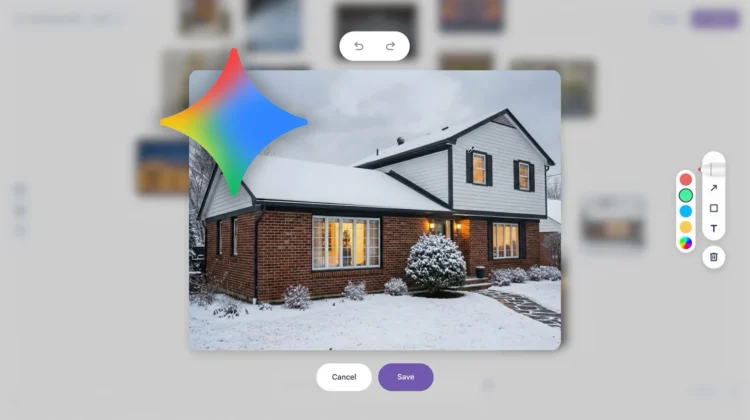
- Doodle to Edit: This is the most “magic” feature of the bunch. You can now doodle directly on images to mark an area, describe what you want to change, and watch it happen. It gives you way more control than just typing a prompt and hoping for the best.
More room to think
Finally, Google is addressing the need for space. You can now have multiple boards per project. This means you can keep your “messy brainstorming” board separate from your “final vision” board without cluttering up a single canvas.
Mixboard is still an experiment, but with these updates, it is becoming a surprisingly powerful tool for creatives. You can try it out right now over at Google Labs.
Join Chrome Unboxed Plus
Introducing Chrome Unboxed Plus – our revamped membership community. Join today at just $2 / month to get access to our private Discord, exclusive giveaways, AMAs, an ad-free website, ad-free podcast experience and more.
Plus Monthly
$2/mo. after 7-day free trial
Pay monthly to support our independent coverage and get access to exclusive benefits.
Plus Annual
$20/yr. after 7-day free trial
Pay yearly to support our independent coverage and get access to exclusive benefits.
Our newsletters are also a great way to get connected. Subscribe here!
Click here to learn more and for membership FAQ

