

• Skip to main content
  • Skip to primary sidebar
  • Deals
  • Features
  • Guides
  • Chromebooks
  • Videos
  • Podcast
  • More +
    • Reviews
    • Unboxing
    • Upcoming Devices
    • Chromebook Plus
    • Chrome
    • ChromeOS
    • Chrome OS Flex
  • Search
  • Sign Up
  • Log In
Chrome Unboxed – The Latest Chrome OS News

Chrome Unboxed - The Latest Chrome OS News

A Space for All Things Chrome, Google, and More!

  • Deals
  • Features
  • Guides
  • Chromebooks
  • Videos
  • Podcast
  • More +
    • Reviews
    • Unboxing
    • Upcoming Devices
    • Chromebook Plus
    • Chrome
    • ChromeOS
    • Chrome OS Flex
  • Search
  • Sign Up
  • Log In

Google Workspace Studio is here to let anyone build custom AI agents with zero coding required

December 4, 2025 By Robby Payne View Comments

Support our independent tech coverage. Chrome Unboxed is written by real people, for real people—not search algorithms. Join Chrome Unboxed Plus for just $2 a month to get an ad-free experience, access to our private Discord, and more. Learn more about membership here.
START FREE TRIAL (MONTHLY)START FREE TRIAL (ANNUAL)

We have been hearing all about the promise of “AI Agents”—software that can actually do things rather than just talk to you—for a while now. Today, Google is making that promise a reality for everyone, not just developers.

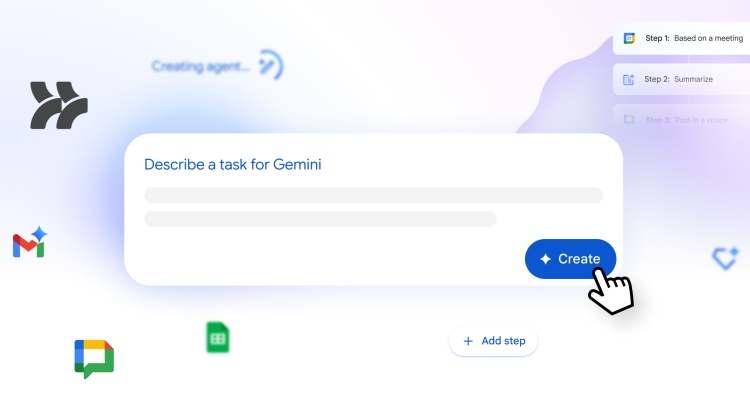
In a major announcement, Google has launched Google Workspace Studio, a new platform designed to let any employee build, manage, and share custom AI agents to automate their daily work. And the best part? No coding is required.

Xremove ads

Harnessing Gemini 3 to automate the grind

Powered by the reasoning capabilities of the new Gemini 3 model, Workspace Studio allows you to build agents in minutes using simple natural language.

The goal is to eliminate the “daily grind”—sifting through emails, managing calendar logistics, and chasing tasks—by delegating them to AI agents that understand context. Because these agents are built on Gemini 3, they aren’t limited to rigid rules; they can reason through problems and adapt to new information.

Xremove ads

How it works: Just describe what you want

Creating an agent is as simple as typing a prompt. You don’t need to know complex syntax. For example, you can simply type: “If an email contains a question for me, label the email as ‘To respond’ and ping me in Chat.”

Studio instantly builds an agent that can monitor your inbox, decide which emails contain actual questions, and execute those actions. It can even go further, extracting specific details like invoice numbers or action items from attachments.

Deep integration across your apps

These agents don’t live in a silo. They are deeply integrated into the Workspace apps you use every day, including Gmail, Drive, and Chat. This allows them to generate content in your tone and understand your company’s specific policies.

Xremove ads

Furthermore, Google has made these agents extensible. Pre-built steps allow you to connect your agents to third-party platforms like Asana, Jira, Mailchimp, and Salesforce, allowing for automation that spans your entire business workflow.

Availability

This isn’t a far-off concept; it is happening now. Google Workspace Studio is rolling out to business customers over the next few weeks. It represents a massive democratization of AI, putting the power to build custom automation tools into the hands of the people who know their own workflows best.

SUBSCRIBE TO UPSTREAM

Get Chrome Unboxed delivered straight to your inbox

Upstream is our flagship, curated newsletter with the top stories, most click-worthy deals, giveaways, and trending articles from Chrome Unboxed sent directly to your inbox a few times a week. Join 31,000+ subscribers.

Xremove ads
SUBSCRIBE HERE!

Filed Under: AI, Gemini, News, Workspace

About Robby Payne

As the founder of Chrome Unboxed, Robby has been reviewing Chromebooks for over a decade. His passion for ChromeOS and the devices it runs on drives his relentless pursuit to find the best Chromebooks, best services, and best tips for those looking to adopt ChromeOS and those who've already made the switch.

Primary Sidebar

Xremove ads

Deals

The Pixel 10a just dropped to $449, but here’s why you should buy the Pixel 10 instead

By Joseph Humphrey
April 13, 2026

Save up to $200 on the two best Chromebooks on the market

By Robby Payne
April 13, 2026

The best Chromebook deals today

By Robby Payne
April 13, 2026

You can grab the battery-powered Nest Doorbell for just $129.99 right now

By Joseph Humphrey
April 11, 2026

Deal Alert: the excellent Lenovo Chromebook Plus 2-in-1 drops to $429

By Robby Payne
April 10, 2026

More Deals

Xremove ads

Reviews

Acer Chromebook Plus Spin 514 Review: Kompanio Ultra power in a convertible

By Robby Payne
December 24, 2025

My review after 6 weeks with the Lenovo Chromebook Plus 14 [VIDEO]

By Robby Payne
August 11, 2025

One week with the best small Android tablet you can buy, and I’m sold

By Robby Payne
May 9, 2025

Best Chromebooks of 2024 [VIDEO]

By Robby Payne
November 28, 2024

Samsung Galaxy Chromebook Plus Review: Samsung is back! [VIDEO]

By Robby Payne
October 28, 2024

More Reviews

Xremove ads

Guides

This Chromebook trackpad shortcut is definitely not new, but is blowing my mind

By Robby Payne
March 11, 2024

How to reduce broadcast delay on YouTube TV to stop live spoilers

By Robby Payne
December 8, 2023

Windows PC keyboard and Chromebook

How to use a Windows keyboard with a Chromebook

By Joseph Humphrey
December 8, 2023

How reset and revert your Chromebook to the previous version of Chrome OS

By Robby Payne
November 29, 2023

My Chromebook Plus features disappeared: here’s how I fixed it

By Robby Payne
November 24, 2023

More Guides

TWITTER · FACEBOOK · INSTAGRAM · YOUTUBE · EMAIL · ABOUT

Copyright © 2026 · Chrome Unboxed · Chrome is a registered trademark of Google Inc.
We are participants in various affiliate advertising programs designed to provide a means for us to earn fees by linking to affiliated sites.

PRIVACY POLICY