


Support our independent tech coverage. Chrome Unboxed is written by real people, for real people—not search algorithms. Join Chrome Unboxed Plus for just $2 a month to get an ad-free experience, access to our private Discord, and more. Learn more about membership here.
START FREE TRIAL (MONTHLY)START FREE TRIAL (ANNUAL)
Google has a team of vulnerability researchers who work around the clock to find holes in Chrome, the Google Play Store, Android, and more, and that hasn’t changed despite the pandemic. Google recently took time to detail how much money it has paid out to researchers in 2020 via its Vulnerability Rewards Program (VRP). Those who found security flaws in its ecosystem were paid a lot of money – $6.7 million to be exact.
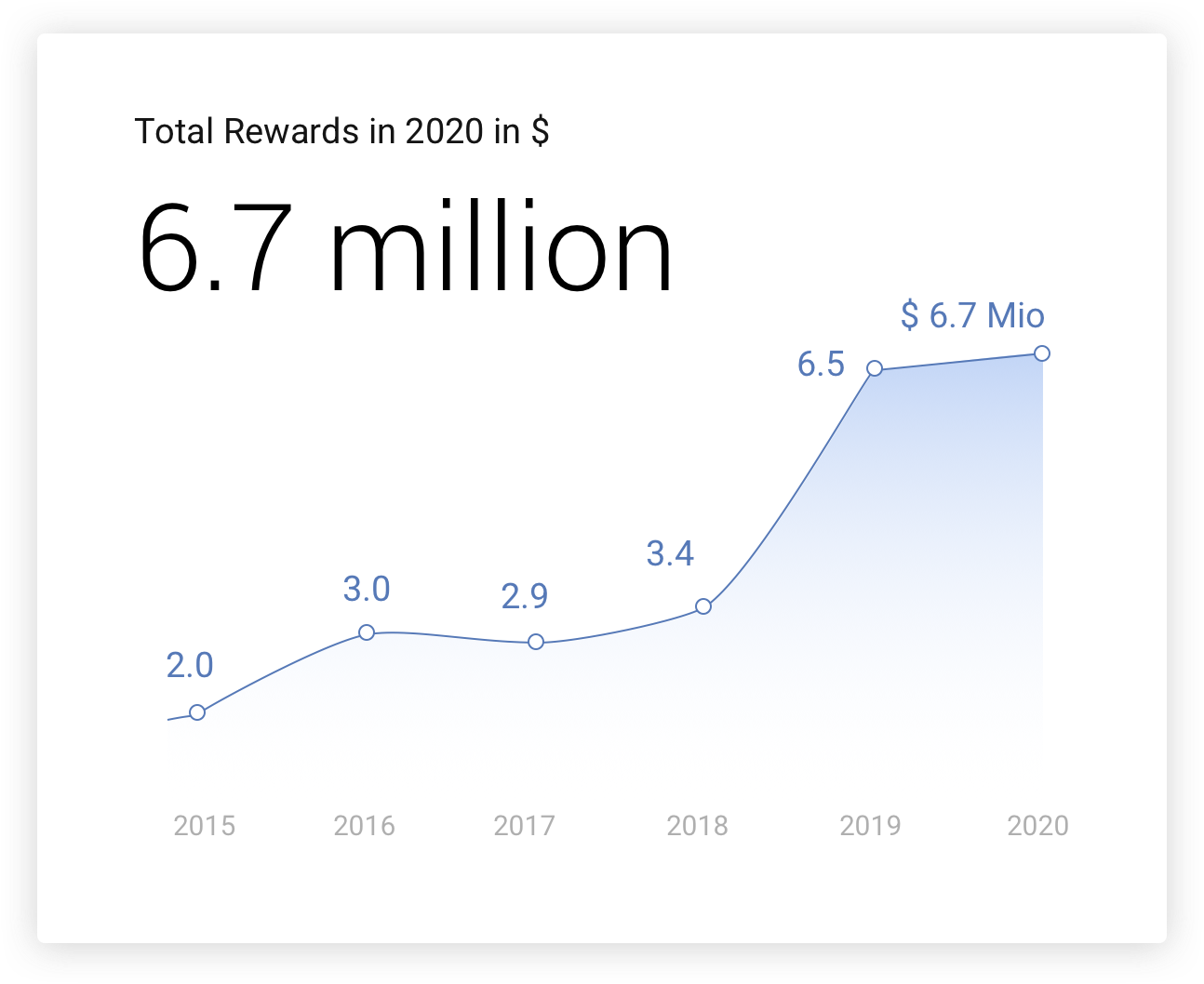
This annual report is up by $200,000 over 2019, and last year was already double what they normally pay out (see 2018) for those who find flaws in Google’s software. These discoveries help keep users, and the internet at large, safe, and the company seems happy to pay out tons of money to fix problems that they, themselves don’t see right away.
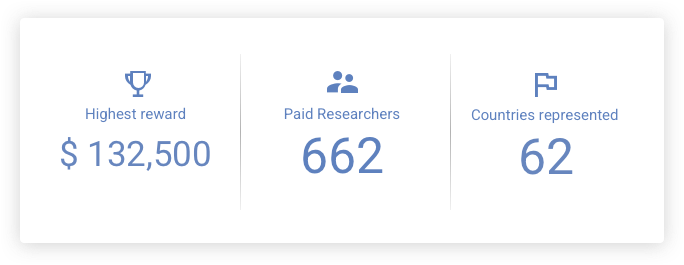
Android VRP paid out $1.74M, Google Play VRP paid out $270,000 to Android researchers around the world, and Chrome VRP paid out $2.1M across 300 bugs in 2020 alone. Chrome is the most interesting, in my opinion, because this year was record-breaking – 83% more money was paid out than last year!
In 2019, 14% of Google’s payouts were for V8 bugs – issues and exploits directly related to the Chrome browser’s JavaScript engine. Interestingly enough, this was cut down to just 6% in 2020 – that’s over a 50% reduction! However, the zero-day exploit that we recently reported on was directly related to this – a heap overflow corruption issue in the V8 engine. We’re not sure if a VRP researcher was directly responsible for bringing this to Google’s attention, but luckily, it was patched right away!
If you’re interested in seeing the Chrome Vulnerability Rewards Program Rules, you can head over to Google’s Application Security page to learn more. There, you will find more on the scope of the program, which vulnerabilities qualify, how you can report bugs, and even a table showing how much you can get paid!
There’s currently a standing $150,000 reward for participants that can compromise a Chromebook or Chromebox with device persistence in guest mode (i.e. guest to guest persistence with interim reboot delivered via a web page). There are also rewards for those who can bypass the lock screen or biometric security, and more. Exploits related to V8 may be eligible for an increased reward, no doubt thanks to the aforementioned zero-day vulnerability!
The page you’ll find using the blue button below also features a host of frequently asked questions related to bug hunting, including when you’ll be paid, and more. The lowest payout is $500, but that’s still a nice bit of pocket cash for anyone who is smart enough in cyber-security or programming. If you choose to participate, I recommend that you take a look and see if you have what it takes to protect millions of Chrome and Chrome OS users who browse the web daily!
Visit the Chrome OS VRP requirements page
SUBSCRIBE TO UPSTREAM
Get Chrome Unboxed delivered straight to your inbox
Upstream is our flagship, curated newsletter with the top stories, most click-worthy deals, giveaways, and trending articles from Chrome Unboxed sent directly to your inbox a few times a week. Join 31,000+ subscribers.

